Telegram Group Chat Support

Samuel Su
on April 17, 2026Your Telegram bot is no longer limited to direct messages. Enable group chat support and let your AI assistant answer questions right where your team or community is already talking.
What's New
- Group and supergroup support — Your bot responds to @mentions, replies, and slash commands in any Telegram group. Enable it with one toggle in the Integrations panel.
- Private context per person — Each group member has their own conversation history with the bot. Others see the answers, but the bot never mixes one person's context with another's.
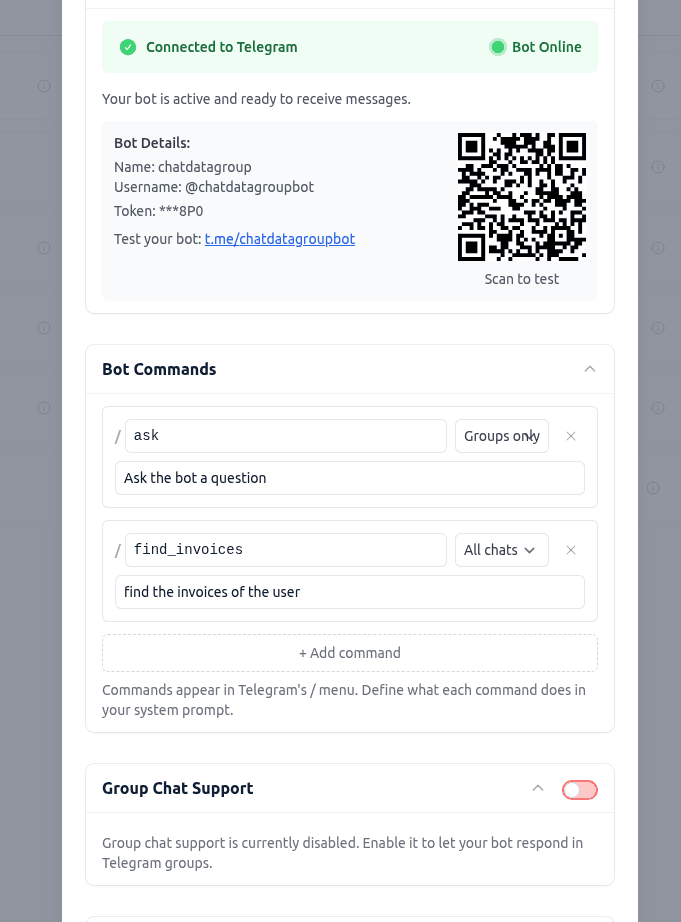
- Configurable slash commands — Use /ask to talk to the bot (included by default), or add your own commands like /hours or /pricing in the Bot Commands section. Each command can be scoped to all chats, groups only, or DMs only. Commands appear in Telegram's / autocomplete menu so users can discover them. Define what each command does in your system prompt.
- Smart welcome message — When the bot joins a group, it introduces itself with a configurable message so members know how to interact with it.
- Reply-to-bot quoting — When someone replies to a bot message, the bot sees the quoted text for that turn so it can give a relevant answer, even if the replier has no prior conversation history.
How It Works
- Go to My Chatbots > [Chatbot] > Integrations > Telegram and expand Group Chat Support.
- Toggle it ON and optionally customize the welcome message (supports a {{botName}} placeholder).
- Expand Bot Commands to manage the slash commands that appear in Telegram's / menu. /ask is included by default — add, edit, or remove commands as needed. Each command can be scoped to all chats, groups only, or DMs only.
- Add your bot to a Telegram group.
- Members interact by @mentioning the bot, replying to its messages, or typing /ask followed by their question.
The bot respects Telegram's Privacy Mode by default, so it only sees messages directed at it — not every message in the group.
Good to Know
- Suggested-question buttons are hidden in groups to prevent one member from accidentally triggering a response in another member's context. CTA link buttons still appear normally.
- Existing DMs are unchanged. Enabling group support has no effect on your bot's direct-message behavior.
- Billing works the same way. Group responses consume message credits from the bot owner's plan, just like DMs.
- Works with live chat escalation. Agents can take over a group member's conversation from the dashboard and reply as the bot.
Enable group chat support in your Telegram integration settings to get started.