Delay Response with Facebook Integrations

Samuel Su
on March 3, 2025Background
With the WhatsApp, Messenger and Instagram integrations, if the AI chatbot responds immediately after the user's message, it can easily be detected as an AI bot, leading to a poor user experience when using our AI bot for roleplay.
New Feature
To address this, we've launched a feature that makes the AI agent wait before replying. You can configure the wait time range for each integration. The AI chatbot waits for a randomly chosen quiet period within the range you set, making it harder to detect as an AI bot.
The wait is a quiet period, not a fixed timer: every new message from the customer restarts it. If someone sends three messages in a row, the bot waits until they have finished, then answers all three together in a single reply that has seen every message — rather than firing three separate replies written without sight of each other. A group answered this way counts as one reply, not several — though credits still reflect the total length of everything you sent.
To configure this, simply click the WhatsApp, Messenger or Instagram integration card in the Integrations tab.
The same behaviour applies to every integration that offers Response Delay — WhatsApp, WhatsApp Web, Messenger, Instagram, Telegram and LINE.
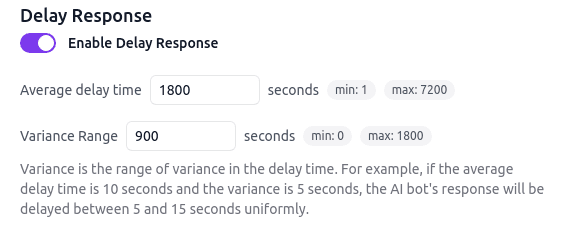
For example, with the configuration above, the AI chatbot waits for a randomly chosen quiet period, uniformly between 0 and 1800 seconds, before replying.
Three details worth knowing:
- The wait restarts on every message, with no upper bound. A customer who keeps typing inside each quiet period keeps postponing the reply. The bot answers once they pause.
- Large groups are answered without waiting. Once a group reaches the channel's message limit, or its attachments are too large to send in one request, the bot answers straight away — including the message that reached the limit — instead of waiting any longer.
- A message too large to join a group starts the next one. If adding your newest message would make the group longer than the AI can read in a single turn, the bot answers the group it already has and replies to that newest message separately, so nothing is lost. (If you lower your message or attachment limits while a group is already waiting, that group is trimmed to the new limits before it is sent.)
The reply quotes the most recent message of the group. A group of voice messages is answered with audio; if any message in it was typed, the reply is text.
Updated: the delay now works by waiting for the customer to finish writing. Each new message restarts the wait, and the messages are answered together in one reply. Previously the reply was generated immediately and only its delivery was delayed, which meant a customer who sent several messages in a row received several replies written without sight of each other.
Each individual wait is capped: the average can be set between 0 and 2 hours with a smaller variance, so any single quiet period is under 4 hours. The TOTAL wait has no cap — every new message starts a fresh quiet period, so a customer who keeps writing keeps postponing the reply.