Stripe Metering Integration

Samuel Su
on February 5, 2025Update (July 2026): Metering has been redesigned into a full monetization suite — automatic pricing setup, usage caps, free trial messages, and in-chat subscribe paywalls. See Turn Your Chatbot Into a Business.
Update (May 2026): Stripe is now connected via OAuth per chatbot — no API key required. See Connect Stripe Directly. The API key setup described below is no longer used.
We're excited to introduce Stripe Metering Setup, allowing you to track and charge for chatbot usage seamlessly with Stripe's usage-based billing.
🚀 How It Works
1️. Connect Stripe – Link your Stripe account from My Chatbots > [Chatbot] > Integrations.
2. Set Up a Meter in Stripe – Follow Stripe's guide to create a meter and pricing model.
3. Enable Metering for Your Chatbot – Configure usage tracking in Chat Data > Settings > Metering.
⚙️ Key Metering Options
- 🔹 Metering Type – Charge users based on message credits or raw message count.
- 🔹 Static vs. Dynamic Customers –
✔ Static: Charge a fixed customer (e.g., a reseller).
✔ Dynamic: Charge based on lead information (email, phone, or name). - 🔹 Customer Identification – Identify users by email (recommended), name, or phone for accurate billing.
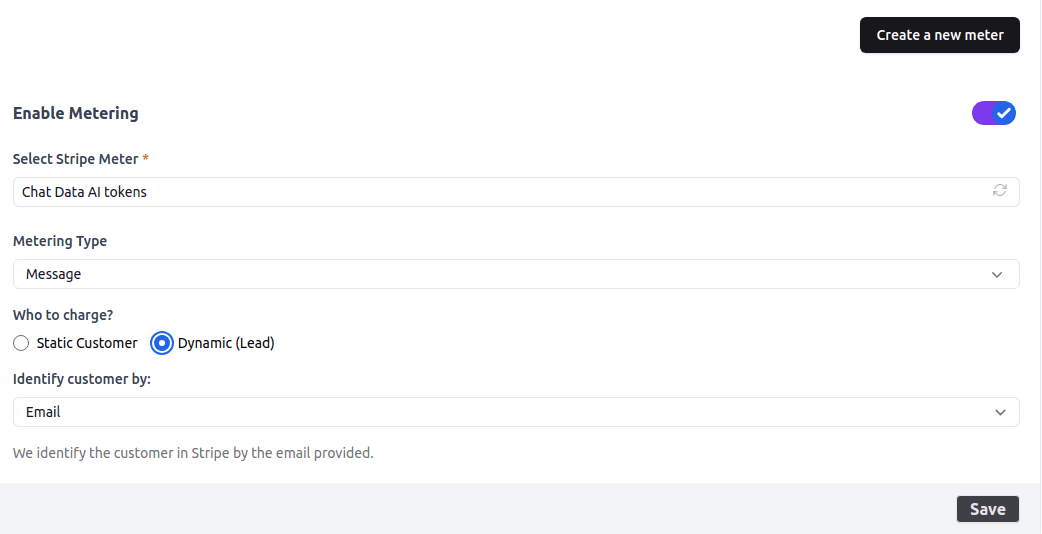
✅ Verify Your Setup
After configuration, chat with your chatbot and check Stripe's Metering Dashboard to see real-time usage tracking.