Telegram Business Account Support

Samuel Su
on May 12, 2026Telegram Business turned every Premium user's personal account into a small business inbox. Now Chat Data plugs an AI assistant into that inbox — replying under your name, in your voice, in 95+ languages, while you sleep, travel, or focus on deep work. When you step in, the AI steps back.
What's New
- AI replies as you, not as a bot. Outgoing messages route through Telegram's business connection so customers see your name and avatar in their chat — no @yourbot suffix, no bot label, no handoff moment. The experience reads as a 1:1 conversation with you.
- Instant manual takeover. Open the chat, type a reply yourself, and the AI detects your message within milliseconds. It pauses LLM responses for that conversation for 30 minutes (configurable via the bot's auto-off window), so you can take over without the bot talking over you.
- Per-customer conversation isolation. Every customer thread is keyed by the business connection plus customer ID. Two different business owners running the same bot, or the same customer reaching different owners, never cross-pollute conversations. Leads, history, and analytics are siloed per connection.
- Voice, photos, and documents handled. Customers can send a voice memo, a screenshot, or a PDF — the AI transcribes audio, analyzes images, and parses documents the same way it does in regular DMs. Owner-sent media is preserved in the conversation context so the AI has the full picture on its next customer turn.
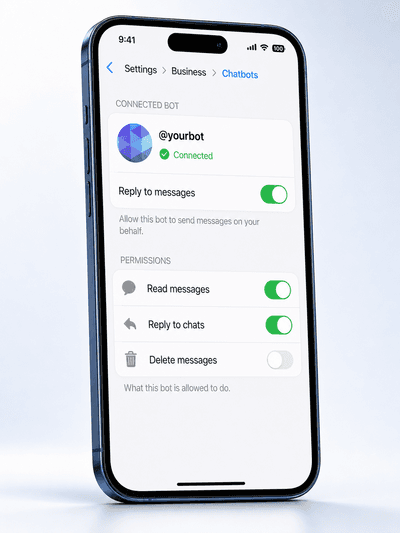
- Owner-managed lifecycle. Pause, revoke reply rights, or disconnect entirely from Telegram itself — Settings → Business → Chatbots. The integration observes connection lifecycle events and adjusts behavior automatically. No dashboard click required.
How It Works
- In @BotFather, send /mybots → select your bot → Bot Settings → Business Mode → Turn on. This declares your bot as eligible to connect to a Telegram Business account.
- Connect the bot in Chat Data with its token (or, if already connected, disconnect and reconnect once so the webhook picks up the new business update types).
- On your phone or desktop, open Telegram → Settings → Business → Chatbots → enter your bot's username → tap to add. That's it — no extra permission step.
- When customers DM you, the AI replies under your name. Open the chat anytime to take over.
For the full walkthrough with annotated phone screenshots at every tap, see the Telegram Business setup guide in our cookbook.
Hit "This bot doesn't support Telegram Business yet"?
That error means your Telegram client is still seeing the cached pre-Business-Mode state of the bot. To resolve:
- Make sure step 1 above is done — Business Mode must be On for the bot in @BotFather.
- Force-quit Telegram completely (swipe it out of the app switcher on mobile, fully quit on desktop — don't just background it).
- Re-launch Telegram and retry step 3.
Telegram caches a bot's capability list per-device, so the toggle takes effect on the server immediately but the client needs a cold relaunch to pick it up.
Built for People Who Chat 1:1 With Customers
If your business runs through your personal Telegram inbox — real estate agents, coaches, freelancers, consultants, solo entrepreneurs — this is for you. The AI handles the routine (pricing, availability, scheduling, FAQs) so you can focus on the conversations that need a human.
Good to Know
- Customers don't see a bot. Replies appear under your name. If you operate in the EU or California, consider adding an AI disclosure line to your system prompt — see our Telegram Business chatbot page for the regulatory context.
- Interactive buttons are off in business mode. Suggested-question buttons and workflow action buttons are suppressed because the callback round-trip for business chats is not yet wired through. Text, files, voice, and photos all work normally.
- Follow-up jobs are disabled for business conversations in this release. The AI doesn't proactively message customers under your name without your explicit involvement.
- Existing Telegram DM and group behavior is unchanged. This is a parallel capability layered on the same bot; nothing about your public bot's behavior is affected.
- One bot, unlimited connected Business accounts. If you build a bot for clients, each of their Telegram Business accounts can connect the same bot independently. Each connection's conversations stay fully isolated.
- Requires Telegram Premium on the account that connects the bot — Telegram Business is currently a Premium feature.
Where to Learn More
- Telegram Business setup guide (cookbook) — step-by-step walkthrough with phone screenshots covering the BotFather toggle, adding the bot to your Telegram Business account, and the "This bot doesn't support Telegram Business yet" troubleshooting fix.
- Telegram Business Chatbot — full product overview with setup walkthrough and FAQ.
- Telegram Group Chat Support — for the related capability covering public bots in groups and supergroups.
Connect your bot to your Telegram Business account to get started.