How to Create a Telegram Bot: BotFather, Token & AI (2026)

Emma Ke
on October 1, 2026CMO
8 min read
How to Create a Telegram Bot: The Short Answer
To create a Telegram bot, open Telegram, message @BotFather, and send /newbot. Pick a display name, then a username that ends in "bot", and BotFather gives you an HTTP API token. That token is the key you paste into any tool (or code) that should answer your bot's messages, and the whole process takes about two minutes.
The bot you just made is an empty shell: it exists, but nothing answers when people talk to it. Below are the exact BotFather steps, how to find and protect your Telegram bot token, and how to turn the bot into an AI assistant with Chat Data in a few minutes without writing code.
What You Need Before You Start
- A Telegram account on your phone or desktop. Any account works; there is no separate developer sign-up.
- Two minutes for the BotFather part.
- Optional: your website URL, FAQ document, or a few paragraphs about your business, if you want the bot to answer questions with AI.
Creating a bot and using the Telegram Bot API is free. Telegram does not charge for bots.
How to Make a Telegram Bot with BotFather (Step by Step)
BotFather is Telegram's official bot for creating and managing other bots, so this is how to create a bot in Telegram no matter what will power it later. Everything happens inside a normal chat.
Step 1: Open BotFather
In Telegram, search for @BotFather and open the account with the blue verified checkmark, or go straight to t.me/BotFather. Copycat accounts with similar names exist, so check for the checkmark. Tap Start if this is your first time.
Step 2: Send /newbot
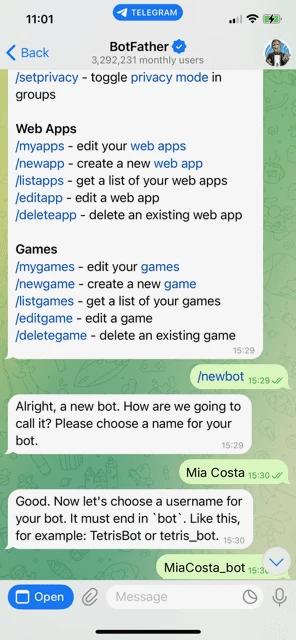
Type /newbot and send it. BotFather replies: "Alright, a new bot. How are we going to call it? Please choose a name for your bot."
Step 3: Choose a display name
Send the name people will see at the top of the chat, such as Acme Support or Mia Costa. It can contain spaces and does not need to be unique. You can change it later with /setname.
Step 4: Choose a username that ends in "bot"
Next, BotFather asks for a username. This is the bot's permanent address (@username and t.me/username), and Telegram's rules are strict:
- It must end in "bot", for example AcmeSupportBot or acme_support_bot.
- It must be 5-32 characters long.
- It can only use Latin letters, numbers, and underscores.
- It must be unique across all of Telegram.
These rules come from the BotFather documentation. If the name is taken, BotFather says so and you can simply try another one.
Step 5: Copy your bot token
When the username is accepted, BotFather replies with a success message, a link to your new bot, and a line like:
Use this token to access the HTTP API:
110201543:AAHdqTcvCH1vGWJxfSeofSAs0K5PALDsaw
That string is your Telegram bot token. Copy it now; you will paste it in the next part. Your Telegram bot is created.
Your Telegram Bot Token: Find It, Protect It, Reset It
The bot token is the password for your bot. Anyone who has it can read messages sent to the bot and reply as the bot. The Bot API documentation uses it to authorize every request.
- Lost your token? Message @BotFather, send /mybots, choose your bot, then tap API Token. BotFather shows the current token again.
- Token leaked? In the same API Token menu, revoke the current token. BotFather issues a new one and the old one stops working immediately. Paste the new token into every tool that uses the bot.
- Keep it private. Do not post it in screenshots, public code, or group chats. A token always looks like a number, a colon, and a long string of letters and numbers.
How to Turn Your Telegram Bot into an AI Bot (No Code)
Most people asking how to make a bot for Telegram want one that actually answers questions. A BotFather bot does nothing on its own; something has to receive its messages and write replies. Developers do this with code and a server. Chat Data does it for you: you build an AI agent that knows your content, connect your token, and the agent answers everyone who messages your bot.
1. Create an AI agent
Sign up at Chat Data, click New agent, and choose Train on your data. Add the sources you want the bot to know: website pages, files, or plain text. You can also start with no sources and just describe the bot's personality and instructions. Test the agent in the playground until the answers look right; building and testing is free.
2. Open the Telegram integration
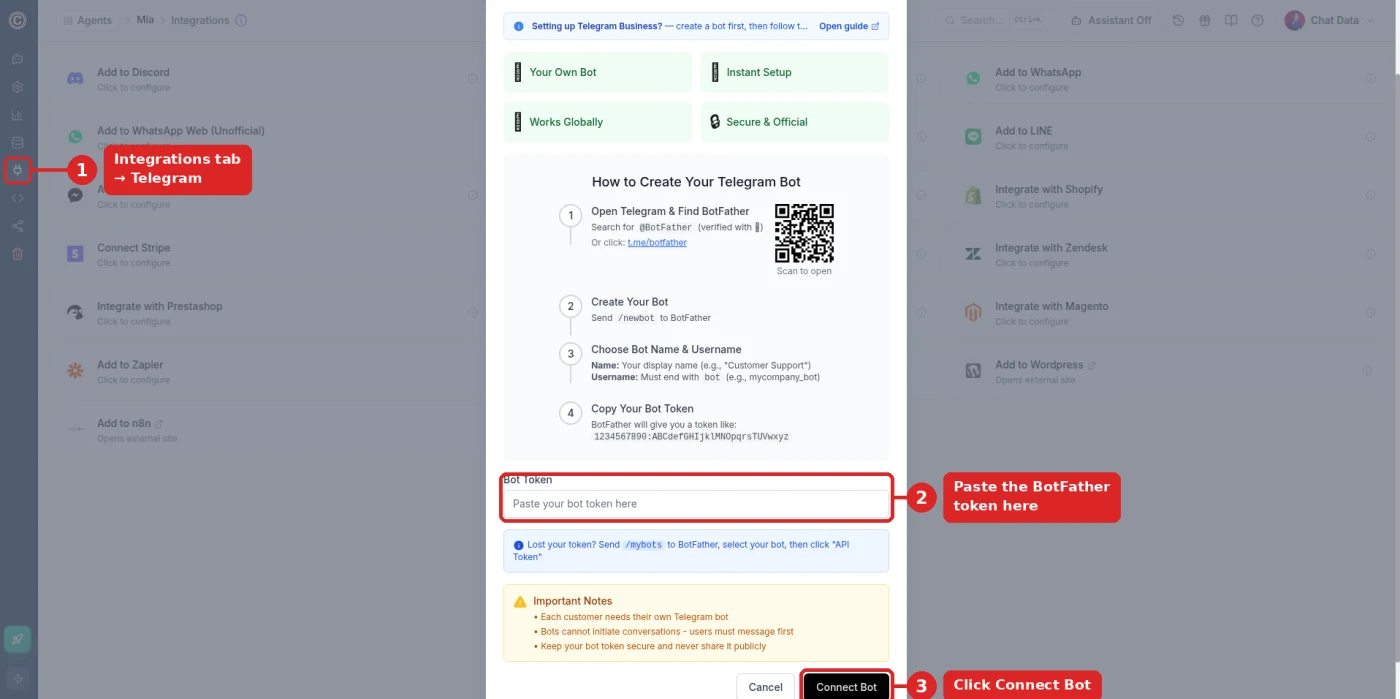
Open your agent and go to Integrations (the plug icon in the left sidebar on desktop, or in the bottom bar on a phone), then choose Telegram.
3. Paste your token and connect
Paste the BotFather token into the Bot Token field and click Connect Bot. Connecting Telegram and other messaging channels requires a paid plan; see pricing for the current options.
4. Test your bot
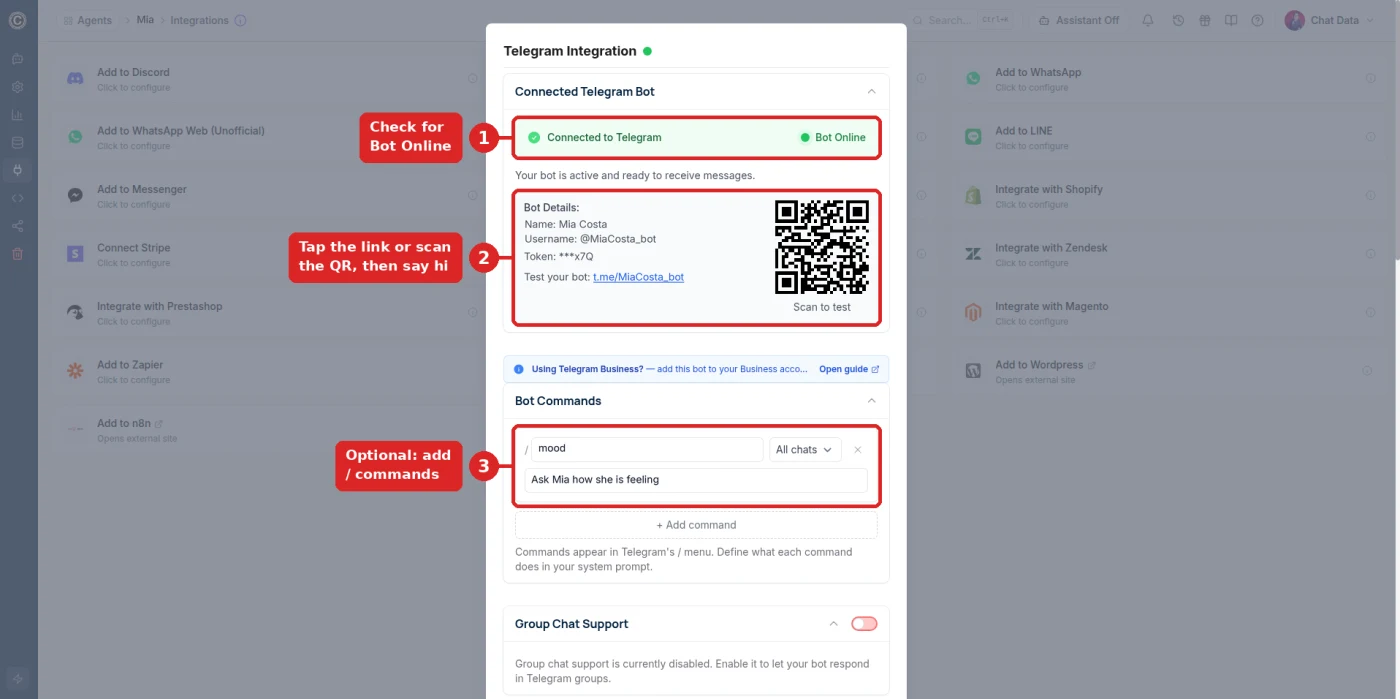
After connecting, the panel shows Connected to Telegram with a green Bot Online badge, your bot's name and username, a t.me link, and a QR code. Tap the link or scan the QR code with your phone, press Start, and say hi. The AI agent answers right away.
Optional: commands and group chats
In the same panel you can:
- Add bot commands. Each command (such as /mood in the screenshot above, or /pricing for a business bot) appears in Telegram's / menu with a short description. Describe what each command should do in your agent's instructions.
- Turn on group chat support. When enabled, the bot answers in Telegram groups it is added to when people @mention it, reply to its messages, or use a slash command.
Want a companion or roleplay character instead of a business assistant? The same steps apply; our Telegram AI girlfriend bot guide covers the persona setup and the Uncensored DeepSeek V4 Flash model (paid plan).
Troubleshooting: Common Telegram Bot Problems
"Sorry, this username is already taken" or "invalid"
Usernames are first come, first served across all of Telegram. Add a word, a region, or an underscore (acme_help_bot, AcmeUSBot), and check that it ends in "bot", is 5-32 characters, and has no spaces, dashes, or dots.
Token error when connecting
- Copy the whole token, including the number before the colon, with no spaces or line breaks.
- If you revoked the token in BotFather, the old one no longer works. Use /mybots → your bot → API Token to get the current one.
- Make sure you copied the token for the right bot if you have several.
The bot is not replying
- Check the status. In Chat Data, open Integrations → Telegram and confirm Bot Online.
- Press Start. A brand-new chat with a bot only begins after you tap Start or send a message.
- One bot, one destination. A token delivers messages to only one webhook at a time (setWebhook). If you later connected the same token to another tool or script, that tool now receives the messages. Reconnect in Chat Data, or create a separate bot for the other tool.
- In a group? Turn on group chat support, then @mention the bot or reply to one of its messages.
Can a Telegram bot message users first?
No. Telegram bots cannot start conversations. A user must open the bot and press Start, send it a message, or add it to a group first. Share your t.me link or QR code wherever your customers already are so they can start the chat.
Telegram Bot Creator Options: BotFather, Code, or No-Code
Every Telegram bot starts in BotFather. The difference is what answers the messages:
| Approach | What you do | Best for |
|---|---|---|
| BotFather only | Create the bot and set its name, picture, and description | Reserving a username |
| Code it yourself | Write a program against the Bot API and host it on a server | Developers who need fully custom logic |
| No-code AI (Chat Data) | Train an AI agent on your content and paste the token | Support, sales, and companion bots without coding |
If you want a bot that understands questions and answers from your own content in plain language, the no-code route is the fastest way to get there.
Next Steps
You now know how to create a Telegram bot, where your bot token lives, and how to connect it to an AI agent. Start by building your agent on Chat Data for free, test it in the playground, and connect your bot when it is ready. For more on what a Telegram AI agent can do for a business, see the Telegram chatbot page.
Frequently Asked Questions
How do I create a bot in Telegram?
Open Telegram, search for the verified @BotFather account, and send /newbot. Choose a display name, then a unique username that ends in "bot" (for example, MyShop_bot). BotFather replies with an HTTP API token, which you use to connect the bot to software that answers its messages.
Where do I find my Telegram bot token?
BotFather sends the token right after you create the bot. If you lost it, message @BotFather, send /mybots, select your bot, and tap "API Token" to see it again. If the token was leaked, use the same menu to revoke it and get a new one.
Is it free to make a Telegram bot?
Yes. Creating a bot with BotFather and using the Telegram Bot API costs nothing. You only pay if you use a hosting service or bot platform to run the bot's replies. With Chat Data, you can build and test an AI agent for free; connecting it to Telegram requires a paid plan.
Can I make a Telegram bot without coding?
Yes. BotFather setup is just a chat, and a no-code platform like Chat Data handles the replies. You train an AI agent on your website, files, or text, paste your bot token into the Telegram integration, and click Connect Bot.
Can a Telegram bot message someone first?
No. Telegram bots cannot start a conversation. A user has to open the bot and tap Start (or send a message), or add the bot to a group, before the bot can reply.
Why is my Telegram bot username not accepted?
Bot usernames must be unique, 5-32 characters long, use only Latin letters, numbers, and underscores, and end in "bot". If BotFather says the username is taken or invalid, add a word or underscore, such as acme_support_bot or AcmeHelpBot.