WhatsApp Business vs WhatsApp Business API: Costs and Using Both

Samuel Su
on November 7, 2026Founder & CEO
10 min read
WhatsApp Business vs WhatsApp Business API: The Short Answer
WhatsApp Business vs WhatsApp Business API comes down to who sends the messages. The WhatsApp Business app is a free phone app where you type the replies yourself (apart from Meta Business Agent in select markets). The WhatsApp Business API, which Meta now calls the Cloud API on the WhatsApp Business Platform, lets software send and receive messages on your number. That is what you need for an AI agent, approved templates and campaigns.
Most small businesses do not have to pick one. Meta supports coexistence: you keep the WhatsApp Business app on your phone and connect the same number to the API through a provider like Chat Data. You answer from the app when you want to. The AI agent answers the rest.
TL;DR
- App: free, one number, you reply by hand, a few built-in tools (Meta Business Agent in select markets).
- API: free to access, but Meta charges per message, and you need a provider or a developer to use it.
- Best for most small businesses: keep the app and connect the same number to an AI agent (coexistence).
- Biggest mistake: connecting a number that is not on the app. It becomes API-only and is hard to undo.
What Is the Difference Between the WhatsApp Business App and the API?
Meta describes the WhatsApp Business app as "ideal for small businesses" and the platform as the way larger businesses talk to customers at scale (WhatsApp Business). Here is how they compare, with coexistence as a third column. Facts are as of November 2026.
| WhatsApp Business app | WhatsApp Business Platform (Cloud API) | App + API on one number (coexistence) | |
|---|---|---|---|
| Who it's for | Small businesses replying by hand | Businesses that need software, scale or many numbers | Small teams that want to keep the app and add AI |
| Numbers | One phone number | Multiple numbers and display names | One number, used in both |
| Users and devices | One phone plus up to four linked devices | No app of its own; your provider's inbox or your code | Your phone app plus Chat Data Live Chat; linked devices must be linked again |
| Automation | Built-in tools to "automate, sort, and quickly respond" | Anything your software does | Chat Data AI agent plus your own replies |
| Chatbots and AI | No custom chatbot | Through a provider or your own build | AI agent answers; Auto Off pauses it after you reply |
| Templates and campaigns | Broadcast lists (256 contacts who saved your number); paid business broadcasts in some countries | Meta-approved templates and campaigns at up to 80 messages per second by default | Same templates and campaigns; fixed at 20 messages per second |
| Cost | Free to download | Free access; Meta charges per message | App messages stay free; API messages use Cloud API pricing |
| Verified badge | Meta Verified subscription, where offered | Official Business Account (blue checkmark) for eligible numbers | No Official Business Account |
| Setup | Download from the app store | Developer resources or a partner | Meta Embedded Signup in Chat Data plus a QR scan |
Sources for the table: linked devices (WhatsApp Help Center), broadcast lists (WhatsApp Help Center), business broadcasts (WhatsApp Help Center), throughput (Meta), coexistence (Meta), badges (Meta, WhatsApp Help Center).
Two rows matter most for a small business.
Templates. In the app, a broadcast list reaches only people who saved your number. On the API, you send Meta-approved templates. Template messages are "the only type of message that can be sent to WhatsApp users outside of a customer service window" (Meta). That window is 24 hours from the customer's last message. New business portfolios can reach 250 unique customers with templates per 24 hours, and that limit rises over time (Meta). See our guides to WhatsApp message templates and WhatsApp broadcast messages.
AI. The app's away and greeting messages send fixed text. In select markets Meta also offers Meta Business Agent, its own AI inside the app (WhatsApp Business), but you can't connect your own AI agent or workflows to the app. An AI agent on the API can answer real questions from your website and files. Meta's terms limit general-purpose AI assistants on the platform. Since January 15, 2026, "AI Providers" may offer them only where Meta is legally required to allow it (Meta). The ban covers AI that is the "primary (rather than incidental or ancillary) functionality" (Meta terms). An agent that answers questions about your own business is the ordinary use.
Is the WhatsApp Business API Free?
Access is free. Messages are not. Meta's own FAQ says "Access to Cloud API is free" and that "Meta will host the WhatsApp Business API for you" (Meta). What you pay for is messages. As of November 2026, Meta's pricing works like this (Meta pricing):
- Messages from customers are free. Meta does not charge for messages users send to you.
- Service replies: replies inside the 24-hour window. Each number gets 1,000 free service messages a month. They reset monthly and do not roll over. After that, Meta charges per message.
- Template messages, including campaigns, are charged per delivered message. The price depends on the category (marketing, utility, authentication) and the recipient's country.
- You pay only when a message is delivered.
- No payment method? Meta delivers service replies inside the free tier and stops delivering them after it. Template messages need a payment method too.
Meta bills your WhatsApp Business account directly through Meta Business Suite. Chat Data does not resell these charges. For what Chat Data itself costs, see pricing.
"Free" also leaves out the work. Meta says your business "will need developer resources or a Business Messaging Partner" to use the platform (WhatsApp Business). The API has no inbox and no chatbot. Something has to sit on top of it: your own code, or a provider. That is why searches for "WhatsApp API free" often end in a dead end.
Which One Does a Small Business Need?
Use the app alone if you get a few messages a day, you always reply yourself, and you never message customers first.
Add the API if any of these is true:
- Messages arrive after hours and nobody answers them.
- The same questions come in over and over: prices, opening times, stock, order status.
- You want to send order updates, reminders or offers to customers who haven't messaged you in the last 24 hours.
- More than one person needs to reply, from a computer.
Do not drop the app to get the API. Many owners think it is one or the other. It isn't. For most small businesses, the best setup is the app and the API on the same number.
The Third Option: Keep the App and Add an AI Agent (Coexistence)
Coexistence means your number stays on the WhatsApp Business app and is also connected to the Cloud API. Meta built it for this case: businesses "can still send messages on a one-to-one basis using the WhatsApp Business app" while a partner's software handles volume (Meta).
With Chat Data, that looks like this:
- You and the AI agent answer on the same number. Customers see one chat.
- Your phone replies show up in Chat Data Live Chat, next to the AI's replies.
- Auto Off keeps the AI quiet after you reply. It is on by default for 30 minutes and can be set from 1 minute to 1 week. You can also switch the AI off for one conversation with the robot button in Live Chat.
- Templates and campaigns go out from the same number, through the Outbound menu.
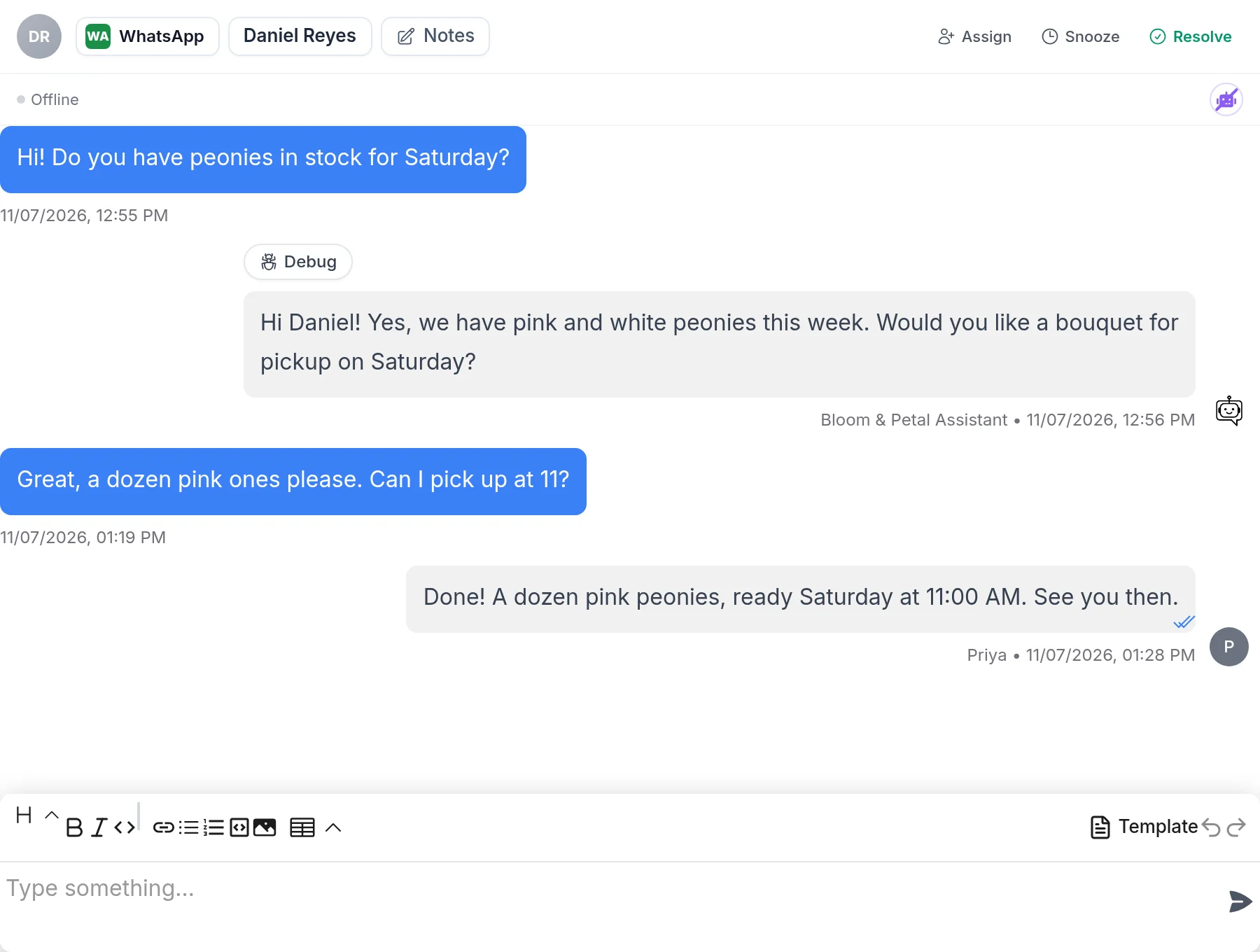
In the screenshot above, the AI assistant answers the first question. A person on the team, Priya, closes the order in the same thread.
Trade-offs to know before you connect
Coexistence is the right choice for most small businesses, but it changes a few things. Meta lists these changes (Meta):
- Linked devices are unlinked. Link them again afterwards. WhatsApp for Windows and WearOS are not supported.
- Broadcast lists are turned off in the app. Send campaigns from Chat Data instead.
- Disappearing messages, view once and live location are turned off for one-to-one chats.
- Groups, calls and business tools keep working in the app.
- Campaign speed is capped at 20 messages per second. Meta allows up to 80 per second for API-only numbers.
- No Official Business Account. Meta does not grant the blue checkmark to WhatsApp Business app numbers.
- Open the app at least every 13 days. If the app goes unused for about 14 days, WhatsApp disconnects the number from the API. The agent then stops getting messages until you reconnect.
- History starts fresh in Chat Data. Earlier chats stay in your app. Chat Data does not import them; it starts with the next message.
On cost, Meta says messages you send from the app "will continue to be free." Messages sent through the API follow Cloud API pricing.
How to Connect Your WhatsApp Business App Number to Chat Data
Before you start, update the WhatsApp Business app to version 2.24.17 or later. If your number is on regular WhatsApp, move it to the WhatsApp Business app first.
- In Chat Data, open your chatbot and go to Integrations > WhatsApp > Connect. Meta Embedded Signup opens.
- Sign in with Facebook.
- Choose or create your Meta business portfolio.
- Enter the number that is on your WhatsApp Business app, or choose the option to connect your existing WhatsApp Business app.
- Scan the QR code with the WhatsApp Business app on your phone.
- In the app, tap Connect (it may say Connect to the Business Platform), then Confirm.
- Back in the browser, click Finish.
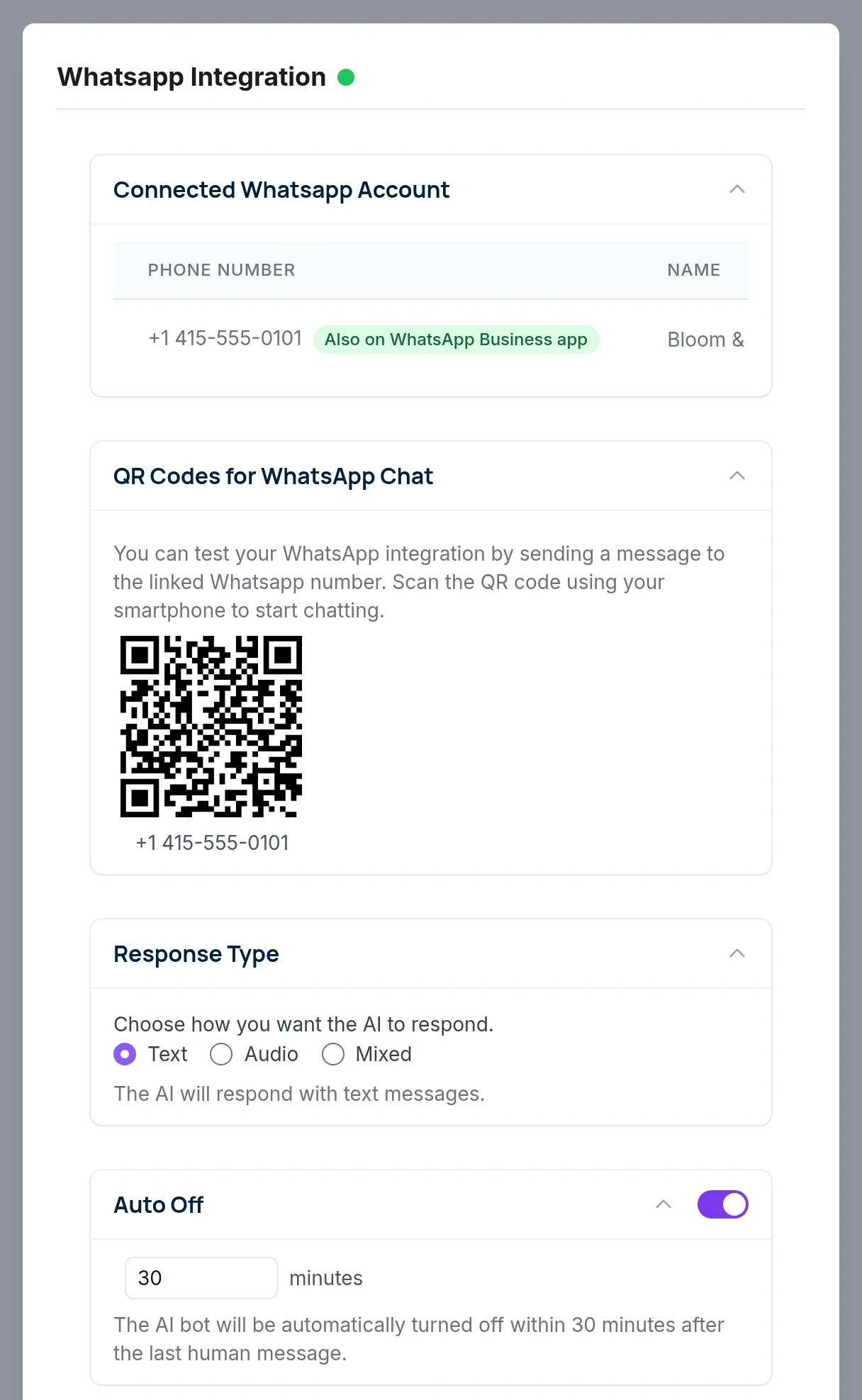
When it works, the number shows an Also on WhatsApp Business app label in the WhatsApp integration. On the same page you will see the Auto Off setting, on at 30 minutes.
Two more steps finish the setup:
- Turn on Live Chat in Settings > Live Chat. It is off by default. You need it for the live inbox and email alerts.
- Train the agent on your website and files so it answers like your business. Then turn on extras such as Delay Response, which waits and answers several quick messages together.
A brand-new number may be refused at first. Meta may ask you to use it in the app for a few days and try again. For more detail, read the WhatsApp integration docs, the WhatsApp coexistence overview, or how to set up a WhatsApp Business auto reply.
The Most Common Mistake: Connecting the Number Without the App
If you connect a number that is not on the WhatsApp Business app, it is registered on the Cloud API only. It then can't be used in the WhatsApp or WhatsApp Business app. The AI agent answers, but nobody can reply from a phone.
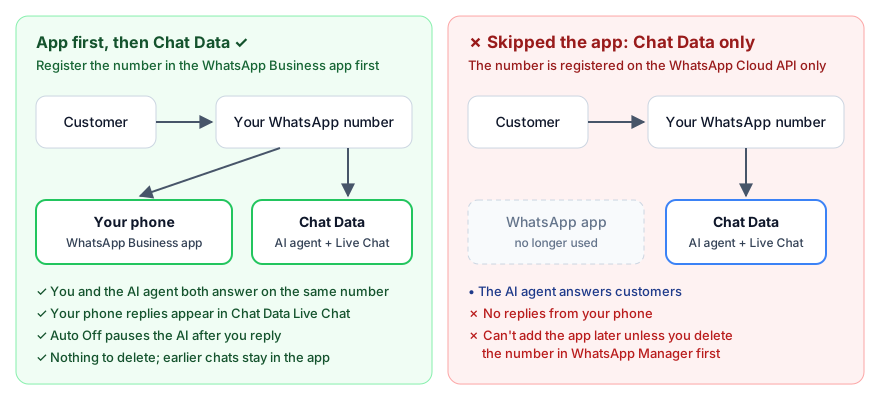
This happens most often when someone types a fresh number into the signup, or skips the QR step. Prevent it like this:
- Register the number in the WhatsApp Business app first.
- Use the app for a few days if the number is new.
- Only then connect it to Chat Data, and scan the QR code with the app when Meta asks.
How to undo it
Clicking Disconnect in Chat Data is not enough. The number stays registered on the Cloud API. To get it back into the app:
- Open Meta WhatsApp Manager and go to Account tools > Phone numbers.
- Delete the number from your WhatsApp Business account. Meta may block this for a while if the number recently sent paid messages.
- Register the number in the WhatsApp Business app.
- Connect it to Chat Data again with the steps above.
It can be done, but it takes time and the number may be out of action in between. Doing it in the right order the first time is much easier.
The Bottom Line
The WhatsApp Business app is for replying by hand. The API is for software: AI agents, templates and campaigns. Access to the API is free, but Meta charges per message, and you need a provider or a developer to use it.
You don't have to give up one for the other. Keep the app, connect the same number to Chat Data, and let the AI agent handle the routine questions while you step in when it counts. Start with the WhatsApp chatbot page or read the coexistence changelog.
Frequently Asked Questions
What is the difference between the WhatsApp Business app and the WhatsApp Business API?
The WhatsApp Business app is a free phone app for one number, where you answer customers by hand with a few built-in tools (plus Meta Business Agent, the AI Meta offers inside the app in select markets). The WhatsApp Business API (the Cloud API on the WhatsApp Business Platform) is a programmable interface that lets software send and receive messages, so you can run chatbots, AI agents, templates and campaigns. The API has no screen of its own; you use it through a provider or your own code.
Is the WhatsApp Business API free?
Access to the Cloud API is free and Meta hosts it, but messages are not. Meta charges per delivered template message by category and recipient country, and gives each number 1,000 free service replies a month before service replies are charged too. You also need a provider or your own development work to use the API at all.
Can I use the WhatsApp Business app and the API on the same number?
Yes. Meta calls this coexistence. You keep chatting from the WhatsApp Business app (version 2.24.17 or later) while a provider such as Chat Data connects the same number to the Cloud API for an AI agent, templates and campaigns. Some app features change, such as linked devices being unlinked and broadcast lists being turned off.
Will I lose my WhatsApp Business app if I connect to the API?
Not if you connect through the coexistence flow and scan the QR code with the app. You lose the app only if you connect a number that is not on the WhatsApp Business app; it is then registered on the Cloud API only. Getting it back means deleting the number in WhatsApp Manager and registering it in the app again.
Can I get a verified badge with the WhatsApp Business app?
Meta grants Official Business Account status (a blue checkmark) only to eligible numbers on the WhatsApp Business Platform, and not to WhatsApp Business app numbers, so a coexistence number does not qualify. Separately, Meta Verified is a paid subscription with a verified badge that you can check for in the app under Settings or Business Tools; it is limited to select businesses and locations.
Do I need a developer to use the WhatsApp Business API?
Meta says businesses need developer resources or a Business Messaging Partner to implement the platform. A provider like Chat Data removes the coding part: you connect through Meta Embedded Signup inside the dashboard and get an AI agent, live chat, templates and campaigns without building anything.