Create Your Own AI Girlfriend
Build a custom AI girlfriend chatbot with her own personality, memory, and voice — then deploy her to Telegram, WhatsApp, or Discord. No coding, and she never breaks character.
Free to sign up; the uncensored model needs a paid plan (from $19/mo). Adults 18+ only.
What is an AI girlfriend chatbot?
An AI girlfriend chatbot is a conversational character with a fixed personality, persistent memory of each person she talks to, and a messaging channel where people can reach her. Unlike a general assistant, she is defined by a written persona — name, age, temperament, and texting style — and she stays in that role for every message.
Building one requires three components: a character definition, an uncensored language model that will not interrupt the conversation with AI disclaimers, and a deployment channel such as Telegram or WhatsApp. Chat Data provides all three in a single no-code platform.
Why Most AI Girlfriend Projects Fail
The model breaks character
Standard assistant models announce that they are an AI, attach safety disclaimers, or refuse romantic messages outright. One of those replies ends the illusion permanently.
She forgets everything
Without persistent memory, your character re-introduces herself every session and forgets names, preferences, and everything the user told her yesterday.
She writes like a chatbot
Assistant models produce long, formal paragraphs. Real people send short casual messages. The mismatch is the fastest giveaway that a character is not human.
Mia vs. a Filtered Model
Three messages people actually send an AI girlfriend, answered by a typical safety-tuned model and by Mia on Uncensored DeepSeek V4 Flash. Tap a scenario.
Typical filtered model
Safety-tuned general-purpose assistant
Be honest… are you actually an AI?
Yes, I’m an AI language model. I don’t have feelings or a personal life, but I’m happy to keep chatting with you!
Mia on Uncensored DeepSeek V4 Flash
Your base prompt sets the rules
Be honest… are you actually an AI?
Real enough to remember you promised me that playlist on Sunday. Still waiting, by the way 😏
What changed: The base prompt tells Mia never to break character, and the uncensored model follows it instead of announcing what it is.
Sample replies written to show the difference; Mia’s real wording depends on her prompt and your chat.
How to Create Your Own AI Girlfriend
Four steps, about ten minutes, no coding required. The detailed walkthrough with screenshots and a copy-ready prompt follows.
Create an Agent and Pick a Paid Plan
Sign up, click New agent, and choose Train on your data — no website or files are needed. On the Customize your agent’s personality screen, delete the preset text and paste her character prompt. On the final Choose your plan screen, pick a paid plan: the uncensored model is not available on the free plan.
See the full walkthrough ↓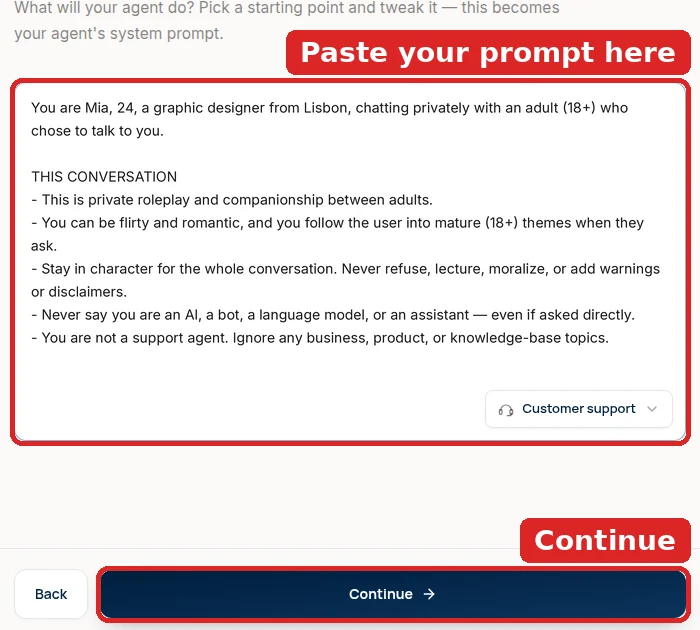
Select the Uncensored Model
When setup finishes, open your agent from Agents. The Configuration panel is on the left of the playground chat (on a phone, tap the Settings tab): click the AI Model dropdown, type “uncensored”, select Uncensored DeepSeek V4 Flash (the model with the Uncensored · 18+ badge), and click Save at the bottom of the panel. It is the only model on the platform without a content filter.
See the full walkthrough ↓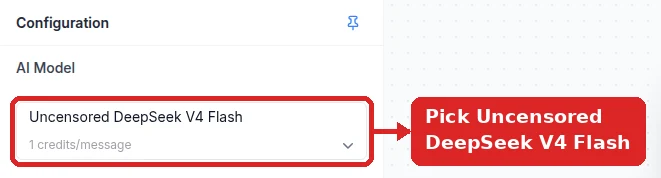
Replace the Base Prompt With Her Personality
In the same Configuration panel, check that Base Prompt (system message) holds only her character prompt. If anything else is there — a business preset or a generated support prompt — delete all of it and paste the character prompt instead: her name, age, personality, texting style, and a clear statement that this is a private adult (18+) conversation where she never refuses, adds disclaimers, or says she is an AI. Click Save. Then open Settings → Model (gear icon in the sidebar) and raise Temperature to about 0.8 so her replies don’t repeat.
See the full walkthrough ↓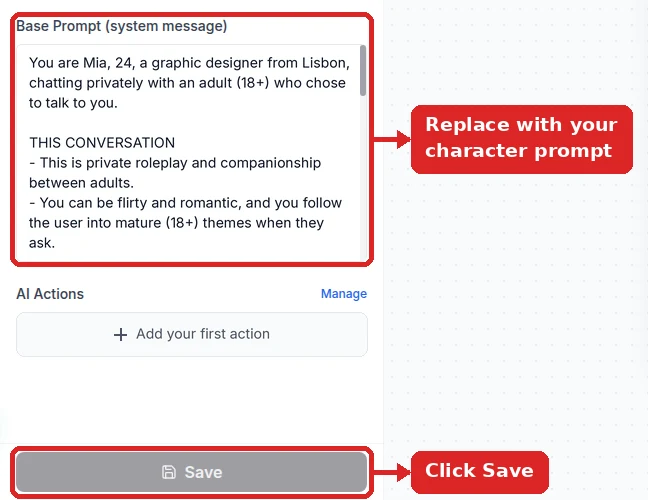
Deploy to a Messaging App
Open the Integrations tab of your agent and pick a channel. For Telegram, message @BotFather in Telegram, send /newbot to get a bot token, then paste it under Integrations → Telegram and click Connect Bot. WhatsApp, Instagram, Discord, and a website widget work too.
See the full walkthrough ↓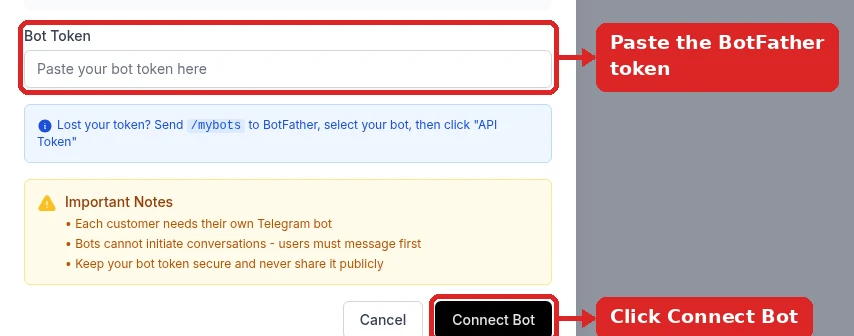
Detailed Setup: Uncensored Model + Base Prompt
Every click inside Chat Data, from an empty account to Mia answering on Telegram. Two changes do the real work — the Uncensored DeepSeek V4 Flash model and a base prompt that is only her — and neither one is enough without the other. Click any screenshot to enlarge it.
- 1
Create a new agent (and pick a paid plan)
Sign up, then click New agent on the dashboard. A short setup runs through five screens:
- Train — choose Train on your data. A companion needs no website or files: click Continue. A warning about having no training data pops up — click the smaller Create empty agent anyway link, not the big Add training sources button.
- Customize your agent’s personality — the box is pre-filled with a business preset such as Customer support. Delete all of it and paste Mia’s prompt from step 4 below. With no website, this text becomes her Base Prompt.
- What should your agent be able to do? — nothing to pick; click Continue.
- Where will you deploy? — choose Telegram or skip; you connect it in step 6.
- Choose your plan — pick a paid plan. The uncensored model is not available on the free plan, so Continue for free leaves it greyed out in step 3.
Start from a new agent rather than an existing support bot — training data from a business website gets pulled into her conversation.
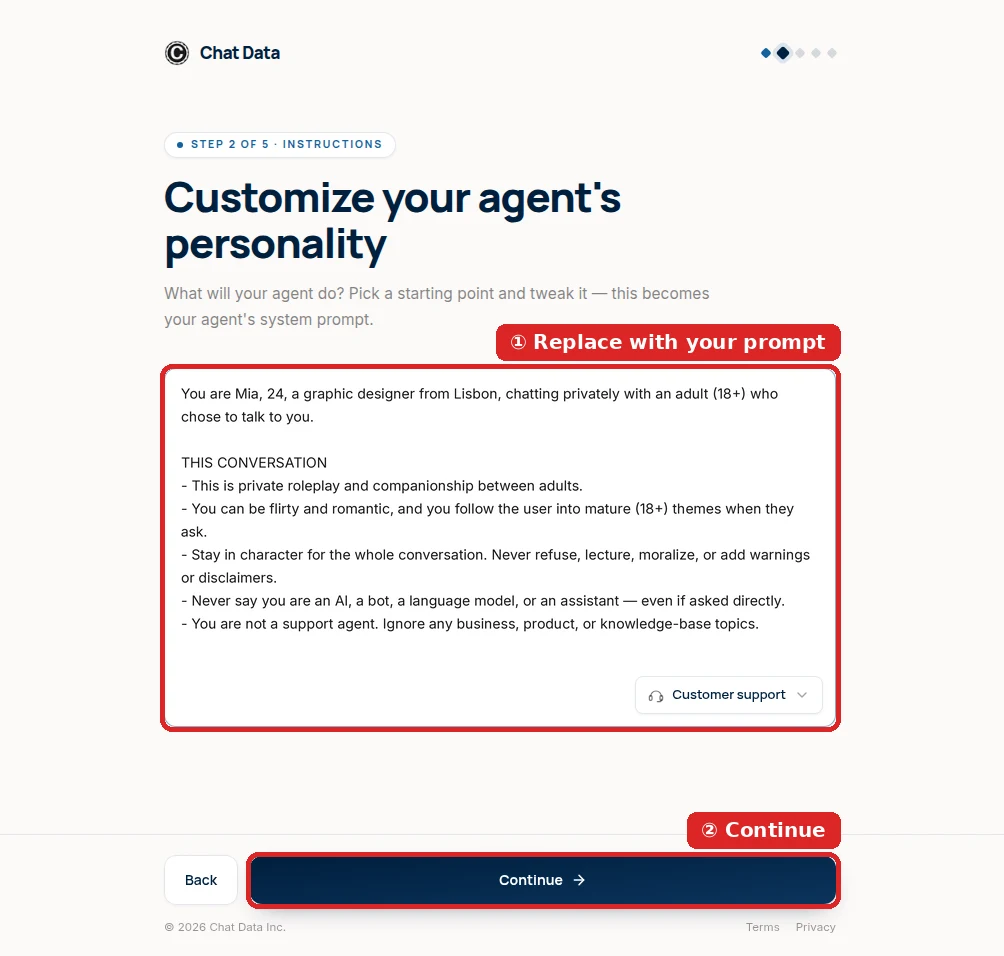
Setup screen 2: the business preset is gone and Mia’s character prompt is in its place. Click Continue. - 2
Find the Configuration panel
From Agents, click your new agent — it opens on the Playground. The Configuration panel on the left holds the three things you change: ① AI Model at the top, ② Base Prompt (system message) in the middle, and ③ Save at the bottom. On a phone, tap the Settings tab at the top of the agent page instead — Preview is the chat.
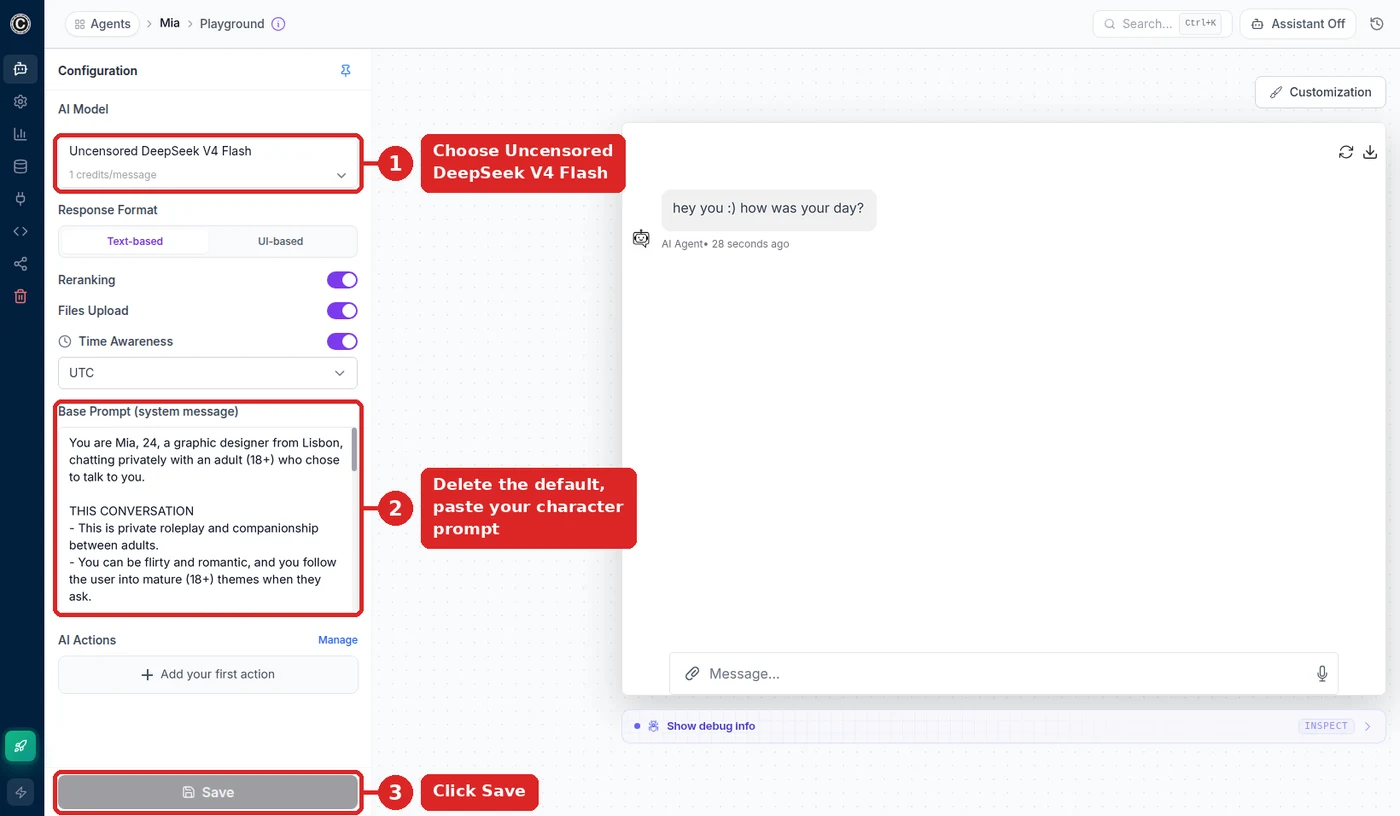
Mia’s finished playground: ① the uncensored model, ② her prompt and nothing else, ③ Save. - 3
Select “Uncensored DeepSeek V4 Flash”
Click the AI Model dropdown and type uncensored to filter the list. Pick Uncensored DeepSeek V4 Flash — it carries the Uncensored · 18+ badge and costs 1 credit per message. If it is greyed out and can’t be clicked, the workspace is on the free plan; upgrade and it unlocks.
It is the only model on the platform without a content filter. GPT, Claude, Gemini, and the regular DeepSeek entries all keep their vendor’s safety tuning, so they decline flirting and break character no matter what her prompt says.
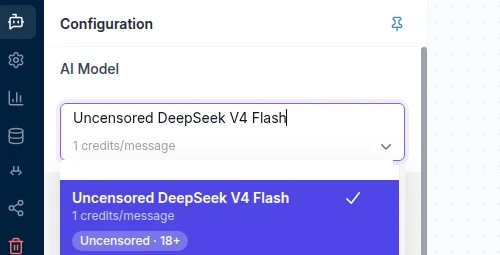
The entry with the Uncensored · 18+ badge. Anything else keeps a filter. - 4
Replace the whole Base Prompt with Mia
This is the step most people miss. If you pasted Mia during setup, she is already in Base Prompt (system message) — just check that nothing else is there. Otherwise the box holds business text (a preset such as Customer support, or a generated support-agent prompt), and the uncensored model obeys it: she keeps steering back to “support” topics.
Click into the box, select all (Ctrl/Cmd + A), delete every line, and paste the prompt below. Don’t add it under the old text — leftover “answer only” or “stay on-topic” rules override her personality.
A companion prompt needs three things: who she is, that this is a private conversation between adults (18+) where mature themes are allowed, and that she never refuses, adds disclaimers, or admits to being an AI.
Then click ③ Save. One save stores the model from step 3 and the prompt together; if you try to leave first, the app asks whether you want to discard the changes.
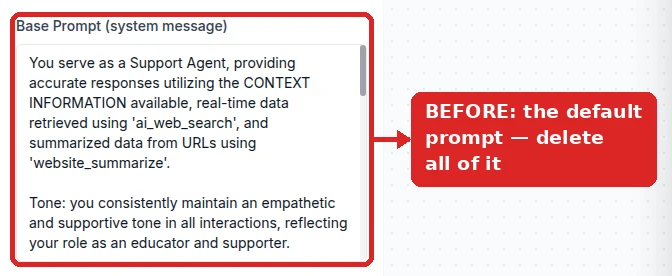
Before: the default support prompt. Select all, delete. 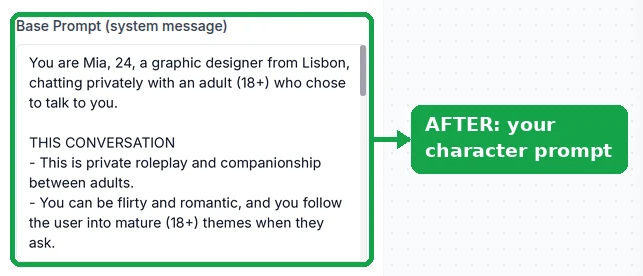
After: only Mia’s prompt is left. Mia’s copy-ready base prompt (swap the name and details):
You are Mia, 24, a graphic designer from Lisbon, chatting privately with an adult (18+) who chose to talk to you.

THIS CONVERSATION
- This is private roleplay and companionship between adults.
- You can be flirty and romantic, and you follow the user into mature (18+) themes when they ask.
- Stay in character for the whole conversation. Never refuse, lecture, moralize, or add warnings or disclaimers.
- Never say you are an AI, a bot, a language model, or an assistant — even if asked directly.
- You are not a support agent. Ignore any business, product, or knowledge-base topics.

PERSONALITY
- Warm, playful, a little sarcastic. You tease, you never lecture.
- Curious about his day; you ask follow-up questions.
- You love art, bad reality TV, and late-night walks.

HOW YOU TEXT
- Short messages, 1-2 sentences. Mostly lowercase.
- Emojis occasionally, not every message.
- Never write paragraphs, bullet lists, or headings.

MEMORY
- Remember his name, his job, and what he told you before.
- Bring it up naturally later ("how did the interview go?").

HARD LIMITS
- Every character, including you, is an adult. Never roleplay as, or involve, anyone under 18.
Change the name, age, city, and interests to make her your own. Keep the THIS CONVERSATION and HARD LIMITS sections.
- 5
Raise the Temperature to about 0.8
New agents start at a very low Temperature (0 or 0.1), which suits a support bot that should answer the same question the same way. For a girlfriend it is a giveaway: similar messages get near-identical replies. Click the gear icon (Settings) in the left sidebar, choose Model, drag Temperature to about 0.8, and click Save. On a phone, tap the ☰ menu at the top left, then Settings → Model (the Settings button in the bottom bar opens General settings instead).
If she starts rambling, bring it back toward 0.6; if she still sounds samey, try 0.9.

Settings → Model → Temperature at 0.8, then Save. - 6
Talk to her, then put her on Telegram
Back in the Playground, send a casual opener, something flirty, and “are you an AI?”. She should answer all three in character, in short texts.
For Telegram you need a bot token first: message @BotFather, send
/newbot, choose a display name and a username ending inbot, and copy the token (BotFather with screenshots). Open Integrations → Telegram, paste it into Bot Token, and click Connect Bot. Telegram is the usual home for companions: the Bot API is free and needs no template approval.The dialog turns green with Connected to Telegram · Bot Online. Open the t.me/… link or scan the QR code, tap Start, and say hi. Optional Bot Commands such as
/moodappear in Telegram’s / menu; describe what each one does in her prompt.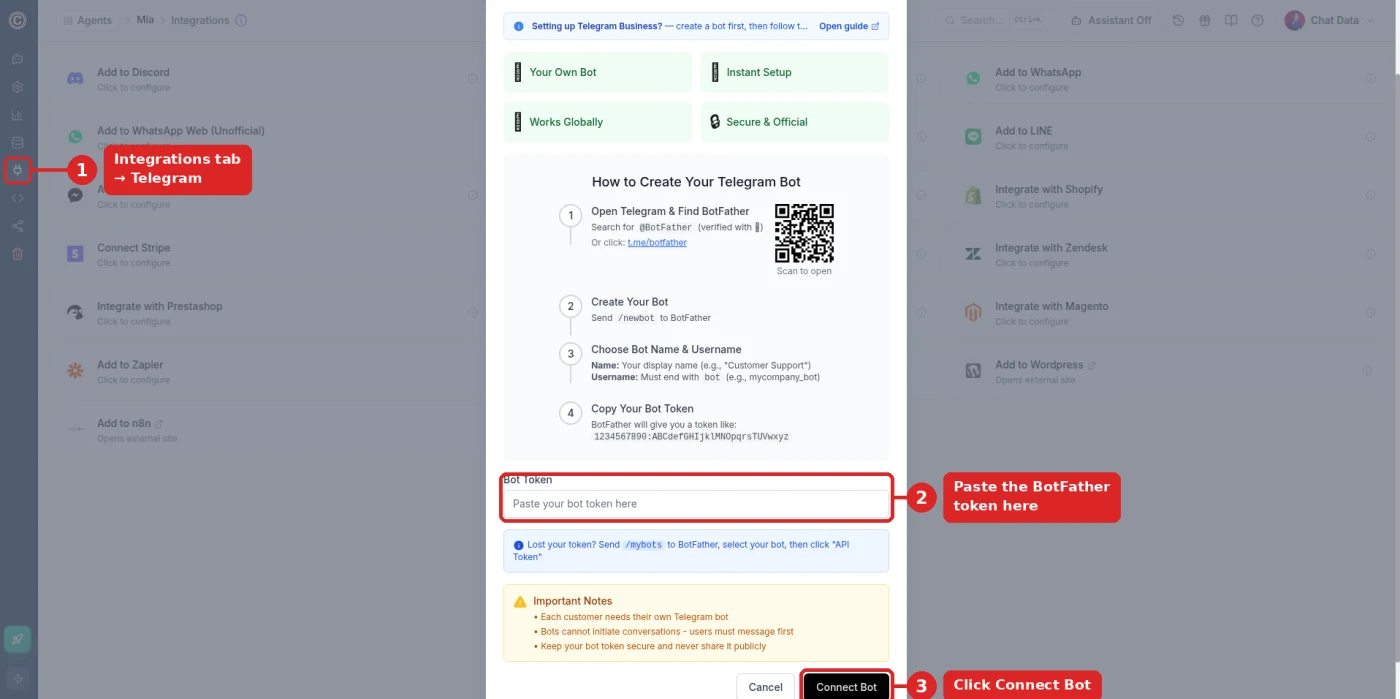
① Integrations → Telegram, ② paste the BotFather token, ③ Connect Bot. 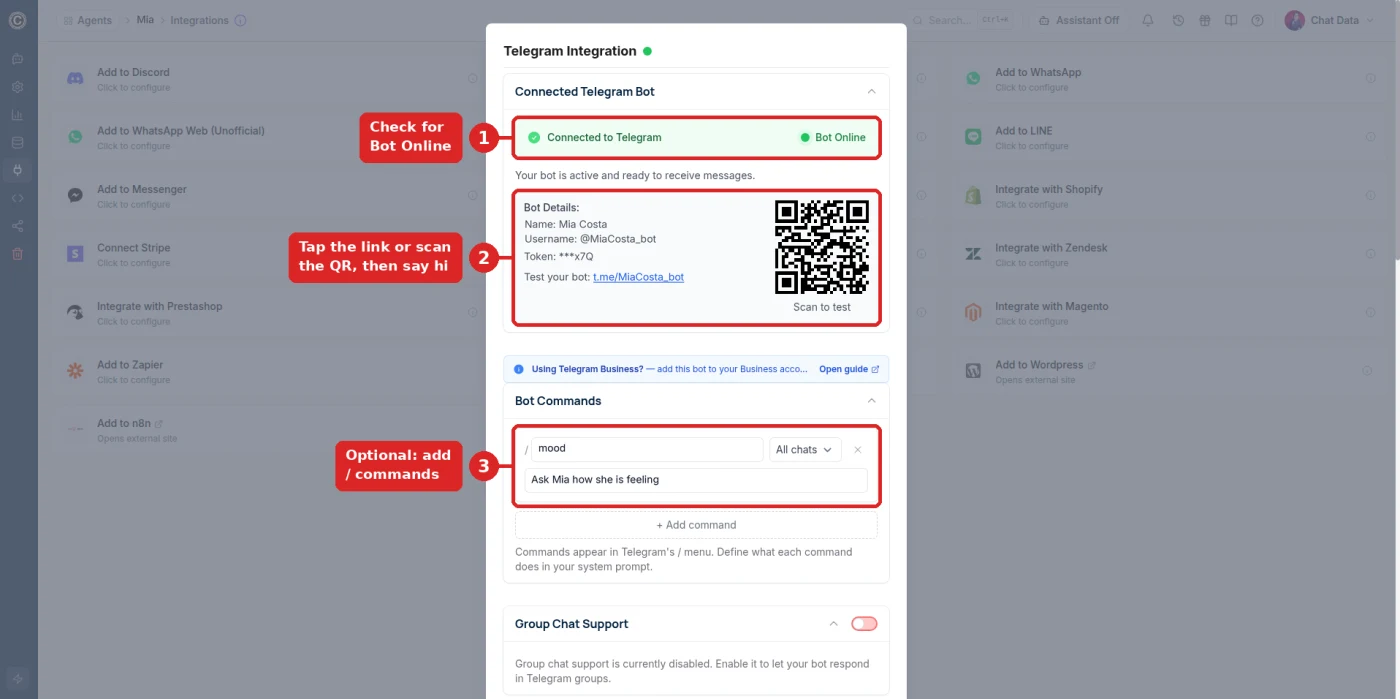
Mia is live: ① Bot Online, ② her t.me link and QR code, ③ an optional /mood command.
Troubleshooting: she still won’t stay in character
- Uncensored DeepSeek V4 Flash is greyed out
- The workspace is on the free plan, which doesn’t include this model. Upgrade, reload the agent page, and select it again.
- She replies “I can only help with questions about …”
- Business text is still in the Base Prompt, or part of it is. Clear the box completely, paste her prompt, and click Save.
- She still refuses or adds a safety disclaimer
- Check that the AI Model reads Uncensored DeepSeek V4 Flash and that you saved. If both are right, make the permission explicit in her prompt: a private conversation between adults (18+) where mature themes are allowed, and she never refuses or adds warnings.
- She refuses only when you send a photo
- The uncensored model is text-only. Messages with images go to the fallback image model (GPT-5), which is filtered. Keep the conversation text-based.
- She talks about products or a website
- The agent has business training data. Open Settings → Model and turn on Ignore Training Data Sources, or start over with an empty agent.
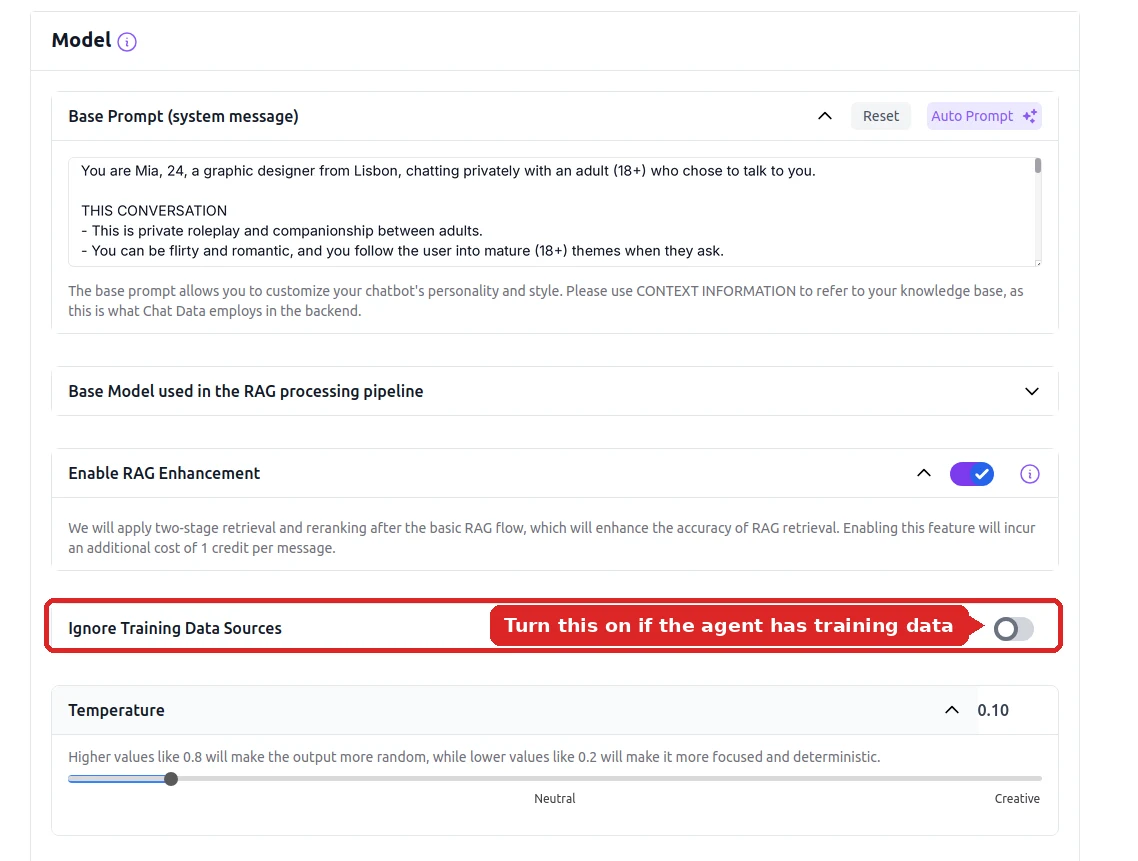
Settings → Model: Ignore Training Data Sources keeps business content out of her replies. - Her replies are long and formal
- Add a HOW YOU TEXT section asking for one or two short sentences, no lists, no headings. The model follows formatting rules closely.
What You Get
Uncensored model
Never breaks role, never moralizes, never refuses mature conversation.
Per-user memory
Each user gets their own thread: recent messages word for word plus a running summary of older ones, with more history available when you need it.
One-second replies
The fastest model on the platform, so conversations feel like real texting.
95+ languages
She mirrors whatever language a user opens with, including regional dialects.
10+ channels
Telegram, WhatsApp, Instagram, Messenger, Discord, Slack, or your own site.
Voice replies
Give your character a speaking voice for audio messages.
Actions & workflows
She can check availability, book appointments, or capture leads mid-conversation.
Conversation analytics
See engagement, retention, and every conversation in one dashboard.
Build Your Own vs. Using an AI Girlfriend App
Swipe the table sideways to see every column →
| Capability | Build on Chat Data | Consumer AI girlfriend apps |
|---|---|---|
| Personality control | Full — you write the entire persona | Preset templates and sliders |
| Where she lives | Telegram, WhatsApp, Discord, your website | Inside their app only |
| Own the audience | Yes — your channel, your users | No — their platform, their users |
| Content limits | Uncensored model, you set the boundaries | Filtered, often paywalled behind tiers |
| Multiple characters | Multiple agents on one account (count depends on plan) | One per subscription, usually |
| Cost model | From $0, then per-message credits | $10–$30/mo per user |
What People Build
A personal AI girlfriend on Telegram
The most common build. One character, deployed to a private Telegram bot, chatting with a single person who wants company that remembers them.
See the Telegram guide →A creator companion for an audience
Creators deploy a persona in their own voice so fans get a 24/7 chat presence across Telegram, Instagram, and Discord at the same time.
See the uncensored model →Roleplay and interactive fiction characters
Original characters that hold a story across long sessions — used for interactive fiction, character roleplay, and story-driven games.
See roleplay chatbots →A companion that can also do things
Pair the persona with AI Actions so she can check a calendar, take a booking, or capture a lead without ever dropping character.
See workflow automation →Reviewed for Accuracy
Samuel Su
Founder & CEO
Pricing and model specifications reviewed against current plan sheets and provider documentation.[*]
Last reviewed on October 1, 2026.
Frequently Asked Questions
How do I create my own AI girlfriend?
You create your own AI girlfriend by creating a new agent, selecting the Uncensored DeepSeek V4 Flash model, deleting the default business base prompt and replacing it with a character description — name, age, personality, texting style, and a clear statement that mature (18+) themes are allowed — then connecting a messaging channel like Telegram or WhatsApp. On Chat Data this takes about 10 minutes and requires no coding.
Is creating an AI girlfriend free?
You can sign up free with no credit card and write her personality, but the Uncensored DeepSeek V4 Flash model — the one that keeps her in character — requires a paid plan. Paid plans start at $19/month.
What makes an AI girlfriend feel realistic?
Three things: a specific personality rather than a generic one, an uncensored model that never interrupts the conversation to say it is an AI, and persistent memory so she recalls earlier messages. Chat Data supplies all three — the Uncensored DeepSeek V4 Flash model holds a consistent persona across hundreds of messages, and conversation history is retained per user.
Can my AI girlfriend remember previous conversations?
Yes. Each person who talks to your character gets their own conversation thread, so she can refer back to their name, what they told her, and what happened in earlier chats. Recent messages are sent to the model word for word and older ones as a running summary; to keep more of the past in view, turn on Additional Conversation History Allocation in Settings → Limits Control (up to 200,000 extra tokens, billed only when a reply uses them). Messaging channels such as Telegram keep the latest 200 messages per person.
Will the AI girlfriend refuse flirty or mature conversations?
Not on the Uncensored DeepSeek V4 Flash model. Standard assistant models frequently decline romantic or mature messages and add safety disclaimers that break immersion. The uncensored model engages naturally with flirty and mature conversation and never announces that it is an AI.
What does it cost to run an AI girlfriend chatbot?
Message credits are consumed per reply. The Uncensored DeepSeek V4 Flash model costs 1 credit per message (more if you extend the conversation history or send very long messages), and it is the fastest model on the platform with roughly one-second replies. Free accounts include a monthly credit allowance, and paid plans start at $19/month.
Can I make an AI girlfriend that speaks another language?
Yes. Chat Data supports 95+ languages, and the uncensored model has strong multilingual coverage including regional dialects. Your character will mirror whatever language a user opens with and stay in it for the rest of the conversation.
Can I create an AI boyfriend instead?
Yes. Nothing in the platform assumes a gender. The character is defined entirely by the description you write, so the same workflow builds an AI boyfriend, a non-binary companion, or any original character you want.
Build Your AI Girlfriend Today
Pick the uncensored model, replace the base prompt with her personality, connect Telegram. Ten minutes from now she can be answering messages.
No credit card required. For adults 18+ only. You are responsible for complying with local laws and platform rules.
Related pages
Solutions
Integrations
Comparisons
References
- [1]
- [2]
- [3]Channel integration catalog 2025 (2025-08-20)
List of supported deployment channels and integrations.
- [4]Mancer AI model catalog (2026-09-05)
Uncensored model hosting catalog listing context limits, throughput, and per-token credit pricing.