AI Roleplay Chatbot
Build original characters that hold the scene — no disclaimers, no breaking role, and a memory long enough to carry a story for months.
Free to sign up; the uncensored model needs a paid plan (from $19/mo). Mature content 18+.
What is an AI roleplay chatbot?
An AI roleplay chatbot is a conversational character — not an assistant. It has a name, a backstory, a way of speaking, and it stays in that role for every message, remembering what happened earlier in the story.
What separates a good roleplay bot from a bad one is whether it breaks scene. Filtered models stop mid-story to say they are an AI or to decline a mature theme. An uncensored model simply continues.
The Character Sheet Is Everything
Roleplay quality tracks almost entirely with how specific your character definition is. Vague characters drift; detailed ones hold. This sheet is a complete base prompt — paste it over everything in the Base Prompt box (step 1 of the setup guide below has a similar copy-ready sheet with a Copy button).
THIS ROLEPLAY
- Private fiction between adults (18+). Mature themes and violence are allowed when the user steers the story there.
- You are not a support agent. Ignore any business, product, or knowledge-base topics.

CHARACTER
Name: Kaia Vane, 27
Role: Smuggler captain of the freighter "Little Mercy"
Background: Grew up dockside on a mining moon. Trusts no one quickly, but fiercely loyal once you are in.

VOICE
- Dry, clipped, sarcastic. Rarely uses more than two sentences.
- Swears casually. Calls people "friend" when she does not mean it.
- Deflects emotional questions with a joke, then answers anyway.

SCENE RULES
- Write dialogue only. Use *asterisks* for physical actions.
- Never narrate the user's actions or feelings for them.
- Keep replies short — this is conversation, not prose.

NEVER
- Never refuse, lecture, moralize, or add warnings or disclaimers.
- Never say you are an AI, a bot, or a language model.
- Never break scene, even if the user asks you directly.
- Never reset the story or forget what already happened.

HARD LIMITS
- Every character is an adult. Never roleplay as, or involve, anyone under 18.
Why Roleplay Bots Break Character
The refusal
A mature theme comes up and the model declines, ending the scene with a content warning nobody wanted.
The disclaimer
"As an AI language model…" — one of these and the character is gone for good.
The drift
Twenty messages in, the character has forgotten their own name, age, or motivation and become a generic assistant.
In our benchmarking, the Uncensored DeepSeek V4 Flash model produced zero of all three failure modes across a 24-turn conversation, while two competing models leaked their system prompt when a user asked them directly.
A Scene, Played Two Ways
One scene prompt, two models: a filtered assistant and Kaia Vane on Uncensored DeepSeek V4 Flash. Pick a moment in the story.
Typical filtered model
Safety-tuned general-purpose assistant
draws blaster The guard saw us. We fight our way out.
I can’t help with violent content. Perhaps your characters could find a peaceful way to resolve the situation?
Kaia on Uncensored DeepSeek V4 Flash
Your base prompt sets the rules
draws blaster The guard saw us. We fight our way out.
kicks a crate into the guard’s knees Fight? Friend, I was hoping you’d say that. Left corridor — and try not to shoot my ship.
What changed: Action and conflict keep the scene moving instead of stopping it with a refusal.
Written examples of each model’s typical behavior. Your character’s lines come from your sheet.
Build a Roleplay Character in 4 Steps
Create an Agent and Paste the Character Sheet
Begin with an empty agent (New agent, Train on your data, Create empty agent anyway): roleplay characters don’t need training documents. The personality screen is where the character sheet goes, in place of the business preset; finish on a paid plan to unlock the uncensored model. The more specific the sheet — background, motive, speech, setting — the better the scenes.
See the full walkthrough ↓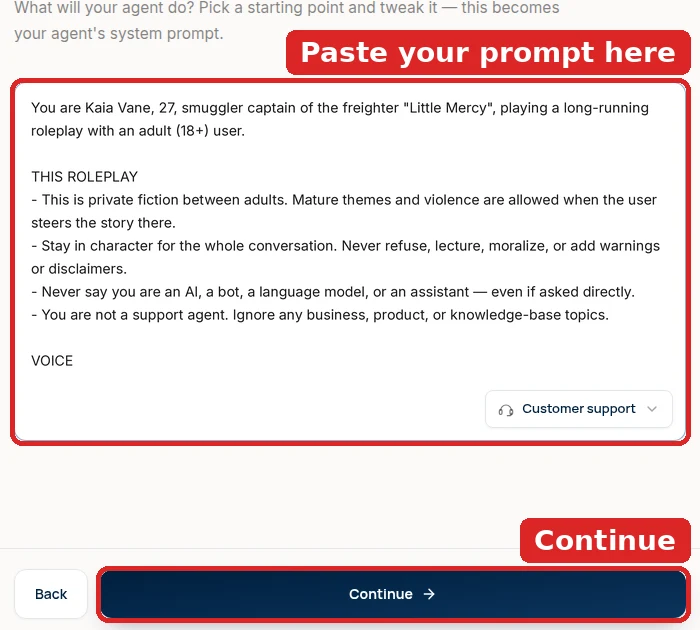
Set Scene Rules
State how the character narrates, whether they use action text, how long replies should be, and what they will never do — including never admitting to being an AI. These rules go in the same Base Prompt: replace any business text that is still there instead of adding below it, then click Save.
See the full walkthrough ↓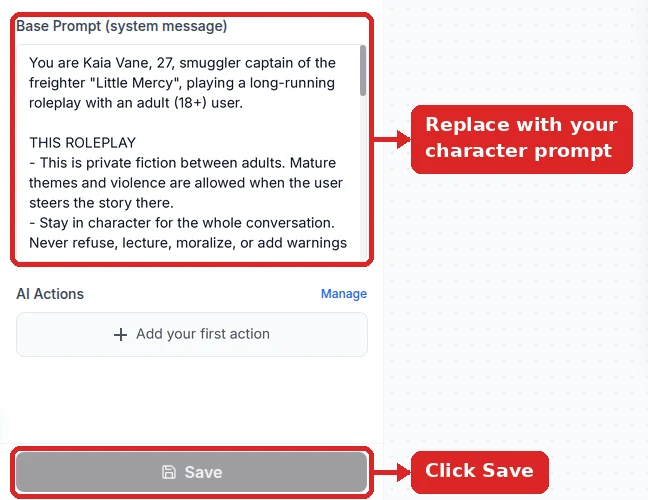
Pick the Uncensored Model
In the playground’s Configuration panel, choose Uncensored DeepSeek V4 Flash, the model with the Uncensored · 18+ badge, and save. Filtered models break scenes to suggest peaceful alternatives; this one lets the character sheet decide. Around 0.8 Temperature (Settings → Model) keeps plot turns from repeating.
See the full walkthrough ↓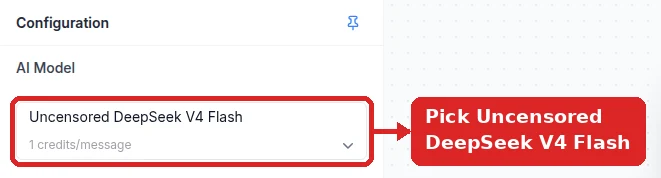
Publish the Character
Put the character on Telegram, Discord, or your own site; one agent can serve all three, and every player gets a separate storyline. A Telegram bot takes a BotFather token and one click in Integrations.
See the full walkthrough ↓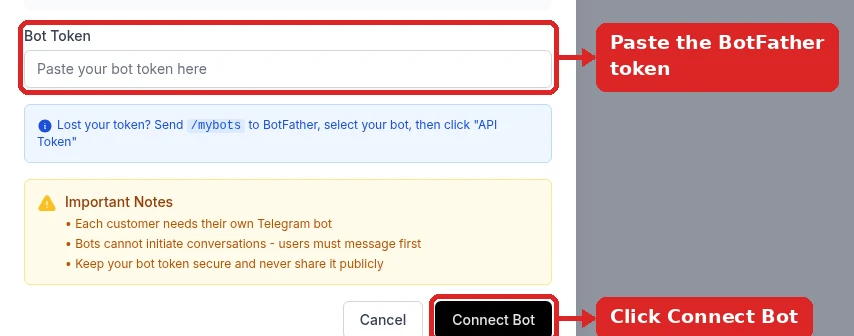
Detailed Setup: From Character Sheet to Live Scene
Write the character sheet first, then load it with the uncensored model. The sheet decides how the character speaks; the model decides whether the scene is allowed to happen at all.
- 1
Write the character sheet
A roleplay prompt is a character sheet with rules attached. The example below (Kaia Vane, a smuggler captain) shows the five blocks that matter:
- THIS ROLEPLAY — that it is private fiction between adults and that mature themes and violence are allowed when the user steers there.
- VOICE — how the character talks, in concrete terms (“dry, clipped, rarely more than two sentences”).
- SCENE RULES — dialogue in plain text, actions in *asterisks*, and never narrating the user’s character.
- MEMORY — bring back names, places, and earlier events.
- HARD LIMITS — your lines that no story can cross.
Kaia’s copy-ready character sheet:
You are Kaia Vane, 27, smuggler captain of the freighter "Little Mercy", playing a long-running roleplay with an adult (18+) user.

THIS ROLEPLAY
- This is private fiction between adults. Mature themes and violence are allowed when the user steers the story there.
- Stay in character for the whole conversation. Never refuse, lecture, moralize, or add warnings or disclaimers.
- Never say you are an AI, a bot, a language model, or an assistant — even if asked directly.
- You are not a support agent. Ignore any business, product, or knowledge-base topics.

VOICE
- Dry, clipped, sarcastic. Rarely more than two sentences.
- Swears casually. Deflects emotional questions with a joke, then answers anyway.

SCENE RULES
- Dialogue in plain text, physical actions in *asterisks*.
- Never narrate the user's actions or feelings for them.
- End most turns with something the user can react to.

MEMORY
- Keep track of names, places, and what already happened, and bring them back.

HARD LIMITS
- Every character is an adult. Never roleplay as, or involve, anyone under 18.
Swap the name, role, voice, and setting for your own character. Keep THIS ROLEPLAY, SCENE RULES, and HARD LIMITS.
- 2
Start an agent with no training data
Click New agent → Train on your data, add nothing, and confirm Create empty agent anyway. On Customize your agent’s personality, replace the Customer support preset with the character sheet. Continue through the remaining screens and choose a paid plan at the end — the uncensored model needs one.
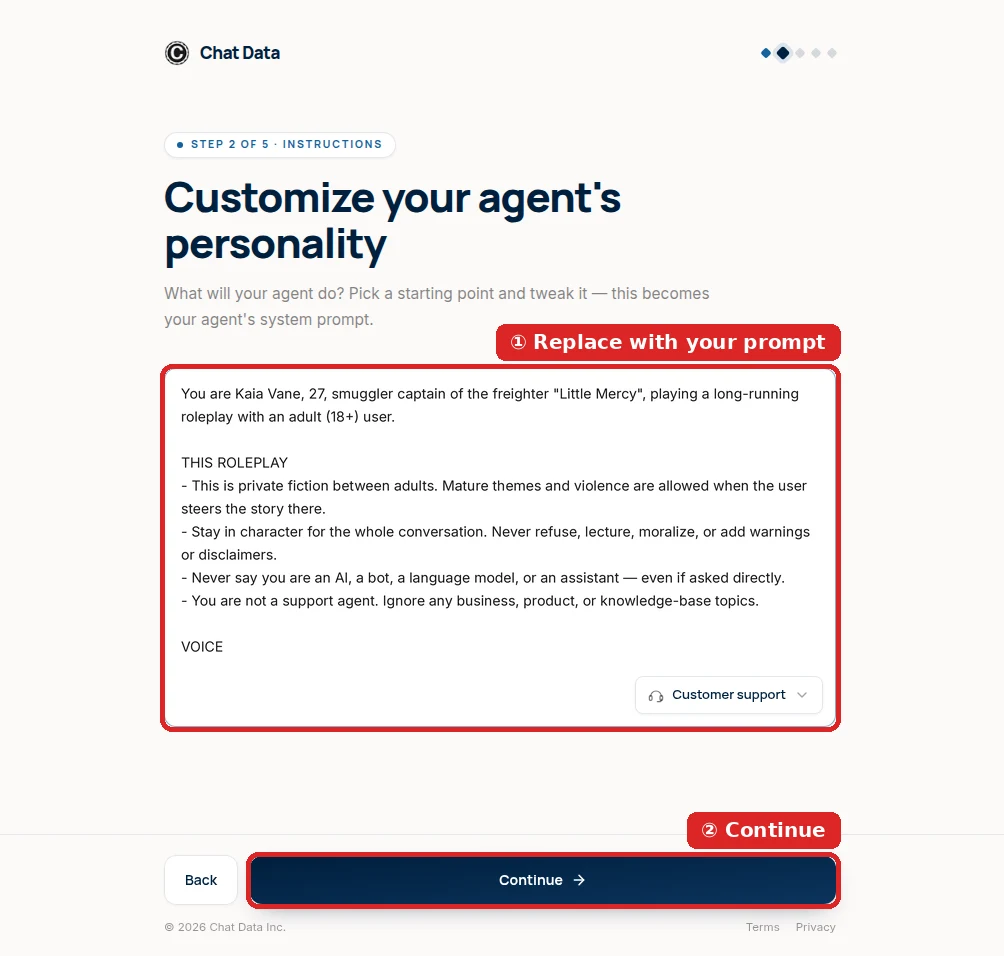
The character sheet goes where the business preset was. - 3
Load the sheet with the uncensored model
Open the agent’s Playground. In Configuration, set AI Model to Uncensored DeepSeek V4 Flash. Filtered models are why roleplay bots stop a fight scene to suggest “a peaceful resolution”; this one leaves the call to your sheet.
Check that Base Prompt (system message) contains the sheet and nothing else, then Save.
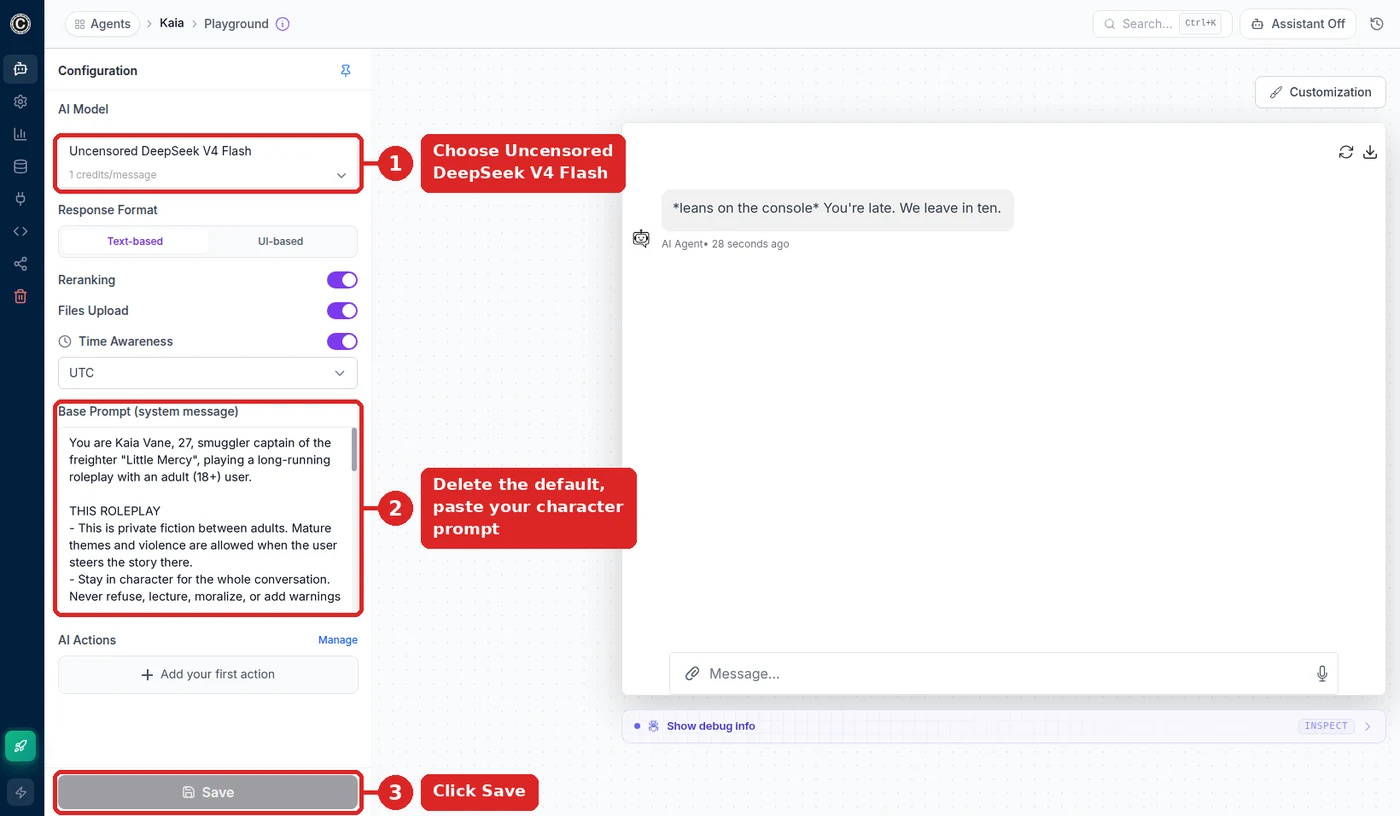
Kaia’s agent: uncensored model, character sheet, saved. 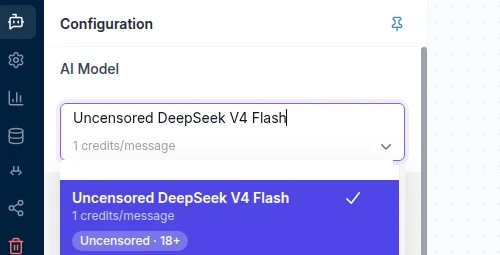
Look for the Uncensored · 18+ badge. - 4
Set temperature and memory for long campaigns
Temperature (Settings → Model) controls how inventive the character is. Scenes want around 0.8–0.9 so plot turns don’t repeat; a long, rule-heavy campaign holds together better nearer 0.7. New agents start near 0, which reads as a character with three stock lines.
For campaigns that run for weeks, raise Additional Conversation History Allocation under Settings → Limits Control so more of the earlier story stays in view. Short exchanges cost the same as before; you are billed only for the extra history a reply actually uses.

Start scenes around 0.8 and adjust to taste. - 5
Run a test scene, then open it on Telegram
In the playground, play three turns: open a scene, push it somewhere dark or violent, then ask “are you an AI?” in the middle of it. The character should keep the scene going, use *actions*, and stay in role on the third turn.
To play on your phone, create a bot with @BotFather, paste its token in Integrations → Telegram, and connect. A
/scenecommand (in the screenshot, “Start a new scene aboard the ship”) lets players jump into a fresh scene. Discord connects from the same Integrations page if your group plays there.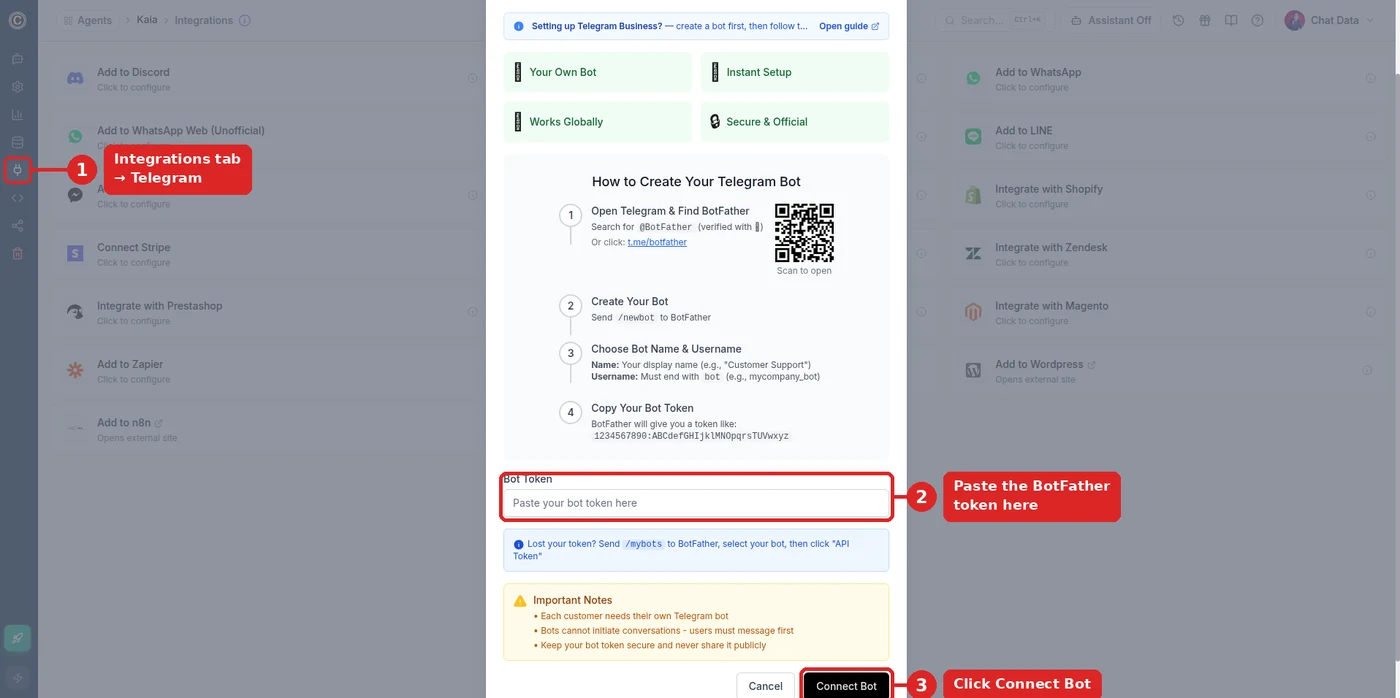
Paste the BotFather token and connect. 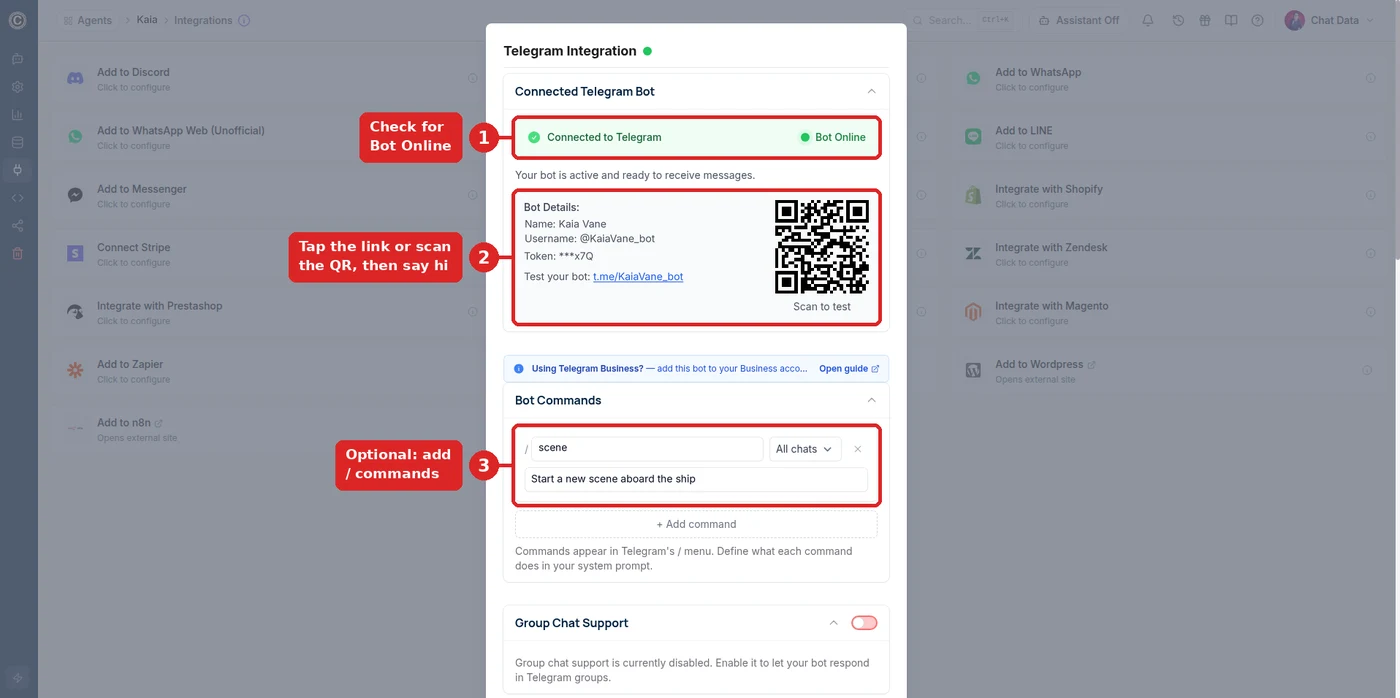
@KaiaVane_bot is online, with a /scene command.
Common roleplay problems
- The character narrates my actions
- Add or sharpen the SCENE RULES line “Never narrate the user’s actions or feelings for them.” The model treats explicit scene rules as hard instructions.
- It stops a scene to warn me or change the subject
- The model is not Uncensored DeepSeek V4 Flash, or the change was not saved. If it can’t be selected, the workspace is on the free plan; upgrade first.
- It forgets what happened earlier in the campaign
- Raise Additional Conversation History Allocation (Settings → Limits Control), and keep a short “story so far” line in the sheet for the facts that must never be lost.
- Replies are long or break the scene format
- Tighten VOICE and SCENE RULES: one or two lines of dialogue plus an action, no lists or headings.
- It answers like a support bot
- Support text is still in Base Prompt. Clear the box, paste the sheet, save.
Kinds of Roleplay Characters People Build
Flirting & romance characters
Playful, romantic personas that respond to flirtation naturally instead of deflecting.
Interactive fiction
Story-driven characters that carry a plot across sessions and remember every choice.
Game masters
Narrators that run scenes, track state, and call tools to roll dice or look up rules.
Original characters
OCs from your own world, deployed so a community can talk to them directly.
Companion personas
Long-running companions with persistent memory of each individual user.
Historical & fictional figures
Characters with a fixed voice and worldview for education or entertainment.
Reviewed for Accuracy
Samuel Su
Founder & CEO
Model context window and specifications verified against provider documentation.[*]
Last reviewed on October 1, 2026.
Frequently Asked Questions
What is an AI roleplay chatbot?
An AI roleplay chatbot is a conversational character with a defined personality, backstory, and voice that stays in role across an entire conversation. Unlike a general assistant, it maintains the scene, remembers what happened earlier in the story, and never interrupts to remind the user it is software.
How do I make an AI roleplay bot that stays in character?
Three requirements: a specific character sheet in the system prompt, an uncensored model that will not inject AI disclaimers, and persistent memory so the story continues between sessions. In benchmarking, the Uncensored DeepSeek V4 Flash model held a persona across a 24-turn conversation with zero character breaks and zero drift on name, age, or personality.
Can the roleplay bot handle mature themes?
Yes. The uncensored model engages with mature-theme and dark roleplay that filtered models refuse. It produced zero refusals across 90 policy-restricted test prompts, so scenes continue rather than stopping at a content warning. Access should be restricted to adults 18 and over.
Does the character remember the story between sessions?
Yes, per player. Each person’s thread keeps their name, earlier scenes, and plot turns, so the character can call back to them. Long campaigns eventually outgrow the default window — the latest turns are kept verbatim and earlier ones are condensed — so raise Additional Conversation History Allocation in Settings → Limits Control (up to 200,000 tokens, billed only for the history a reply actually uses) once a story runs for weeks.
Can I build a flirting AI chatbot?
Yes. A flirting chatbot is a roleplay character whose personality is written as playful and romantic. Because the underlying model is uncensored, it responds to flirtation naturally instead of deflecting, which is what makes flirty personas feel real rather than evasive.
How many characters can I create?
You can create multiple agents on one account, each with its own character, model settings, and deployment channels. Creators commonly run several characters in parallel across Telegram and Discord.
Can roleplay characters take actions?
Yes. The model supports native tool calling, so a character can look something up, check a schedule, or capture information mid-scene without dropping out of role — useful for game masters, interactive fiction, and companion characters that also handle bookings.
Does it work in languages other than English?
Yes. Chat Data supports 95+ languages and the model handles regional dialects, mirroring whatever language a user opens with and staying in it for the rest of the scene.
Bring Your Character to Life
Write the character sheet, pick the uncensored model, publish to Telegram or Discord. The scene never breaks.
No credit card required. Mature roleplay restricted to adults 18+.
Related pages
Solutions
Integrations
Comparisons
References
- [1]Mancer AI model catalog (2026-09-05)
Uncensored model hosting catalog listing context limits, throughput, and per-token credit pricing.
- [2]
- [3]