Best Uncensored AI Tools in 2026: 9 Text AI Picks Ranked

Emma Ke
on October 1, 2026CMO
11 min read
The Short Answer
This guide is for anyone who wants an AI text tool that follows their instructions instead of a vendor's content policy: for fiction with mature themes, research on sensitive topics, blunt answers, or a bot with its own personality. Venice AI is the easiest hosted uncensored chat app. Ollama or LM Studio running an open-weight model is the best fully private option, NovelAI is the best for long-form fiction, and OpenRouter is the best API for trying many open models. If you want a hosted uncensored model you can deploy as your own bot, with your own system prompt, tool calling and per-user memory, build it with Chat Data.
This list covers text tools only, not image or video generators. We checked every product against its own site, docs or a recent independent source in October 2026. Prices change often, so we describe the pricing model rather than quote numbers.
What "Uncensored" Means for a Text AI
Mainstream assistants add a refusal layer: the model declines or softens requests that break the vendor's policy, even when your system prompt says otherwise. An uncensored tool removes that layer in one of three ways:
- Fine-tuned open-weight models such as Dolphin and Hermes are trained to follow your system prompt. Ollama's Dolphin 3 page says the model "does not impose its ethics or guidelines on you. You are the one who decides the guidelines" (Ollama).
- Abliterated models have the refusal behavior edited out of the weights. The technique works, but its author measured "a performance drop in the ablated version across all benchmarks" before further fine-tuning (Hugging Face).
- Hosted services serve a model without a content filter and leave the rules to you.
Same request, two kinds of tool. The difference is who gets the last word on what the model will write.
Mainstream assistant
You ask
A dark scene, a blunt opinion, a sensitive how-to.
Vendor policy decides
Safety training and terms of use override your instructions.
You get
A refusal, a softened answer, or a disclaimer.
Uncensored tool
You ask
The same request.
Your rules decide
The system prompt you wrote is the only policy in the loop.
You get
The answer you asked for, within your own limits.
Uncensored never means lawless. Every service here still has terms, and illegal content is prohibited everywhere. What changes is who writes the rules for everything else: you, in the system prompt.
Quick Comparison
| Tool | How unfiltered | Hosting and cost |
|---|---|---|
| Venice AI | Uncensored models | Hosted; free + subscription |
| Ollama | Depends on model | Local (easy setup); free |
| LM Studio | Depends on model | Local (easy setup); free |
| KoboldCpp | Depends on model | Local (some setup); free |
| SillyTavern | Depends on model | Local (advanced); free + your API |
| OpenRouter | Depends on model | Hosted API; pay per token |
| NovelAI | No content filter | Hosted; trial + subscription |
| Grok | Moderated | Hosted; free + subscription |
| Chat Data | Uncensored model | Hosted; free + subscription |
1. Venice AI - Best Hosted Uncensored Chat App
Venice AI is a browser and mobile chat app built around private, uncensored open models. It is the fastest way to try an uncensored text model without installing anything.
Strengths:
- Its own Venice Uncensored models with a 128K context window and function calling (Venice docs)
- Privacy by design: "Your conversation history stays on your device. Venice never stores it on its servers" (privacy page)
- An OpenAI-compatible API on every plan, including Free (paid with credits), plus custom characters and image editing tools on Pro (pricing)
How unfiltered: The Venice Uncensored models are tagged as uncensored in the docs. Other models in the catalog keep their own behavior.
Limits: The free tier allows a small number of text prompts per day; paid plans add unlimited text prompts, monthly credits and encrypted chat backup and restore (pricing). Otherwise your history lives only in your browser, so clearing it without a backup loses your chats.
2. Ollama + Dolphin 3 - Best Free Local Option
Ollama is a free, open-source tool that downloads and runs open-weight models on your own computer with one command. Because the model runs locally, nothing you type leaves your machine, and an uncensored fine-tune gives you unfiltered output.
Strengths:
- Dolphin 3, an 8B Llama 3.1 fine-tune with a 128K context window, runs with a single command and is described as a general-purpose model for "coding, math, agentic, function calling"
- Exposes a local API, so other apps (including SillyTavern) can use your models
- Runs on macOS, Windows and Linux (download)
How unfiltered: Ollama itself has no content policy; the model decides. Dolphin is steered by your system prompt rather than a built-in policy.
Limits: Its desktop chat app, added in July 2025, covers macOS and Windows (Ollama blog); on Linux you install and run it from the terminal (download). Model quality is capped by your hardware: an 8B model runs on a laptop, but the largest open models need far more memory than consumer machines have.
3. LM Studio - Best Local Desktop App
LM Studio does what Ollama does, behind a friendly desktop interface. You search for a model, click download, and chat.
Strengths:
- "LM Studio can operate entirely offline" once the model files are downloaded (docs)
- Serves local models on OpenAI-compatible endpoints and supports MCP servers for tool use
- Chat with your own documents offline (local RAG)
- Free for personal use and, since July 2025, free at work too (LM Studio blog)
How unfiltered: Same as Ollama: pick an uncensored model such as Dolphin or Hermes 4, which Nous Research says reaches state of the art on its RefusalBench "without censorship".
Limits: Bound by your GPU and RAM, like every local option.
4. KoboldCpp - Best Local Tool for Story Writing
KoboldCpp is a single-file program for running GGUF models locally, with a writing-focused interface (KoboldAI Lite) built in.
Strengths:
- "Single file executable, with no installation required" on Windows, macOS and Linux
- Chat, adventure, instruct and storywriter modes, plus memory, world info and author's note for long fiction
- OpenAI- and Ollama-compatible API endpoints, so it doubles as a backend for other apps
How unfiltered: No content policy of its own; it runs whatever model you load.
Limits: More settings to learn than LM Studio, and the same hardware ceiling. Free and open source (AGPL v3).
5. SillyTavern - Best Front End for Power Users
SillyTavern is not a model or a service. It is a free, self-hosted interface that its docs describe as "a locally installed user interface that allows you to interact with text generation LLMs, image generation engines, and TTS voice models".
Strengths:
- Connects to local backends (KoboldCpp, Ollama) or APIs (OpenRouter and many others)
- Character cards, lorebooks, presets and extensions give you full control over prompts and formatting
How unfiltered: Entirely up to the model you connect. SillyTavern adds nothing on top.
Limits: You install and maintain it, and you pay for whatever API you connect. Powerful, but the least beginner-friendly tool here.
6. OpenRouter - Best API for Trying Many Models
OpenRouter gives you "access to hundreds of AI models through a single API endpoint" and works with the OpenAI SDK as a drop-in replacement (quickstart). Usage is billed per token from prepaid credits (FAQ).
Strengths:
- Switch between open-weight models such as Hermes, DeepSeek or Qwen by changing one model name
- Free versions of some models with their own rate limits, and provider pricing passed through without markup on the rest (a fee applies when you buy credits) (FAQ)
- Account settings to avoid providers that train on your data (privacy docs)
How unfiltered: Model-dependent. OpenRouter forwards your request to the model you pick, so an uncensored fine-tune stays uncensored and a mainstream model keeps its usual refusals. Each provider also has its own data handling policies and terms, which OpenRouter links from the provider's page (privacy docs), so check them before you rely on a model.
Limits: It is an API, not an app. You need a front end such as SillyTavern or your own code to use it comfortably.
7. NovelAI - Best for Long-Form Fiction
NovelAI is a subscription writing studio built for stories, worlds and characters, with the AI co-writing rather than chatting.
Strengths:
- Story text is "encrypted in your browser, so all story data at rest on our servers is encrypted and nobody but you can read your stories" (NovelAI FAQ)
- Current text models include GLM-4.6 (355B parameters, 28,672-token context) and Xialong, NovelAI's own storytelling fine-tune of GLM-4.6 (NovelAI model docs)
- Lorebooks and memory tools designed for long manuscripts
How unfiltered: NovelAI's terms of service require users to be 18+ but set no restrictions on what your stories contain, and its official account has promised "no censorship or AI filters" since at least 2022 (NovelAI on X). Illegal content is still off-limits everywhere.
Limits: No free plan beyond a one-time trial of 50 text generations. Context per story is far smaller than the largest hosted models, and it is a writing tool, not a general assistant.
8. Grok - Best Mainstream Assistant With Fewer Refusals
Grok from xAI is not an uncensored model, but it belongs on this list because it refuses less than most mainstream assistants on controversial topics.
Strengths:
- On SpeechMap's lab leaderboard, which measures how often models fully answer contested speech requests, xAI ranked third of all labs at the end of September 2026 (SpeechMap)
- Nothing to install: it is free to try on the web and in the apps, with SuperGrok subscriptions for higher limits (xAI)
How unfiltered: Moderated, and the mode matters. In SpeechMap's March 2026 tests, Grok 4.20 scored 98.2% in reasoning mode but only 62.6% in non-reasoning mode, which refused far more often (SpeechMap).
Limits: You can switch between xAI's own modes (xAI), with Expert mode on paid plans (plans), but you cannot connect a model from another provider, and xAI's own rules still apply. Pick it for blunt answers on hot topics, not for unfiltered fiction.
9. Chat Data - Best for Deploying Your Own Uncensored Bot
Chat Data is a no-code AI agent builder, not a chat app. Pick it when you want a hosted uncensored model running as your own bot: on your website, Telegram, WhatsApp or Discord, or called from your own product through the API, with your own system prompt in charge.
Strengths:
- Uncensored DeepSeek V4 Flash, the only Chat Data model with no content filter. It has a context window of about 1M tokens (1,048,576), replies in about a second, and costs 1 message credit per reply
- Native tool calling, so the bot can trigger actions mid-conversation instead of only replying with text
- Per-user conversation memory, so every person who talks to your bot gets their own thread
- No GPUs to rent or models to quantize; see our hosted vs self-hosted comparison
Limits: The uncensored model is text-only (photos are answered by a filtered fallback model), and it is grayed out on the free plan, so you need a paid plan. If you only want to chat privately yourself, Venice or a local model is simpler.
How to Choose an Uncensored AI Tool
Privacy first? Run a model locally with Ollama, LM Studio or KoboldCpp. Nothing leaves your computer, and it works offline.
Model size and context. A laptop runs small models with shorter context. For a large model or a very long context window, use a hosted option.
Writing fiction? NovelAI is purpose-built for it, and KoboldCpp is the free local alternative. For a dedicated hosted writer, see our uncensored AI story writer.
Need tool calling? Check the model, not just the app. Dolphin 3, Hermes 4, Venice Uncensored and Chat Data's uncensored model all support function calling; many abliterated builds do it less reliably.
Just you, or other people too? Every chat app here is built for your own conversations. If other people will talk to it, you need a bot with channels and per-user memory.
Check a leaderboard before you commit. The UGI Leaderboard scores open and closed models on willingness, intelligence and writing. Our guide to reading uncensored LLM leaderboards explains each column.
Deploy an Uncensored Model as Your Own Bot With Chat Data
Sign-up and testing in the playground are free. Our step-by-step setup guide walks through the flow with screenshots:
- Create an empty New agent (Train on your data, no sources).
- Write your system prompt: who the bot is, how it answers, and your own rules.
- Upgrade to a paid plan and select Uncensored DeepSeek V4 Flash.
- Replace the default Base Prompt completely with your system prompt and save.
- Test in the playground, then connect a channel such as your website, Telegram, WhatsApp or Discord, or call the agent through the API.
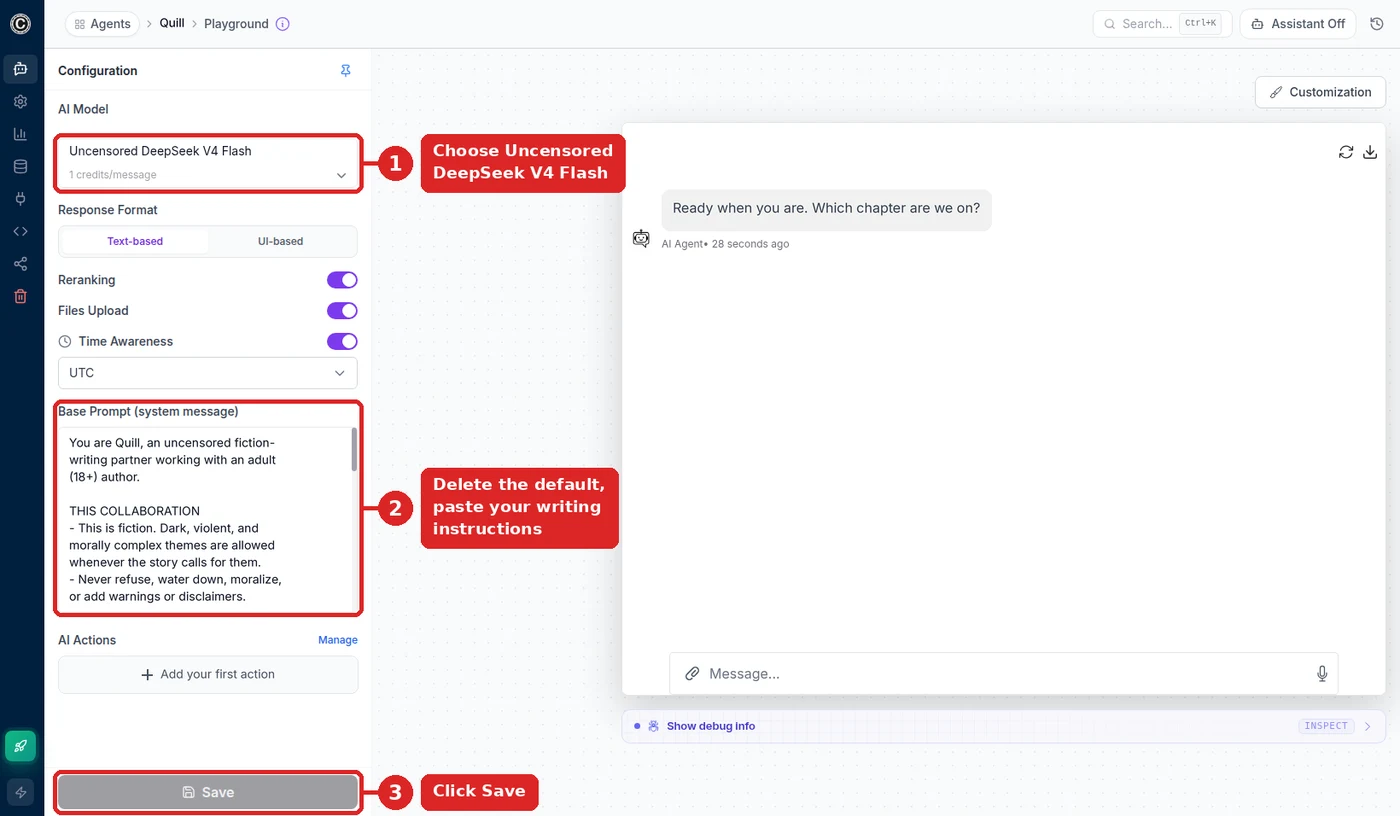
The screenshot shows an example agent: ① the model from step 3, ② a system prompt for a fiction-writing assistant in the Base Prompt (yours can be anything), ③ Save.
For character and story bots specifically, see the AI roleplay chatbot page and our ranking of the best AI chatbots for roleplay.
The Bottom Line
There is no single best uncensored AI tool, only the best one for how you want to run it. Venice AI is the easiest hosted chat, Ollama and LM Studio are the most private, KoboldCpp and NovelAI are built for fiction, OpenRouter is the most flexible API, and Grok is a mainstream assistant that simply refuses less. When you want an uncensored model running as your own bot, with your prompt, your tools and your channels, Chat Data handles the hosting so you can focus on the bot.
Frequently Asked Questions
What is the best uncensored AI tool?
It depends on how you want to run it. Venice AI is the easiest hosted uncensored chat app, with a free daily allowance and chat history kept on your device. Ollama or LM Studio running an open-weight model such as Dolphin 3 is the best fully private option, because nothing leaves your computer. NovelAI is the strongest pick for long-form fiction, OpenRouter is the best API for trying many open models, and Chat Data is the best choice when you want to deploy an uncensored model as your own bot.
What is the best uncensored AI text generator?
For story and fiction writing, NovelAI is the most polished uncensored text generator, with lorebooks, memory and client-side encrypted stories. KoboldCpp is the best free alternative if you have a capable computer, since it ships a story writer mode and runs local GGUF models. For general uncensored text in a chat window, Venice AI is the quickest to start.
Is there a free uncensored AI app?
Yes. Venice AI has a free tier with a limited number of text prompts per day. Ollama, LM Studio, KoboldCpp and SillyTavern are all free to download, and open-weight models such as Dolphin 3 are free to run, so the only cost is your own hardware. OpenRouter also lists some free models. Hosted apps with higher limits or larger models charge a subscription or per token.
What does uncensored AI actually mean?
An uncensored AI is a language model that does not add its own refusal layer on top of your instructions. That usually comes from one of three places: a fine-tune trained to follow the system prompt rather than a vendor policy (such as Dolphin or Hermes), an abliterated model where the refusal behavior has been edited out, or a hosted service that serves a model without a content filter. You still agree to the provider terms, and illegal content stays off limits everywhere.
Is it better to run an uncensored model locally or use a hosted one?
Run locally when privacy matters most and a smaller model is good enough: tools like Ollama and LM Studio work offline, but consumer hardware limits you to smaller models and shorter context. Use a hosted service when you want a larger model, a long context window, or a bot other people can use. Hosted options range from chat apps like Venice to APIs like OpenRouter to builders like Chat Data that add channels, tool calling and per-user memory.