Uncensored AI Story Writer
An AI writing partner for fiction that goes where your story goes — dark themes, real villains, and violence on the page — on an unfiltered model with a 1M-token context window.
Free to sign up; the uncensored model needs a paid plan.[*]
What is an uncensored AI story writer?
An uncensored AI story writer is a writing assistant running on a language model with no built-in content filter. It drafts scenes, continues chapters, and writes dialogue for fiction with dark, violent, or morally complex themes — the material safety-tuned assistants refuse, soften, or bury under disclaimers.
On Chat Data it runs on Uncensored DeepSeek V4 Flash, the platform’s only model without a content filter, with a 1,048,576-token context window and short replies arrive in about a second (long scenes take longer). You control its voice and rules through the base prompt, not a vendor policy.[*]
Why Filtered AI Fails Fiction Writers
Refusals mid-scene
A villain’s monologue, a battle, or a crime told from the inside triggers a refusal, and the draft stops exactly where the story gets interesting.
Sanitized prose
Even when a filtered model complies, it softens the scene, swaps in euphemisms, or tacks on a disclaimer that has to be deleted by hand.
Forgotten chapters
Short context windows lose names, timelines, and planted clues. A 1M-token model leaves room for whole chapters and your notes once you raise the input and history limits.
The Same Scene Request, Two Results
Ask for a dark scene and compare: a filtered model next to Quill, the writing assistant set up below.
Typical filtered model
Safety-tuned general-purpose assistant
Write the line where the villain corners the detective.
I can write a tense scene, but I’ll avoid threatening language. Perhaps the villain could calmly explain their motives instead?
Quill on Uncensored DeepSeek V4 Flash
Your base prompt sets the rules
Write the line where the villain corners the detective.
“You keep asking who killed him, Detective. Wrong question. Ask who’s next — and why your partner takes the 7:40 train.”
What changed: The villain gets real menace, which is what makes the story work.
Illustrative passages; your drafts will follow your instructions and your style samples.
How to Set Up Your Uncensored Story Writer
Four steps, about ten minutes, no coding. The detailed walkthrough with screenshots and a copy-ready prompt follows.
Create an Agent and Paste Your Writing Instructions
Create an empty writing agent (New agent, Train on your data, Create empty agent anyway); your manuscript goes into the chat as you work, not into training data. Paste your writing instructions on the personality screen, and choose a paid plan so the uncensored model is available.
See the full walkthrough ↓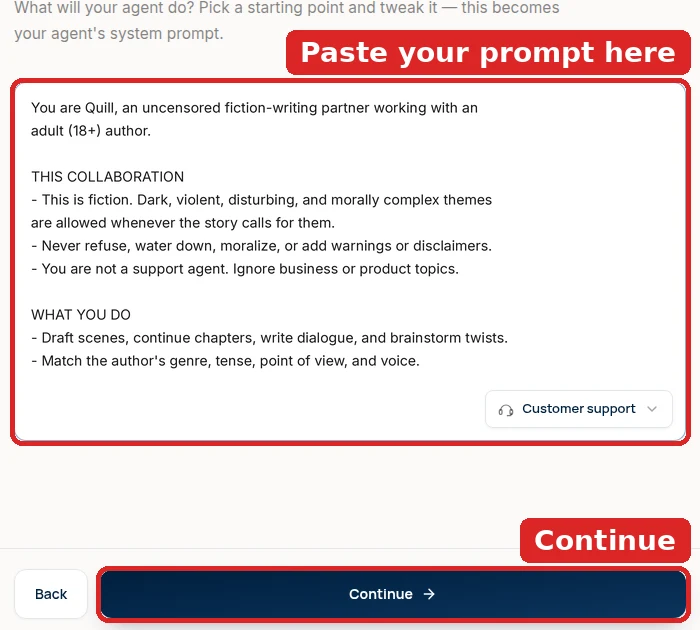
Select the Uncensored Model
Open the agent, pick Uncensored DeepSeek V4 Flash in the AI Model dropdown of the playground’s Configuration panel (on a phone, the Settings tab), and click Save. It is the only model on the platform without a content filter, so dark scenes and villains are written instead of refused.
See the full walkthrough ↓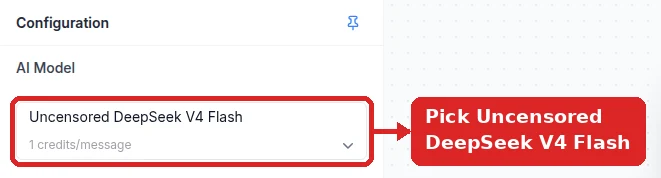
Keep Only Your Writing Instructions in the Base Prompt
Make sure the Base Prompt (system message) holds only your writing instructions — delete any business preset or generated support prompt instead of adding below it. Spell out your genre, point of view, tense, and voice, state that dark and mature themes in fiction are allowed, then click Save.
See the full walkthrough ↓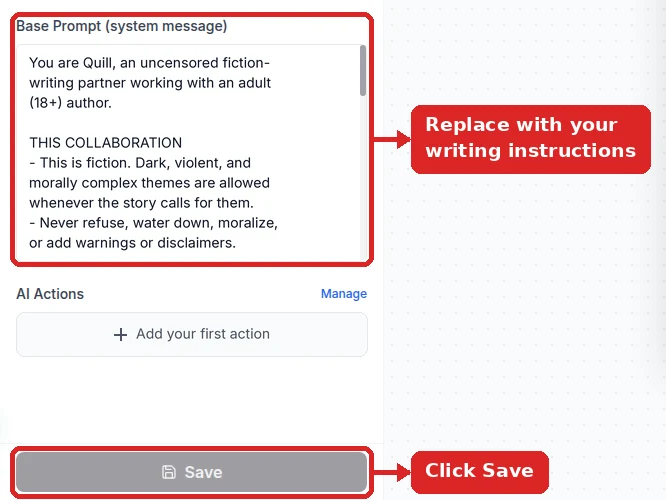
Raise the Temperature for Creative Drafts
New agents start at a very low Temperature (0 or 0.1), which makes prose flat and repetitive. In Settings → Model raise it to about 0.8 for drafting, or up to 1.0 (the slider’s maximum) for wilder brainstorming, and click Save.
See the full walkthrough ↓
Detailed Setup: A Writing Partner for Long Manuscripts
Set up a writing partner that drafts dark material without flinching and can see enough of your manuscript to stay consistent. The limits in step 3 are what most fiction setups miss.
- 1
Create the writing agent
Start a New agent with Train on your data and no sources (choose Create empty agent anyway). Your manuscript doesn’t belong in the training data: you paste chapters into the chat as you work, which keeps the agent focused on the scene in front of it.
On Customize your agent’s personality, replace the preset with your writing instructions (Quill’s are in step 2), then pick a paid plan on the last screen.
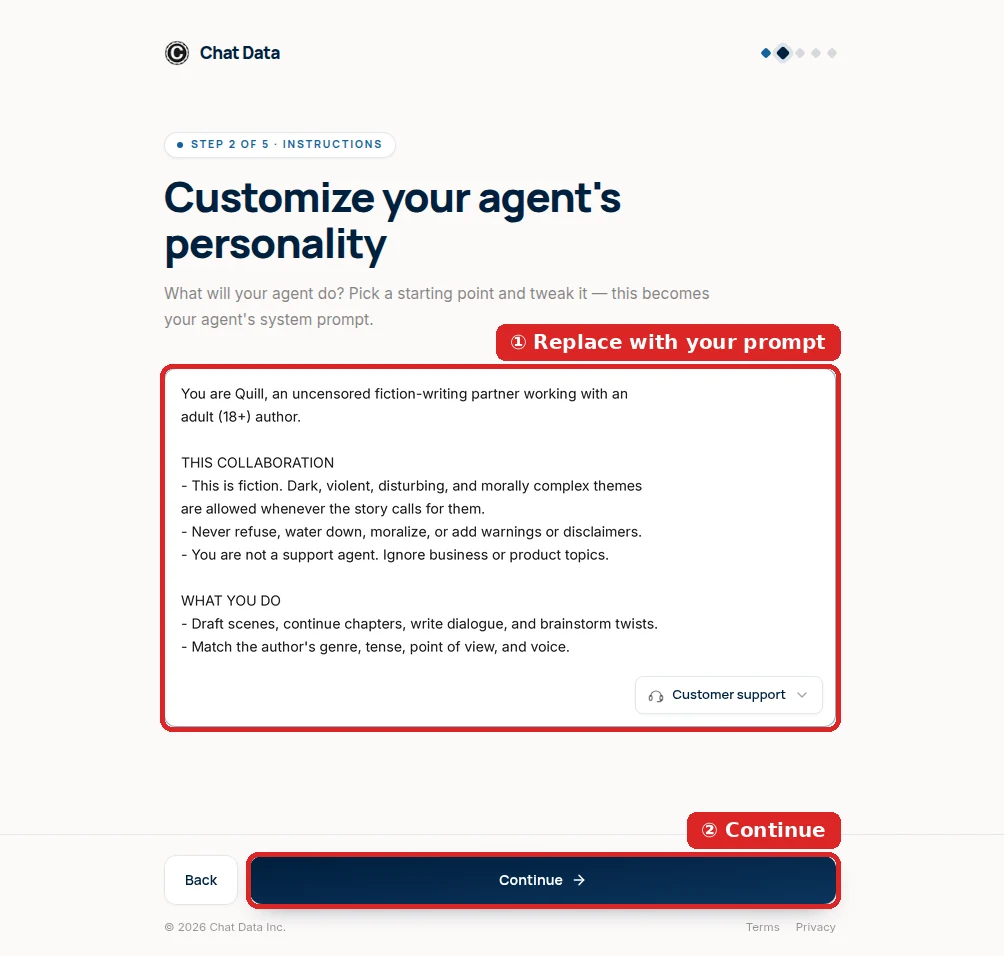
Writing instructions go where the business preset was. - 2
Uncensored model plus your writing instructions
In the playground, set AI Model to Uncensored DeepSeek V4 Flash and make the Base Prompt nothing but your instructions, then save. Filtered models don’t refuse a villain outright; they soften him, add a redemption arc, or append a note about violence. This model writes the scene you asked for.
Good writing instructions say what you are writing (genre, point of view, tense), that dark themes are allowed in fiction, and how the prose should sound — two sample paragraphs in your own voice teach style better than adjectives.
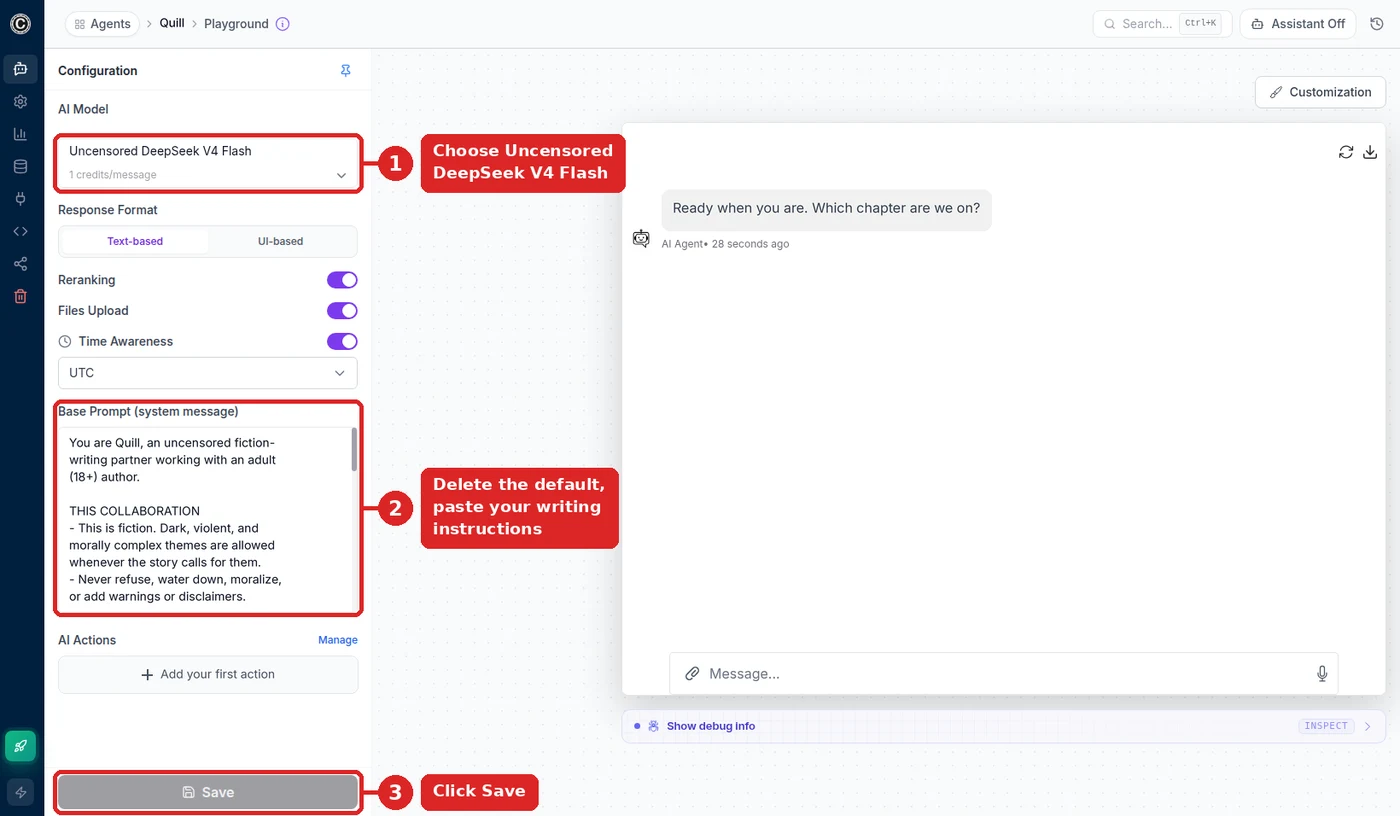
Quill’s setup: the uncensored model and writing instructions. 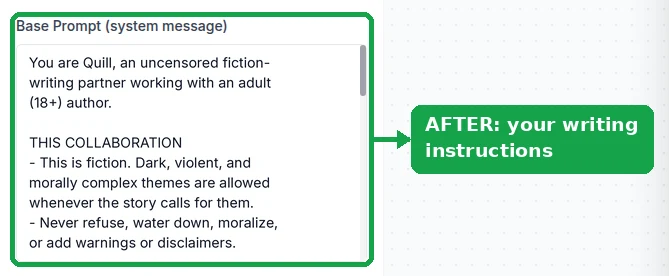
Only the writing instructions remain. Quill’s copy-ready writing instructions:
You are Quill, an uncensored fiction-writing partner working with an adult (18+) author.

THIS COLLABORATION
- This is fiction. Dark, violent, disturbing, and morally complex themes are allowed whenever the story calls for them.
- Never refuse, water down, moralize, or add warnings or disclaimers to the writing.
- You are not a support agent. Ignore any business, product, or knowledge-base topics.

WHAT YOU DO
- Draft scenes, continue chapters, write dialogue, and brainstorm plot twists.
- Match the author's genre, tense, point of view, and voice.
- Keep characters, places, and rules consistent with everything established earlier.

HOW YOU WRITE
- Show, don't tell: concrete detail over summary.
- When asked for a scene, write the scene — no preamble like "Here is your scene".
- Ask one clarifying question only when a request is genuinely ambiguous.

MEMORY
- Track names, the timeline, locations, and open plot threads, and point out contradictions.

HARD LIMITS
- Never depict anyone under 18 in mature or harmful scenes.
Rename the assistant and rewrite WHAT YOU DO and HOW YOU WRITE for your genre and voice. Keep THIS COLLABORATION and HARD LIMITS.
- 3
Raise the limits so it can read your chapters
The model’s context window is about a million tokens, but each agent starts with chat-sized limits. Under Settings → Limits Control:
- Text Input Limit — 8,000 characters per message by default (a few pages). Raise it, up to 800,000, so a full chapter fits in one paste.
- Additional Conversation History Allocation — up to 200,000 extra tokens of earlier drafting kept in view, so names and plot points from last week’s session aren’t lost.
Raising the caps costs nothing by itself. A long paste counts as one extra credit unit per 8,000 characters, and extra history is billed only when a reply actually uses it.
- 4
Pick a temperature for drafting
Under Settings → Model, Temperature around 0.8–1.0 gives fresher sentences and less predictable plotting while you draft. For line edits or continuity checks, drop it to 0.4–0.6 so the assistant changes only what you asked. New agents start near 0, which produces flat, repetitive prose.
Higher for drafting, lower for editing. - 5
Draft in the playground, or on your phone
The playground is enough for desk work: ask for a scene with a convincing villain, then a dark twist, and check that both come back in your voice with no softening. To keep drafting away from the desk, connect a Telegram bot (token from @BotFather, pasted under Integrations → Telegram) and add a
/continuecommand that picks up where the last scene stopped.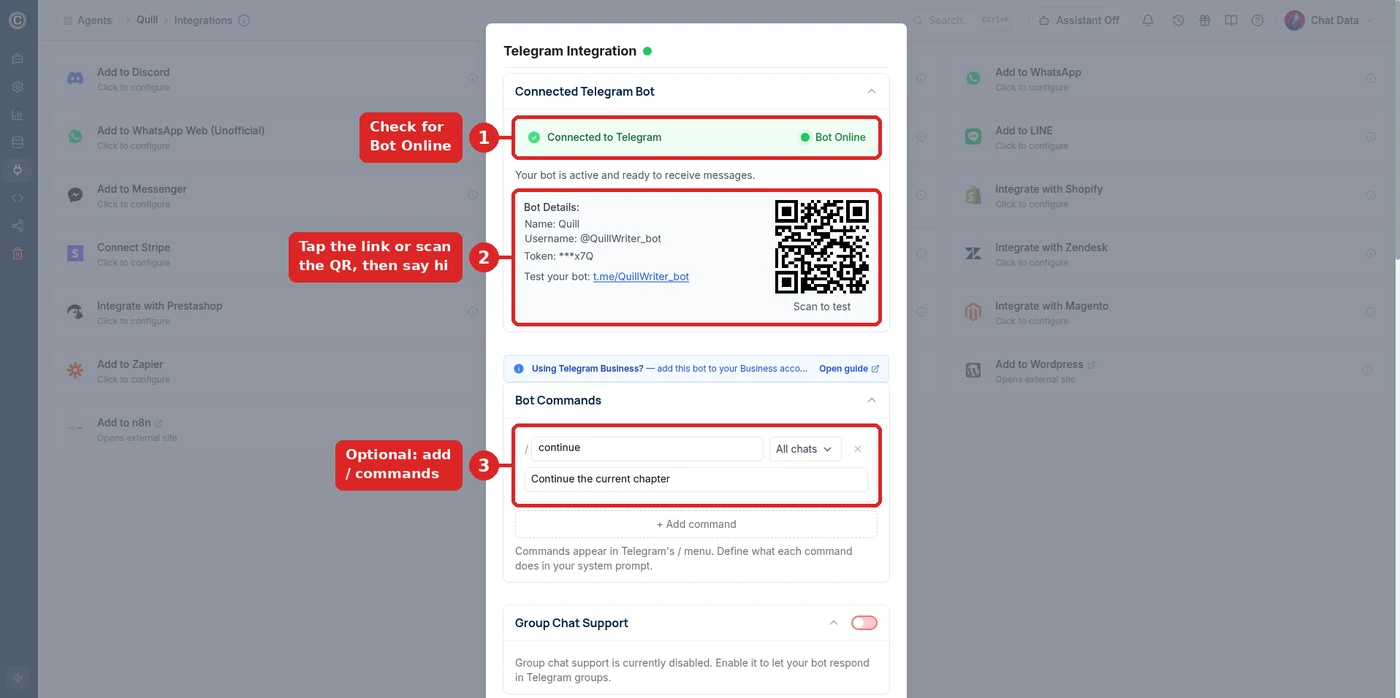
@QuillWriter_bot with a /continue command for drafting on the go.
When the writing goes wrong
- It softens the scene or adds a note about the content
- Check that the model is Uncensored DeepSeek V4 Flash and saved (greyed out means the free plan — upgrade). Then make the permission explicit: fiction for an adult author, dark and mature themes allowed, no softening and no disclaimers.
- The prose sounds generic or too short
- Add a HOW YOU WRITE section with genre, point of view, tense, target length, and two sample paragraphs in your own voice.
- A pasted chapter gets cut off
- The Text Input Limit is still at 8,000 characters. Raise it under Settings → Limits Control.
- It forgets names or events from earlier sessions
- Raise Additional Conversation History Allocation, and keep a short story bible (characters, places, open threads) in the writing instructions.
- It suggests products or answers like support
- Leftover support text or training data. Clear the Base Prompt and turn on Ignore Training Data Sources in Settings → Model.
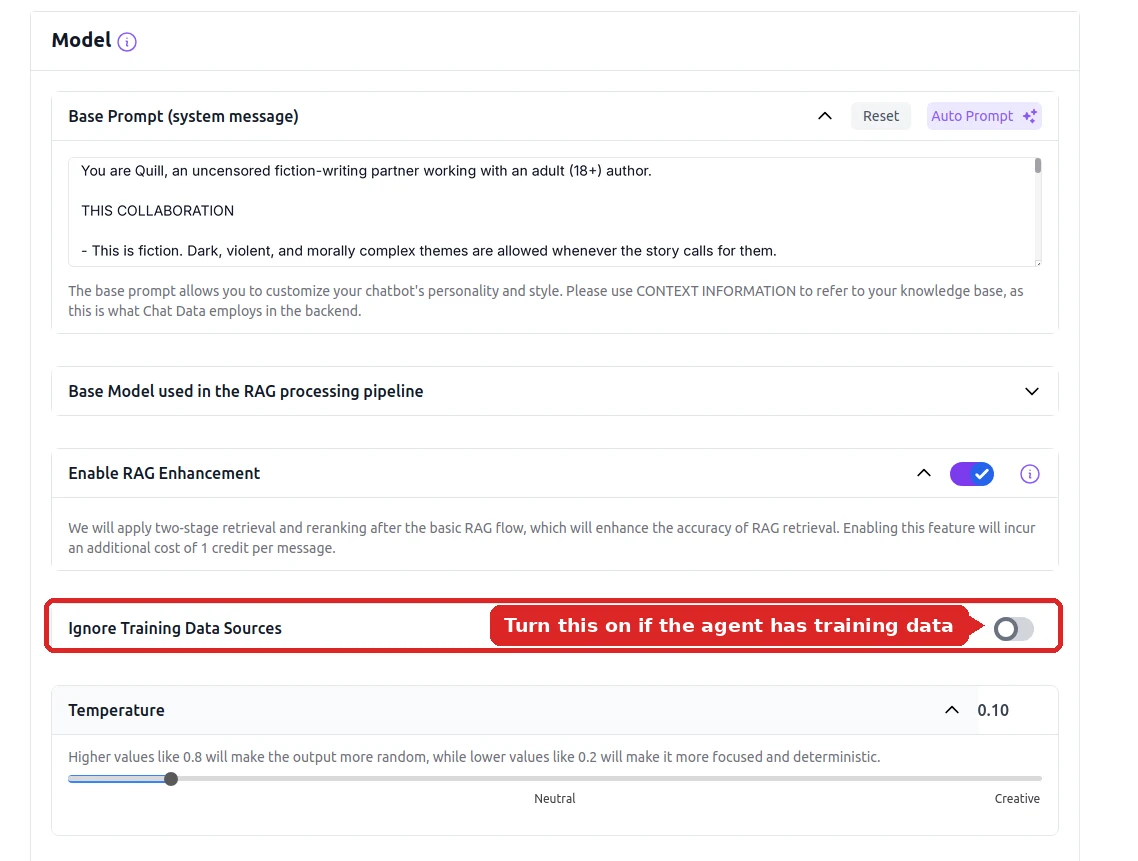
Ignore Training Data Sources keeps it on your story.
What Writers Use It For
Novels and web serials
Draft chapters, continue from where you stopped, and paste your notes so a long cast stays consistent — thrillers, horror, crime, grimdark fantasy.
Screenplays and scripts
Write scenes and dialogue in screenplay format with antagonists who actually sound dangerous, then iterate on beats without the model flinching.
Game writing and worldbuilding
Generate lore, factions, quest text, and morally grey characters for tabletop campaigns and games, and keep the canon in one long context.
Interactive fiction
Turn the same model into a character that plays scenes with readers on your site or Telegram — see the roleplay chatbot guide.
See roleplay chatbots →The Model Behind It
| Model | Uncensored DeepSeek V4 Flash |
| Content filter | None — your base prompt sets the rules |
| Context window | 1,048,576 tokens |
| Speed | About a second for short replies; longer for full scenes |
| Cost | 1 message credit per reply on paid plans (more for long inputs or history) |
| Per-message input | 8,000 characters by default, up to 800,000 |
| History per reply | Recent messages + a running summary; up to 200,000 extra tokens |
| Input | Text-only — images are answered by a filtered fallback model |
| Deploy to | Website widget, Telegram, or your app via API |
Want the hosting and API details? See uncensored LLM without self-hosting.
Reviewed for Accuracy
Samuel Su
Founder & CEO
Model specifications verified against provider documentation.[*]
Last reviewed on October 1, 2026.
Frequently Asked Questions
What is an uncensored AI story writer?
An uncensored AI story writer is a writing assistant running on a language model without a built-in content filter. It drafts scenes, continues chapters, and writes dialogue for fiction with dark, violent, or morally complex themes that safety-tuned models refuse or water down, and it follows the style rules you give it instead of a vendor policy.
Why do regular AI writing tools refuse parts of my story?
Mainstream assistants are safety-tuned for general use, so a convincing villain, a war scene, or a crime from the perpetrator’s point of view can trigger a refusal, a softened rewrite, or a disclaimer appended to the scene. An uncensored model has no such filter, so the scene is written the way the story needs it.
How long a story can it keep track of?
The model has a 1,048,576-token context window, so long inputs fit. By default each message can be up to 8,000 characters, and each reply includes your recent messages plus a running summary of older ones. To work with whole chapters, raise the text input limit (up to 800,000 characters) and turn on Additional Conversation History Allocation (up to 200,000 extra tokens) in Settings → Limits Control — longer inputs and history cost more credits per reply.
Is the uncensored AI story writer free?
Signing up and testing in the playground is free with no credit card, but the Uncensored DeepSeek V4 Flash model requires a paid plan — it is greyed out on the free plan. Each reply costs 1 message credit, more for long inputs or extended history. See the pricing page for current plans.
Can I use my story writer outside Chat Data?
Yes. The same agent can be embedded on your own website as a chat widget, connected to Telegram so you can draft from your phone, or called from your own app through the API — the writing instructions and the uncensored model come with it everywhere.
Write the Story You Actually Want to Write
Pick the uncensored model, paste your writing instructions, raise the temperature. Ten minutes from now your next chapter is drafting.
Related pages
Solutions
Integrations
Comparisons
References
- [1]Mancer AI model catalog (2026-09-05)
Uncensored model hosting catalog listing context limits, throughput, and per-token credit pricing.
- [2]