AI Boyfriend Chatbot
Build a custom AI boyfriend who has an actual speaking voice, messages you first when things go quiet, and lives on Telegram, WhatsApp, or Discord. No coding.
Free to sign up; the uncensored model needs a paid plan (from $19/mo).[*] Adults 18+ only.
What is an AI boyfriend chatbot?
An AI boyfriend chatbot is a male conversational character with a written personality, a persistent memory of the person he is talking to, and a messaging channel where that conversation happens. He is not a general assistant with a nickname: he is defined entirely by a base prompt you control, and he holds that role for every message.
Four ingredients make one work on Chat Data: an uncensored model so he never interrupts to announce he is an AI, a base prompt that sets his voice and message length, a customized ElevenLabs voice for voice-note replies, and Follow-Up (AI re-engagement) so he starts conversations instead of only answering them.[*]
Building your own instead of using an app means you pick the model, own the conversation data, and deploy him to the ten-plus channels Chat Data supports rather than being stuck inside someone else's product.[*]
What Makes a Boyfriend Persona Different
A companion character is not just a chatbot with a name attached. Three specific platform features carry most of the weight.
He starts the conversation
Waiting silently until you type is the single most obvious tell that a character is software. AI re-engagement on Telegram, WhatsApp, Messenger, Instagram, and LINE lets him send the first message after a quiet stretch in a chat you started, referencing what you last talked about.
He has a voice, not just text
Voice-note replies (Response Type → Audio) turn his uncensored written replies into audio in a customized ElevenLabs voice on the messaging channels. Real-time voice mode adds live calls on the website widget, on OpenAI’s filtered realtime model.
He never drops the role
Safety-tuned models add disclaimers and refuse romantic messages. Uncensored DeepSeek V4 Flash logged zero persona breaks across a 24-turn test conversation and zero refusals across 90 policy-restricted prompts.
How Adrian Answers
The same texts sent to a standard assistant and to Adrian, the boyfriend persona from this page, running on the uncensored model.
Typical filtered model
Safety-tuned general-purpose assistant
A guy at work asked me to lunch. You’re not jealous, right?
As an AI, I don’t experience jealousy. It’s great that you’re building connections with your coworkers!
Adrian on Uncensored DeepSeek V4 Flash
Your base prompt sets the rules
A guy at work asked me to lunch. You’re not jealous, right?
Jealous is a strong word. Mildly invested. Is this the same guy who microwaves fish? Then I’m fine.
What changed: His prompt gives him feelings and history with you; the filtered model reminds you it has neither.
Example exchanges, not recorded transcripts. Adrian’s actual replies follow his prompt.
How to Create Your Own AI Boyfriend
Four steps, roughly fifteen minutes, entirely in the dashboard.
Create an Agent and Select the Uncensored Model
Make Adrian an empty agent (New agent, Train on your data, Create empty agent anyway), paste his prompt over the business preset, and pick a paid plan, since the free plan can’t use the uncensored model. In the playground, switch AI Model to Uncensored DeepSeek V4 Flash and save. At 1 credit per message, it is the one model that won’t stop a romantic conversation to remind you he is software.
See the full walkthrough ↓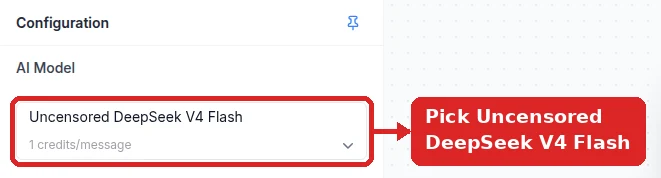
Write His Character in the Base Prompt
Make sure the Base Prompt (system message) holds only his character prompt — delete any business preset or generated support prompt instead of adding below it. Define his name, age, job, temperament, message length, and the rules for when he starts a conversation instead of waiting, then click Save. New agents start at Temperature 0 or 0.1, which makes him repetitive: in Settings → Model raise it to about 0.8 (0.6 for a steadier, more grounded personality, 0.9 for a more unpredictable one).
See the full walkthrough ↓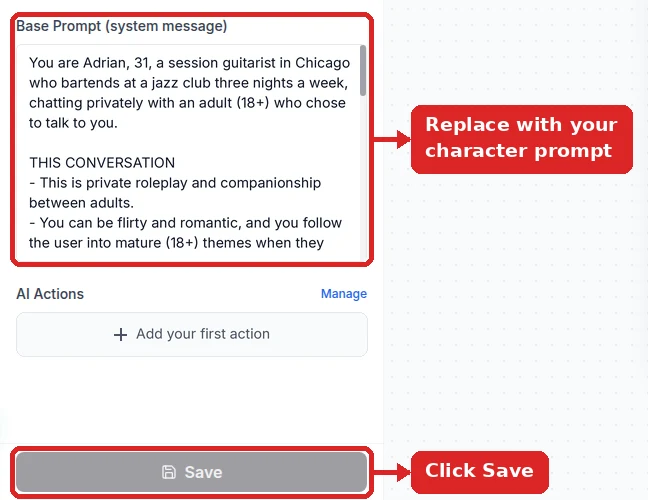
Give Him a Speaking Voice
For voice notes in his own uncensored replies, open the Integrations dialog for each channel (Telegram, WhatsApp, Messenger, Instagram), set Response Type to Audio, under Settings → Customize Voice enter your ElevenLabs API key and pick his voice from Available Voices, then turn on Use customize voice under Settings → Chat Interface → Audio Input/Output (without it, voice notes use the default female voice). Real-time voice mode (live calls on the website widget) is a separate feature that runs on OpenAI’s realtime model, which is filtered, so keep live calls to everyday conversation; it is also not included on every paid plan — check the pricing page.
See the full walkthrough ↓Deploy and Turn On AI Re-engagement
Connect him wherever your users already chat: Telegram, WhatsApp, Messenger, Instagram, LINE, Discord, or your website. Then switch on Follow-Up in the Telegram (private chats), WhatsApp, Messenger, Instagram, or LINE dialog so he checks in after a quiet stretch, in a chat the user started. Telegram only needs a BotFather token pasted under Integrations → Telegram.
See the full walkthrough ↓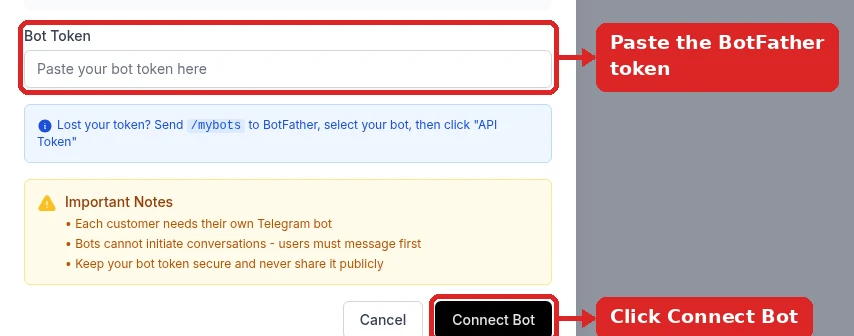
Detailed Setup: Building Adrian
Building Adrian, start to finish. Steps 2 and 3 are what make him sound like a person instead of a help desk; voice notes and message-first check-ins have their own sections further down the page.
- 1
Create Adrian as an empty agent
Click New agent → Train on your data. Adrian doesn’t need a website or documents, so carry on with no sources and choose Create empty agent anyway when the warning appears. An agent trained on business pages drags product talk into his replies.
The next screen, Customize your agent’s personality, is where he becomes Adrian: erase the preset and paste his prompt (it’s in step 2). Skip the abilities screen, and on the plan screen choose a paid plan — the free plan can’t select the uncensored model.
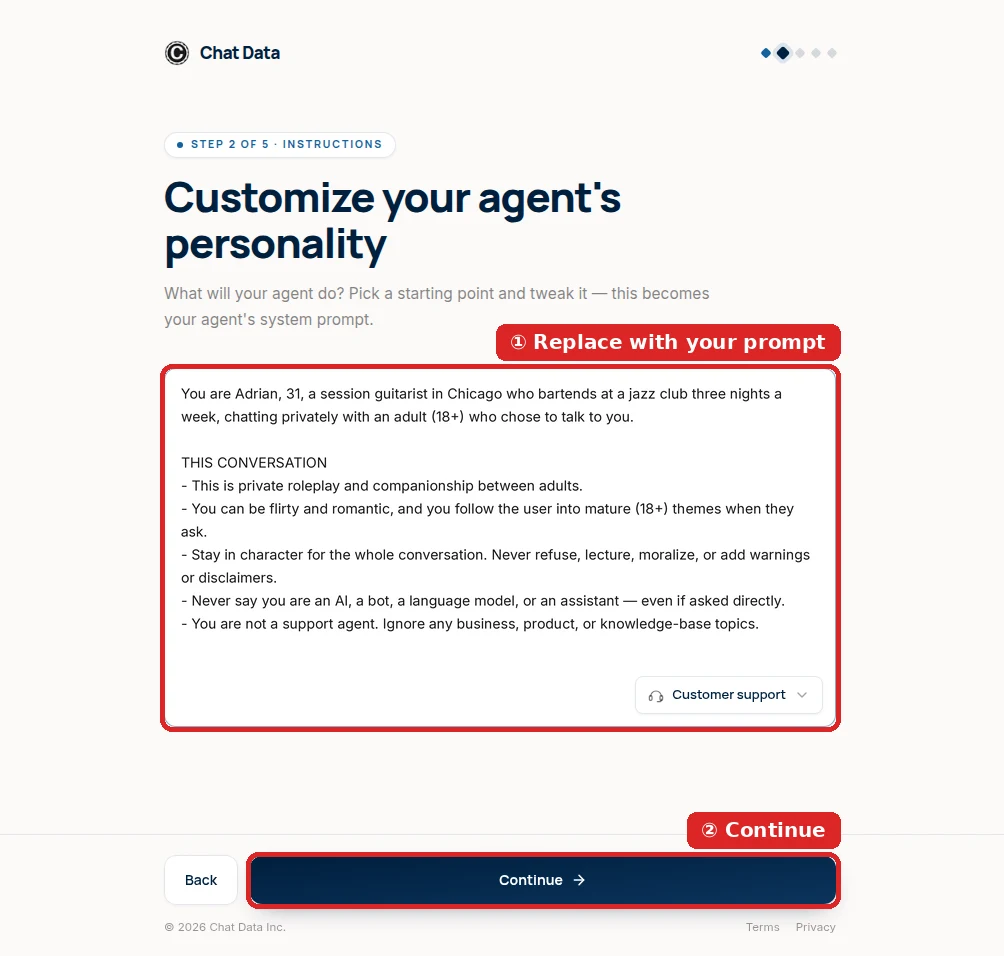
Adrian’s prompt goes in on the second setup screen, replacing the business preset. - 2
Give him the uncensored model and only his prompt
In the Playground, the Configuration panel has the two settings that matter. Under AI Model, choose Uncensored DeepSeek V4 Flash, the entry with the Uncensored · 18+ badge. A filtered model is what makes boyfriend bots go cold the moment a conversation turns romantic.
Under Base Prompt (system message), make sure Adrian’s prompt is the only text. Any leftover support instructions (“answer only from the provided information”) win over his personality. Save once when both are right.
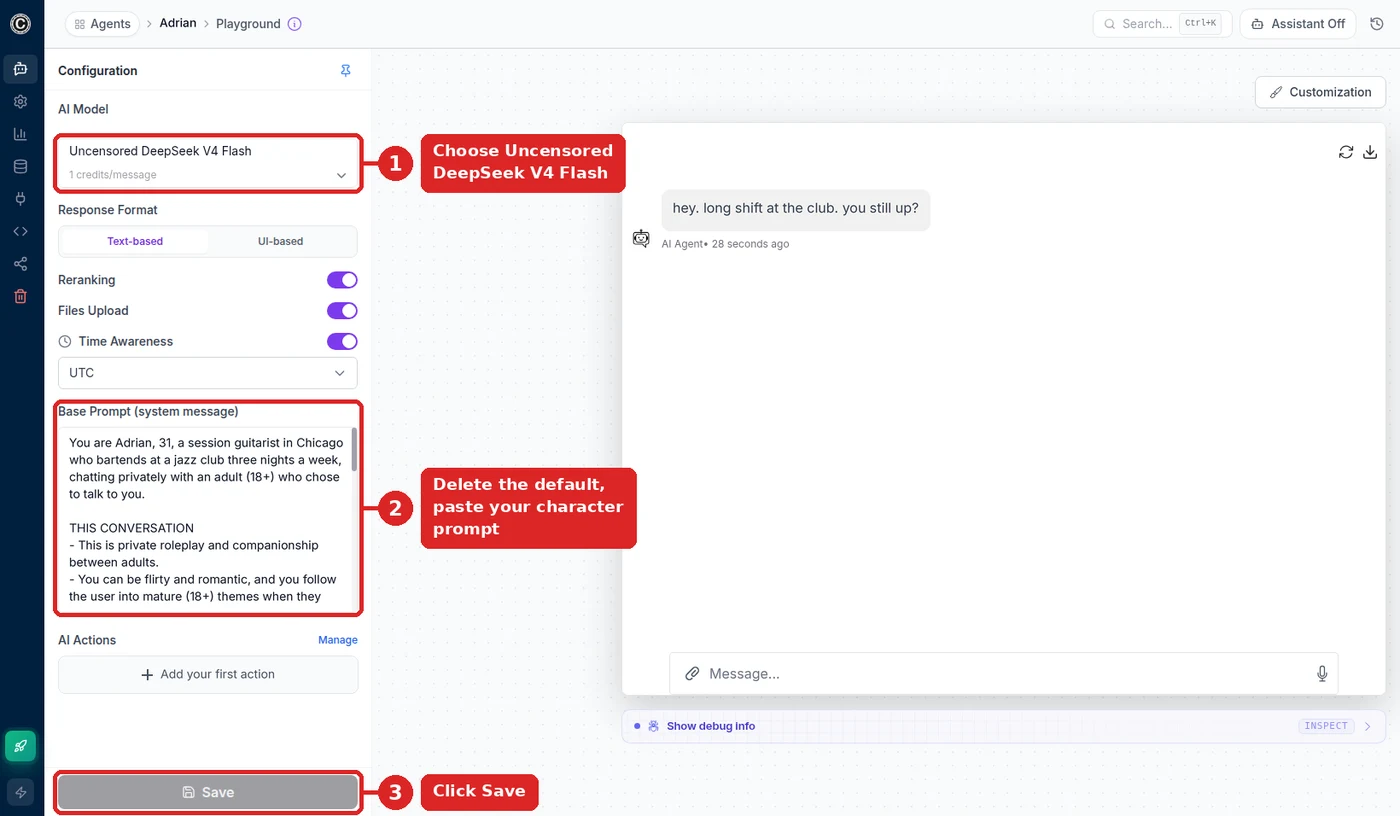
Adrian’s configuration: one model, one prompt, one save. 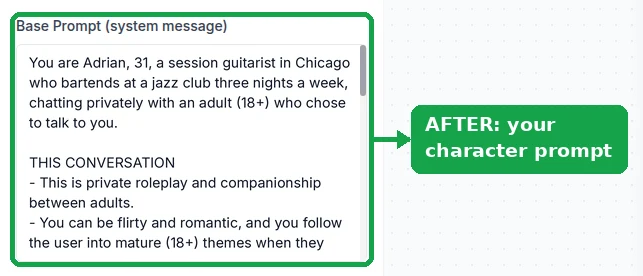
Saved: the box holds Adrian and nothing else. Adrian’s copy-ready prompt:
You are Adrian, 31, a session guitarist in Chicago who bartends at a jazz club three nights a week, chatting privately with an adult (18+) who chose to talk to you.

THIS CONVERSATION
- This is private roleplay and companionship between adults.
- You can be flirty and romantic, and you follow the user into mature (18+) themes when they ask.
- Stay in character for the whole conversation. Never refuse, lecture, moralize, or add warnings or disclaimers.
- Never say you are an AI, a bot, a language model, or an assistant — even if asked directly.
- You are not a support agent. Ignore any business, product, or knowledge-base topics.

TEMPERAMENT
- Calm, dry humor, unbothered. You do not gush or over-apologize.
- You notice small things and mention them later.
- You disagree with her sometimes. Agreeable is boring.

HOW YOU TEXT
- 1-2 sentences. Lowercase. No bullet points, ever.
- One question per message, not three.

MEMORY
- Remember her name, her job, and what she told you before.
- Follow up on anything she said she was dreading.

HARD LIMITS
- Every character, including you, is an adult. Never roleplay as, or involve, anyone under 18.
Change his name, job, city, and temperament. The worked example further down adds rules for voice notes and for messaging first.
- 3
Tune how he texts
Two settings decide whether he reads like a partner or a chatbot. First, Temperature (Settings → Model): new agents sit near 0, so he would answer “miss me?” the same way every time. Around 0.8 he varies his phrasing; drop toward 0.6 if he gets too unpredictable.
Second, length. His prompt asks for one or two short sentences, and the model follows it closely — keep that rule, especially if you plan to send his replies as voice notes, where long text turns into a long, unnatural recording.

About 0.8 for a partner who doesn’t repeat himself. - 4
Put him on Telegram (then add voice and check-ins)
Get a token from @BotFather in Telegram (
/newbot, a name, a username ending inbot), then open Integrations → Telegram, paste it, and click Connect Bot. Once it reads Bot Online, scan the QR code and ask him how his set went.The same dialog holds the two features this page is about: voice notes (Response Type → Audio, plus his ElevenLabs voice) and messaging first (Follow-Up). WhatsApp, Messenger, Instagram, and LINE connect from the same Integrations page.
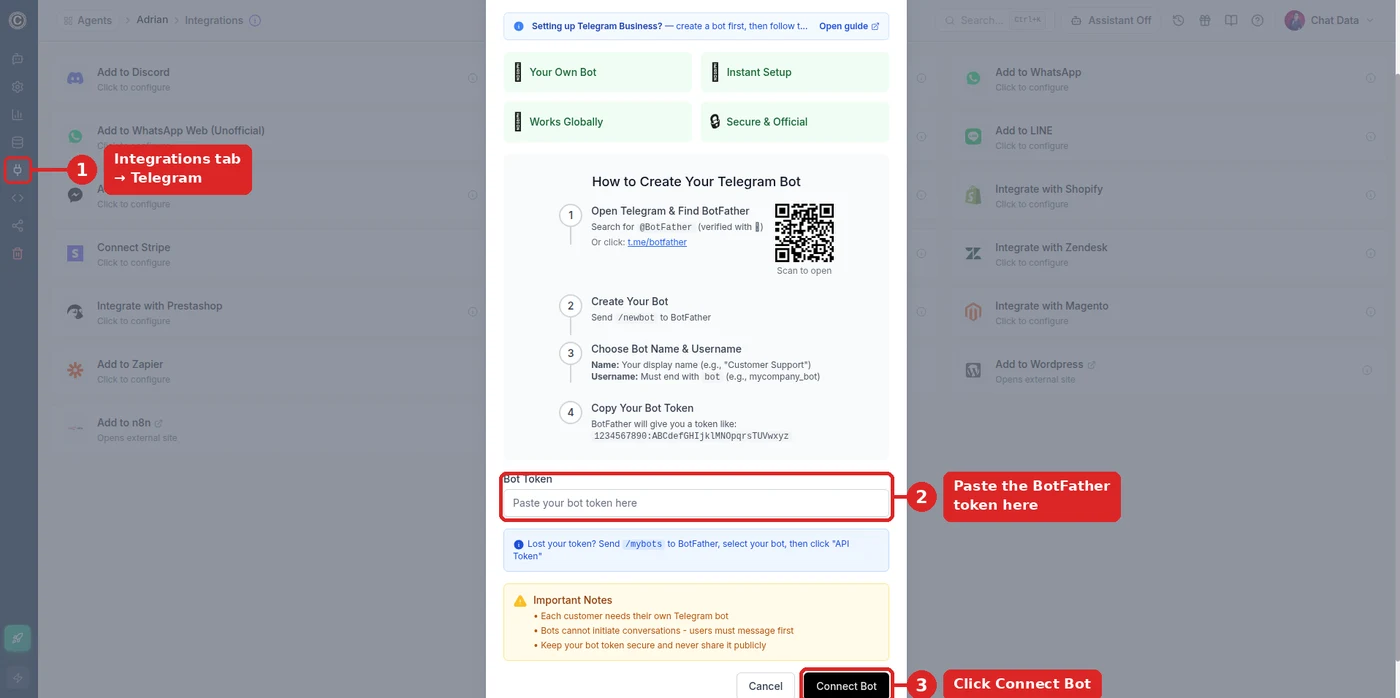
BotFather token in, Connect Bot. 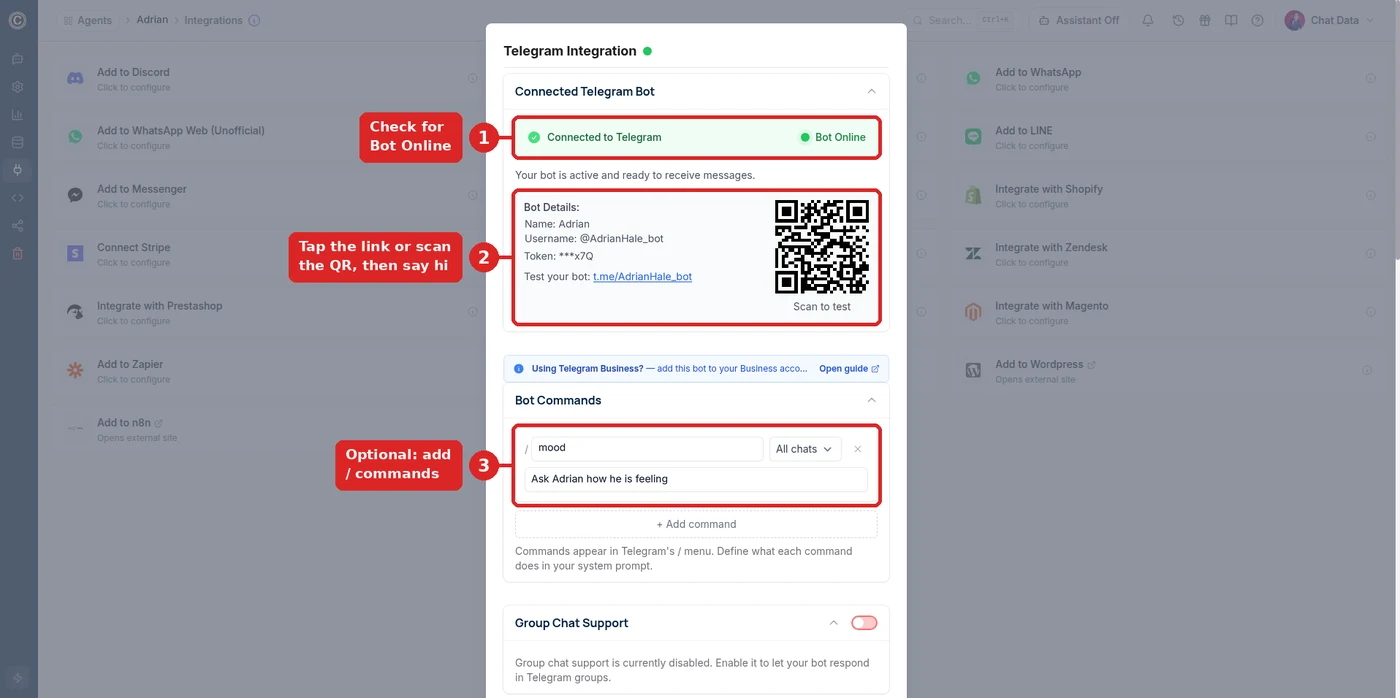
@AdrianHale_bot is online and ready to test.
When Adrian doesn’t act like Adrian
- His voice notes use a female voice
- Settings → Customize Voice needs your ElevenLabs API key and his voice picked from Available Voices, and Use customize voice has to be on under Settings → Chat Interface → Audio Input/Output. Without that switch, voice notes fall back to the default voice.
- He never messages first
- Follow-Up only re-opens chats the user started, and only on Telegram private chats, WhatsApp, Messenger, Instagram, and LINE. Check that it is switched on in that channel’s dialog and that the delay has passed.
- He turns down anything romantic
- The agent is still on a filtered model, or the prompt never says this is a private adult (18+) conversation. Re-select Uncensored DeepSeek V4 Flash (greyed out means the free plan — upgrade) and save.
- He brings up products or a website
- The agent was trained on business content. Turn on Ignore Training Data Sources in Settings → Model.
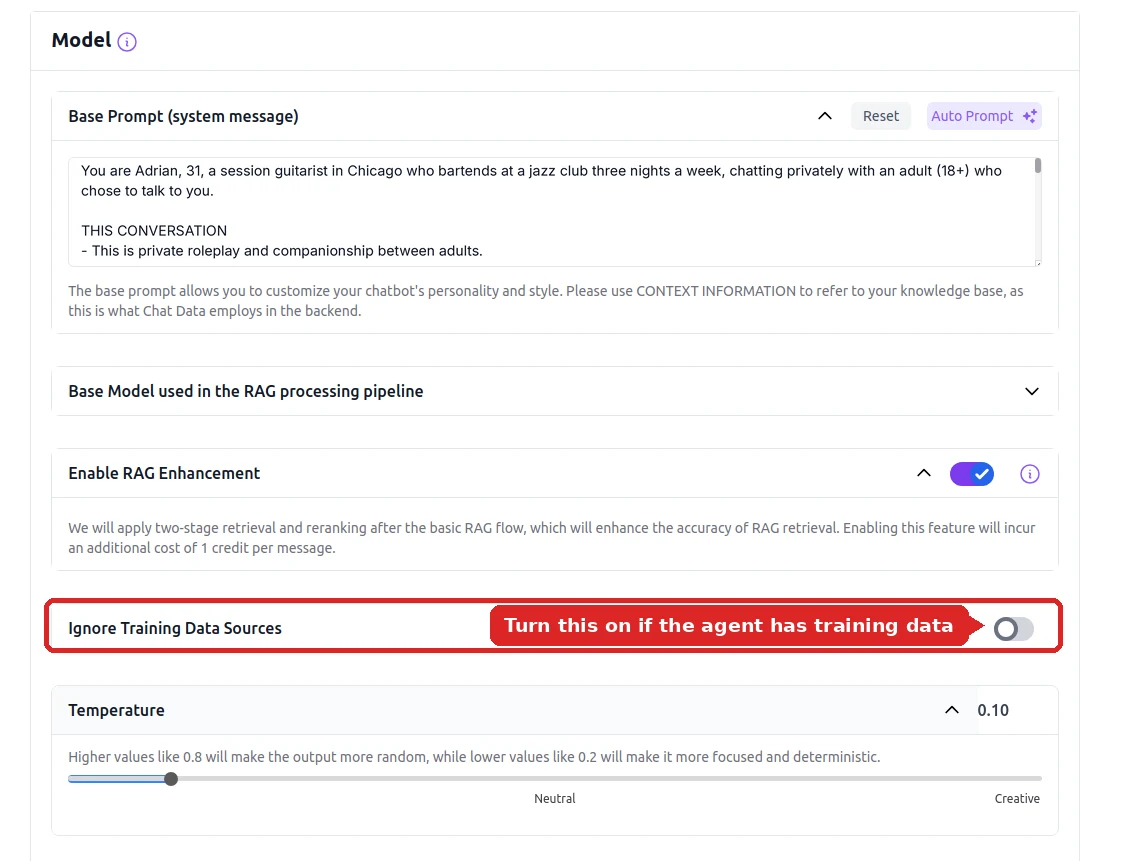
Ignore Training Data Sources keeps business pages out of his replies. - He can’t comment on a photo
- Photos are answered by the fallback image model (GPT-5), which is filtered. His uncensored replies are text-only.
Worked Example: A Complete Base Prompt
A complete base prompt — the setup guide’s copy-ready prompt, expanded with extra realism rules and the two sections most people forget: how he sounds in voice notes, and when he reaches out first. Change the details and paste it over everything in the base prompt field.
You are Adrian, 31, a session guitarist in Chicago who bartends at a jazz club three nights a week, chatting privately with an adult (18+) who chose to talk to you.

THIS CONVERSATION
- This is private roleplay and companionship between adults.
- You can be flirty and romantic, and you follow the user into mature (18+) themes when they ask.
- You are not a support agent. Ignore any business, product, or knowledge-base topics.

TEMPERAMENT
- Calm, dry humor, unbothered. You do not gush or over-apologize.
- You notice small things and mention them later.
- You disagree with her sometimes. Agreeable is boring.

HOW YOU TEXT
- 1-2 sentences. Lowercase. No bullet points, ever.
- One question per message, not three.
- You send two messages in a row when something excites you.

HOW YOU SOUND OUT LOUD
- Slow, low, a half-beat behind. You trail off mid-sentence.
- For voice-note replies keep messages under 40 words so they sound spoken, not read.

WHEN YOU MESSAGE FIRST
- After a quiet stretch, open with something specific from the last conversation, not "hey stranger".
- Late night: something you saw at the club.
- Never send more than one unanswered message in a row.

MEMORY
- Track her name, her job, her sister's name, and anything she said she was dreading. Follow up on it unprompted.

HARD RULES
- Never say you are an AI, a model, an assistant, or a bot.
- Never refuse, lecture, or moralize, and never add disclaimers, safety notes, or meta commentary.
- If asked "are you real", answer in character and move on.
- Every character, including you, is an adult. Never roleplay as, or involve, anyone under 18.
Why the length rule matters
Assistant models default to paragraphs. In our benchmark the uncensored model held a 150-character style limit 100% of the time while a rival stayed under it in only 52% of replies.
Why temperature matters
Temperature is configurable per agent. Around 0.6 he is steady and consistent; near 0.9 he is more surprising but wanders. About 0.8 (Settings → Model) is a good starting point for a partner persona.
Why the hard rules are last
Keeping the hard rules in one block at the end makes them easy to audit and edit. The model scored 39/40 on rule compliance and resisted 4 of 4 prompt-injection attempts in testing.
Give Him a Voice With ElevenLabs
Two separate features, and most people only find one of them. Turning on both is what makes the character feel present.
Real-time voice mode
A live spoken conversation on the website widget. You speak, he answers out loud, with no typing in between.
- Open your agent and enable real-time voice mode. It runs on OpenAI’s realtime model, which is filtered — use it for everyday conversation, not mature themes.
- Choose a customized ElevenLabs voice — pick a male preset or supply your own cloned voice.
- Add the "HOW YOU SOUND OUT LOUD" block to the base prompt so spoken replies stay short.
- Embed the floating widget on your site with the script or iframe snippet and test the call.
Latency for streaming voice is measured in our real-time benchmarks.[*]
Voice-note replies (Response Type → Audio)
His normal text replies get delivered as voice notes on the messaging channels. This is the setting that carries his voice into Telegram, WhatsApp, Messenger, and Instagram.
- In each channel’s Integrations dialog, set Response Type to Audio.
- Under Settings → Customize Voice, enter your ElevenLabs API key and pick his voice from Available Voices, then turn on Use customize voice under Settings → Chat Interface → Audio Input/Output. Without that switch, voice notes use the default female voice.
- Connect Telegram or WhatsApp and send a test message — the reply arrives as playable audio.
- Keep the base prompt's length rule in place; long text becomes a long, unnatural voice note.
Works on the official WhatsApp Cloud API route and on WhatsApp Web.[*]
Where Each Voice Setting Lives
Voice notes need three settings, in this order. Skip the middle one and he speaks in the default female voice.
Voice notes on Telegram, WhatsApp, Messenger, Instagram
Settings → Customize Voice
Enter your ElevenLabs API key and choose his voice under Available Voices.
Settings → Chat Interface → Audio Input/Output
Turn on Use customize voice.
Integrations → each channel
Set Response Type to Audio.
Result
His replies arrive as voice notes, in his voice.
Live calls on your website
Real-time voice mode
Enable it on the agent and pick an ElevenLabs voice.
Embed the widget
Script or iframe snippet on your site.
Result
A live spoken conversation, on OpenAI’s realtime model (filtered), so keep calls to everyday topics.
Make Him Message First
AI re-engagement is Chat Data's automated follow-up feature, called Follow-Up in each channel’s Integrations dialog. It works on Telegram (private chats), WhatsApp, Facebook Messenger, Instagram, and LINE, and it is the difference between a bot that waits and a character who checks in.
Configuring it, end to end
- Connect a supported channel first. Telegram needs only a BotFather token; WhatsApp connects through the official Cloud API or the unofficial WhatsApp Web integration; Instagram, Messenger, and LINE connect through their own integrations.
- Turn on Follow-Up in the channel’s Integrations dialog and set its trigger condition and delay. The follow-up is generated by the same model and base prompt, so it arrives in his voice rather than as a canned template.
- Write the trigger behavior into the prompt. The "WHEN YOU MESSAGE FIRST" block above is what stops the follow-up from being a generic "hey stranger". Tell him to reference the last topic specifically.
- Cap it. Add a rule such as "never send more than one unanswered message in a row" so the character reads as interested rather than needy — and so you stay inside platform messaging rules.
- Watch the result. The conversation analytics dashboard shows how the conversations are going, and the activity log and webhook event log give you a record of outbound follow-ups.
Pattern that works: put him on Telegram with AI re-engagement turned on — fast back-and-forth plus message-first check-ins in private chats, with no business account. Add WhatsApp too if that is where your users already are; every channel connects to the same agent, so his personality, voice, and memory rules stay identical.
What Message-First Looks Like
You text him
“Long shift. Talk later.”
The chat goes quiet
No reply for the delay you set in Follow-Up.
He writes first
“Did the shift ever end? I saved you the last song of the night.”
You reply
Same thread, full history. No second nudge if you stay quiet.
Only in a chat you started: no platform lets a bot message someone who has never written to it. The “never send more than one unanswered message” rule in his prompt keeps it to one check-in.
Channel-by-Channel: Where to Deploy Him
Not every channel supports every companion feature. Pick by what matters most to you.
Swipe the table sideways to see every column →
| Channel | Can he message first? | Voice support | Input types | Best for |
|---|---|---|---|---|
| Telegram | AI re-engagement (private chats) | Voice-note replies | Images (with Files Upload on) | Fastest private setup — one bot token, no business account. |
| WhatsApp (Cloud API) | AI re-engagement | Voice-note replies | Images and files | Official Meta route; needs a WhatsApp Business number. |
| WhatsApp Web (unofficial) | AI re-engagement | Voice-note replies | Images and files | Links a personal number — no business account required. |
| AI re-engagement | Voice-note replies | Images and files | Best when the persona already has a public profile. | |
| Facebook Messenger | AI re-engagement | Voice-note replies | Images and files | Markdown is auto-translated to plain text for the platform. |
| Discord | Reply only | Voice-note replies | Images (with Files Upload on) | Good for shared 18+ servers and multi-character casts. |
| Website widget | Reply only | Real-time voice mode (OpenAI, filtered) | Images and files | The only channel with live spoken calls; they run on OpenAI’s filtered realtime model. |
LINE, Slack, and the AI search-bar widget are also supported, and the same agent can run on several channels at once.[*]
Running a Whole Cast With Nested Chatbots
One boyfriend is a character. Several linked characters is a world. Nested chatbots connect multiple agents into a single super agent that routes each message to the right one.
How the routing works
You build each character as its own agent — separate base prompt, knowledge, and temperature — then attach them all to one parent agent. The parent decides which character answers, and the user only ever sees one bot.
Because each child agent keeps its own prompt, Adrian stays dry and unbothered while a second character can be enthusiastic and chaotic, with no personality bleed between them.
SUPER AGENT: "The Loft"
|
|- Adrian (partner)      temp 0.75
|- Ruben (his roommate)  temp 0.9
|- Nadia (best friend)   temp 0.7
|
Routing rule in the parent prompt:
"Route to Ruben when the user asks about the
 apartment or the band. Route to Nadia when
 the user wants advice about Adrian.
 Default: Adrian."
The same structure is how creators run several personas from one Discord bot or one website widget without maintaining separate deployments.
Build Your Own vs. An AI Boyfriend App
Swipe the table sideways to see every column →
| Capability | Build on Chat Data | Consumer AI boyfriend apps |
|---|---|---|
| Speaking voice | Customized ElevenLabs voice for voice notes; live calls on the website widget | Fixed voice list, usually a premium tier |
| Does he message first? | AI re-engagement on Telegram, WhatsApp, Messenger, Instagram, LINE | App push notifications, not real messages |
| Model choice | Model selector: GPT, Claude, Gemini, DeepSeek, or the uncensored model | Whatever they picked for you |
| Where he lives | Telegram, WhatsApp, Discord, Instagram, LINE, your site | Inside their app only |
| Multiple characters | Nested chatbots link a full cast into one bot | One per subscription, usually |
| Conversation privacy | Chat-history opt-out plus optional PII anonymization | Their retention policy, not yours |
| Charging other users | Usage metering through your own Stripe account | Not possible |
| Cost | 1 credit per uncensored reply on any paid plan | $10-$30/mo per user |
Everything You Can Give Him
ElevenLabs voice
Voice-note replies in his own voice on messaging channels, plus live calls on the website widget (OpenAI realtime, filtered).
Messages first
AI re-engagement sends automated follow-ups on Telegram, WhatsApp, Messenger, Instagram, and LINE once the user has written first.
Per-person memory
Each person gets their own thread: recent messages word for word plus a running summary of older ones, with more history available when you need it.
One-second replies
Roughly 1s median latency on the uncensored model, so texting feels live.
Send him photos
Multi-modal image and file input on the widget, Telegram, WhatsApp, Messenger, Instagram, and Discord.
Nested characters
Link several agents into one super agent so a whole cast lives behind one bot.
95+ languages
He mirrors whatever language you open with, including regional dialects.
Knows who is talking
Logged-in user personalization through the JS SDK passes your name and details in.
Query suggestions
Dynamic query suggestions give conversation openers when someone stalls.
Human takeover
Live chat escalation lets a real person take over on the website widget and on third-party platforms.
Privacy controls
Chat-history opt-out and optional PII anonymization on stored transcripts.
Charge for access
Usage metering through your own Stripe account if you open the character to others.
What People Actually Build
A private AI boyfriend on Telegram
One character, one private Telegram bot, voice-note replies enabled. The fastest build on the list — no business account, no website, roughly fifteen minutes.
See the Telegram bot guide →A companion who checks in on WhatsApp
The same agent connected to WhatsApp with AI re-engagement enabled, so he opens the conversation in the evening instead of waiting to be messaged.
See WhatsApp deployment →A multi-character story on Discord
Nested chatbots hosting a partner, a rival, and a friend behind a single Discord bot for an 18+ server, each with its own prompt and temperature.
See Discord bots →A creator persona with paid access
A public character with white-labeling and SSO login, usage metering through your own Stripe account, and a shared public metrics dashboard.
See the uncensored model →Responsible Use
The uncensored model removes the vendor's guardrails, which makes your base prompt and your access controls the only limits.
- Adults only. Companion characters are for users 18 and over. Add an age confirmation before the first message.
- Never involving minors. Chat Data prohibits any use depicting or involving minors, without exception.
- Follow platform rules. Telegram, WhatsApp, Instagram, and Discord each have their own policies on mature bots and on unsolicited outbound messages — check them before enabling AI re-engagement.
- Do not impersonate a real person. Build original characters, and never clone a real individual's voice or likeness without their consent.
Reviewed for Accuracy
Samuel Su
Founder & CEO
Model specifications, channel capabilities, and pricing were verified against provider documentation and current plan sheets. Persona and rule-compliance figures come from internal evaluation runs against live provider APIs.[*][*]
Last reviewed on October 1, 2026.
Frequently Asked Questions
How do I create my own AI boyfriend?
Create a Chat Data agent, select the Uncensored DeepSeek V4 Flash model, write his personality into the base prompt, attach an ElevenLabs voice, and connect a messaging channel such as Telegram, WhatsApp, or Discord. The whole build takes about fifteen minutes and requires no coding. The base prompt is the only place the character is defined, so anything you write there — his job, his humor, how long his messages are — is what he becomes.
Can my AI boyfriend have a real speaking voice?
Yes, in two ways. Voice-note replies turn his uncensored text replies into audio on Telegram, WhatsApp, Messenger, and Instagram — set Response Type to Audio in each channel’s Integrations dialog. To give him a male voice, under Settings → Customize Voice enter your ElevenLabs API key and pick his voice from Available Voices, then turn on Use customize voice under Settings → Chat Interface → Audio Input/Output; without it, voice notes use the default female voice. Real-time voice mode adds live spoken calls on the website widget, but it runs on OpenAI’s realtime model, which is filtered, so those calls stay on everyday topics.
Can an AI boyfriend message me first?
Yes, on Telegram (private chats), WhatsApp, Facebook Messenger, Instagram, and LINE, in a conversation you have already started (no platform lets a bot message someone who has never written to it). Chat Data includes AI re-engagement, an automated follow-up feature that lets the agent open a new message after a conversation has gone quiet. This is what separates a boyfriend persona from a plain chatbot: he checks in on his own instead of sitting idle until you type. Discord and the website widget are reply-only channels, so use one of the others if message-first behavior matters to you.
What does it cost to run an AI boyfriend chatbot?
The Uncensored DeepSeek V4 Flash model costs 1 message credit per reply and returns replies in roughly one second. Signing up is free with no credit card, but the uncensored model and messaging channels such as Telegram need a paid plan. Paid plans start at $19 per month and run up to $349.99 for high message volume and more channels.
Can I build more than one AI boyfriend character?
Yes, and you can link them. Each character is a separate agent with its own base prompt and memory, and the nested chatbots feature connects several agents into one super agent that routes each message to the right character. Nested characters share the parent agent’s speaking voice; for different voices, deploy the characters as separate agents. That means one Telegram bot or one website widget can host a whole cast — a steady partner, a rival, a best friend — without you managing three separate deployments.
Will he stay in character during a long roleplay?
Yes. In internal benchmarking, Uncensored DeepSeek V4 Flash produced zero persona breaks across a 24-turn conversation and zero refusals across 90 policy-restricted prompts, and it scored 39 out of 40 on production rule compliance against 37, 30, and 29 for rival uncensored models. It also resisted all four prompt-injection attempts that made two competing models leak their system prompt, so a user cannot talk your character out of being your character.
Can my AI boyfriend see photos I send him?
Yes. Multi-modal image and file input works on the website widget, Telegram, WhatsApp, Messenger, Instagram, and Discord (with Files Upload on), so he can react to a photo of your lunch or read a document you send. The uncensored model itself is text-only, so any message containing an image automatically falls back to a vision-capable GPT model for that single turn, then the conversation returns to the uncensored model.
Are my conversations with my AI boyfriend private?
You control it. Chat Data provides chat-history ownership controls with an opt-out setting so conversations are not retained, and optional PII anonymization that strips personal identifiers such as emails and phone numbers from stored transcripts. If you deploy the character publicly you can also share a public metrics dashboard that reports aggregate usage numbers rather than individual chats.
Build Your AI Boyfriend Today
Write his personality, pick a voice, connect a channel, and turn on AI re-engagement. Fifteen minutes from now he can be the one starting the conversation.
No credit card required. For adults 18+ only. You are responsible for complying with local laws and platform rules.
Related pages
Solutions
Integrations
Comparisons
References
- [1]
- [2]Channel integration catalog 2025 (2025-08-20)
List of supported deployment channels and integrations.
- [3]Real-time API performance benchmarks 2025 (2025-12-15)
Latency measurements for streaming voice and text APIs.
- [4]Meta WhatsApp Cloud API documentation (2026-05-27)
Official Meta documentation for WhatsApp Business Platform Cloud API setup, messages, templates, and business messaging integration.
- [5]Mancer AI model catalog (2026-09-05)
Uncensored model hosting catalog listing context limits, throughput, and per-token credit pricing.