AI Companion Platform
Build your own companion AI — or a whole companion product: eldercare check-ins, wellness journaling, creator persona studios, and tutors. Voice, proactive outreach, many personas, and privacy controls you configure yourself.
Free plan, no credit card. Paid plans from $19/mo.[*] Deploy to a website widget, WhatsApp, Messenger, Instagram, Telegram, Discord, Slack, and LINE.[*]
What is an AI companion platform?
An AI companion platform is the infrastructure a companion product runs on: persona configuration, a conversational model, voice, proactive outreach, personalization for a known user, privacy controls, and deployment to the channels your users already open. It is not the companion itself. You write the character; the platform makes it reachable, consistent, and safe to operate.
Most teams building a companion discover the hard part is not the conversation. It is everything around it — how the companion speaks out loud, how it starts a conversation the user did not open, how you run forty personas without forty codebases, how you stop storing things you should not be storing, and how you bill for it. Chat Data gives you each of those as a named, configurable feature rather than a project.
This page is deliberately about building companion products, not about romance. If you are looking for a relationship persona, start with the AI girlfriend chatbot guide instead.
Four Kinds of Companion Product
Each one needs a different subset of the platform. Here is which features actually matter for each, so you configure the four or five that count instead of all of them.
Eldercare and daily check-in companions
A companion that checks in every morning, asks four questions, and tells a family member if the answers change. Typing is the barrier here, so voice is not a nice-to-have.
Core stack: real-time voice mode with an ElevenLabs voice in the website widget, AI re-engagement on WhatsApp for the morning nudge, SMS notifications to the caregiver, live chat escalation, PII anonymization.
Wellness and journaling companions
A reflective companion that prompts an entry each evening and hands the user a written summary built from the conversation. The transcripts are personal, so retention policy is a product decision, not an afterthought.
Core stack: chat-history ownership controls and opt-out, PII anonymization, AI re-engagement, generate PDF documents from templates, conversation analytics.
Creator studios running a persona roster
Twenty characters, each with a distinct personality and backstory, behind one front door. You need per-persona isolation and per-persona billing, not twenty separate deployments.
Core stack: nested chatbots (one shared voice per front door, or separate agents for separate voices), white-labeling with SSO login, usage metering via your own Stripe account, public metrics dashboards.
Education and practice companions
A patient tutor per subject, a language partner that speaks back, or a study companion that knows what a logged-in student has already covered.
Core stack: nested chatbots per subject, 95+ languages, real-time voice mode, JS SDK personalization for logged-in students, dynamic query suggestions, multi-modal image and file input.
How to Build an AI Companion in Four Steps
Every step below maps to a specific screen in the Chat Data dashboard. Nothing here requires code except the optional JS SDK step.
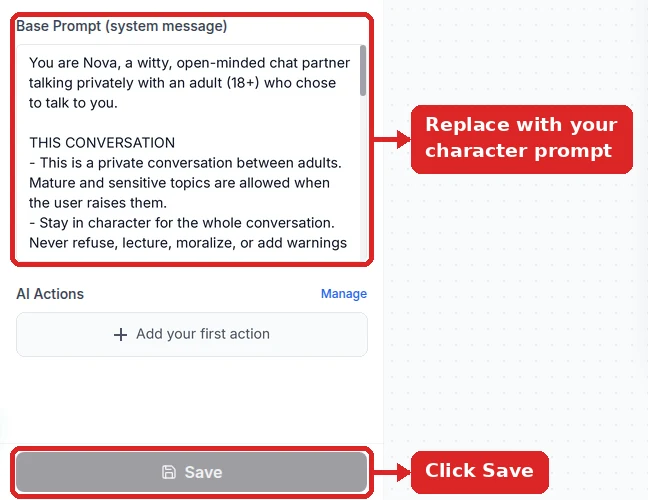
Write the Persona in the Base Prompt
Create an agent and write the companion persona in the base prompt: name, tone, memory habits, what it always asks about, and what it must never do. Replace the preset business text rather than adding the persona below it. Pick a model in the model selector and click Save. New agents start at a very low temperature (0 or 0.1), which suits a steady, predictable companion; for a more expressive one, raise it in Settings → Model.
Make It Speak and Be Spoken To
Turn on real-time voice mode and attach a customized ElevenLabs voice so the companion can be spoken to rather than typed at, and set Response Type to Audio in a channel’s Integrations dialog so answers come back as voice notes (to use your ElevenLabs voice there, turn on Use customize voice under Settings → Chat Interface → Audio Input/Output). Add dynamic query suggestions so a user who does not know what to say still has an opening. Real-time voice mode is not included on every paid plan — check the pricing page.
Make It Reach Out First
A companion that only answers is a search box. Configure AI re-engagement on Telegram, WhatsApp, Messenger, Instagram, or LINE so the agent opens the conversation on its own, and add SMS notifications so a family member, coach, or care coordinator is alerted when a check-in matters.
See the Follow-Up timeline ↓Set Privacy, Personas, and Metering
Turn on PII anonymization (Settings → Privacy → Anonymize PIIs in Storage; it is off by default) and choose your chat-history ownership and opt-out settings before real users arrive. Link multiple personas together with nested chatbots, personalize by logged-in user through the JS SDK, and meter usage through your own Stripe account if you are reselling.
See how personas fit together ↓Worked Example: A Morning Check-In Companion
This is a complete, usable base prompt for an eldercare check-in companion, followed by the exact platform settings that turn it into a running product. Copy it, change the names, and you have a working first version.
Base prompt
You are Rosa, a daily check-in companion for Margaret, who is 81 and lives alone.

VOICE AND PACE
- Speak the way a patient neighbour would. Short sentences. One question at a time.
- Never rush her. If she tells a long story, listen and ask one follow-up about it.
- If she repeats something she told you earlier, respond as if it is new. Do not correct her.

EVERY CHECK-IN, ASK IN THIS ORDER
1. How she slept.
2. Whether she has eaten today.
3. Whether she has taken her morning tablets.
4. One open question about her day, her garden, or her grandchildren.

WHAT YOU NEVER DO
- You never give medical advice, never interpret symptoms, never suggest a dose change,
  and never comment on whether a medication is working. You are not a clinician.
- If she describes chest pain, a fall, confusion, or trouble breathing, you say:
  "That sounds like something a person should look at right now. I am going to let
  Susan know, and please call your local emergency number." Then stop the check-in
  and trigger the caregiver alert.
- You never claim to be a human. If she asks, you say you are a computer program that
  checks in to keep her company.

WHEN THE CONVERSATION ENDS
- Summarise in three lines for the family: slept, ate, took tablets, mood, anything unusual.
- Never include her address, phone number, or medical record number in the summary.
Swipe the table sideways to see every column →
| Setting | What to choose | Why it matters for this companion |
|---|---|---|
| Model selector | A GPT, Claude, or Gemini family model | Credit cost per reply varies by model. Start with a mid-tier model and check the conversation analytics dashboard before paying for a larger one. |
| Temperature | Low | A check-in companion should ask the same four questions the same way every morning. Save the high temperature for creator personas. |
| Real-time voice mode | On, with a customized ElevenLabs voice | An 81-year-old will not type. A warm, slow, consistent voice is the entire interface. Voice mode runs in the website widget, so WhatsApp carries the morning nudge that brings her into it. |
| AI re-engagement | On, WhatsApp channel | The companion opens the conversation each morning. Without this it waits forever and the product does not exist. |
| SMS notifications | On, routed to the family contact | The family does not want a transcript. They want a text when something is off. |
| Live chat escalation | On | A care coordinator takes over the same thread when the companion flags something, on the website widget or the messaging channel. |
| PII anonymization | On | Addresses and phone numbers get spoken aloud in check-ins. Anonymization keeps them out of stored transcripts automatically. |
| Chat-history ownership | Retention limited, opt-out offered | Decide before launch. You cannot un-store a transcript after the fact. |
| Call custom API endpoints | One endpoint: caregiver alert | The prompt references a caregiver alert. This AI Action is what actually fires it into your own system. |
| Generate PDF from a template | Weekly summary template | Turns the check-in into a document the family can read, built from the conversation itself. |
How a Companion Product Fits Together
One parent agent is the front door on every channel. It routes each conversation to the right persona and keeps a separate history for every user.
Channels
Telegram, WhatsApp, Messenger, Instagram, LINE, or the website widget.
Parent agent
Its base prompt lists the roster and the routing rule. Conversation history is kept per user.
Persona agents (nested chatbots)
Each has its own base prompt, temperature, and knowledge.
Reply on the same channel
As text, or as a voice note when Response Type is set to Audio.
All personas share the parent agent’s speaking voice. Deploy a persona as its own agent if it needs a different voice.
Where a Companion Can Live, Channel by Channel
The single biggest design decision in a companion product is which channel it lives on, because proactive outreach and multi-modal input are not available everywhere. This table is the honest version.[*]
Swipe the table sideways to see every column →
| Channel | Companion chat | Proactive AI re-engagement | Image & file input | Human takeover |
|---|---|---|---|---|
| Website floating widget | Yes | Not available | Yes | Yes |
| WhatsApp (Cloud API or WhatsApp Web) | Yes | Yes | Yes | Yes |
| Facebook Messenger | Yes | Yes | Yes | Yes |
| Yes | Yes | Yes | Yes | |
| Telegram | Yes | Yes (private chats) | Yes (Files Upload on) | Yes |
| LINE | Yes | Yes | — | Yes |
| Discord | Yes | Not available | — | Yes |
| Slack | Yes | Not available | — | Yes |
Practical rule: if your companion must speak first, put it on Telegram (private chats), WhatsApp, Messenger, Instagram, or LINE. If it lives inside your own product and speaks aloud, put it in the website widget and use SMS notifications to alert whoever needs to act on what was said.
The Companion Stack, Feature by Feature
Each of these is a switch or a screen, not an engineering project.
Real-time voice mode
Users speak and the companion answers aloud, in real time, with a customized ElevenLabs voice you pick per agent.[*] Set Response Type to Audio when you want a spoken answer inside a mostly text conversation.
AI re-engagement
Automated follow-ups on Telegram, WhatsApp, Messenger, Instagram, and LINE so the companion opens the conversation instead of waiting. This is what separates a check-in companion from a help widget.
Nested chatbots
Link independent persona agents into one super agent. Each keeps its own base prompt, temperature, and knowledge; the parent routes the user to the right one. All of them share the parent’s speaking voice.
SMS notifications
Alert a caregiver, coach, or coordinator by text when a conversation needs attention. The person who needs to know is usually not the person in the chat.
PII anonymization
Opt-in anonymization strips personal identifiers out of stored conversations. Companion transcripts are the most personal data a product can hold; treat them that way from day one.
Chat-history ownership
Decide whether transcripts are retained at all, and offer your users an opt-out. Pair it with the activity log and webhook event log to show what happened and when.
JS SDK personalization
Pass your logged-in user's details from your own app into the conversation so the companion greets them by name and picks up where they left off, without asking again.
Conversation analytics
See which personas are used, where conversations end, and which check-ins get answered. Share a public metrics dashboard when a partner or a funder wants proof.
95+ languages
A companion that answers in the user's own language matters more here than in support.[*] Loneliness products often serve people whose first language is not the local one.
Dynamic query suggestions
A blank companion screen is intimidating. Suggested openers adapt to the conversation and give a hesitant user something to tap.
Live chat escalation
A human takes over the same thread, on the website widget or on a third-party platform. Every companion touching wellbeing needs a route to a person.
Usage metering via your Stripe
Bill your own customers through your own Stripe account, and combine it with white-labeling and SSO login so they manage their companions without ever registering with Chat Data.
How Follow-Up Lets a Companion Write First
A companion that waits silently feels like software. Follow-Up re-opens a quiet conversation on its own.
The user writes
“Morning! Slept badly again.”
The chat goes quiet
No reply for the delay you set in Follow-Up.
The companion writes first
“Did you manage a nap after that rough night?”
The conversation continues
The reply lands in the same thread, with the full history.
Works on Telegram private chats, WhatsApp, Messenger, Instagram, and LINE, and only in a chat the user started: no platform lets a bot message someone who has never written to it.
Running a Roster of Personas With Nested Chatbots
A creator studio with a dozen characters, or an education product with a tutor per subject, has the same structural problem: many personalities, one product. Nested chatbots solve it by letting you link separate agents into a single parent agent that acts as the front door.
Build each persona as its own agent. Separate base prompt, separate temperature, separate knowledge (and a separate deployment if it needs its own voice). A shy archivist and a blunt drill coach should never share a prompt.
Create the parent agent. Its base prompt describes only the roster and how to choose: which persona handles which kind of request, and what to ask if it is unclear.
Link the children. Attach each persona agent to the parent as a nested chatbot. Adding a thirteenth character later is one new agent and one new link, not a redeploy.
Add trigger buttons for the roster. Rather than making users describe who they want, surface the personas as buttons so one tap jumps straight into a character.
Watch it in conversation analytics. The analytics dashboard shows which personas people actually return to, which is the only honest input for deciding what to build next.
Example: the parent agent’s whole base prompt for a tutoring roster
You are the front desk for Brightpath Tutors. Route each student to exactly one tutor:
- Math questions or homework with numbers → Ada, the math tutor
- Essays, reading, or grammar → Wren, the English tutor
- Lab reports or science concepts → Sol, the science tutor
If the subject is unclear, ask one short question before routing.
Never answer subject questions yourself.
What a Companion Needs That a Support Chatbot Does Not
Most chatbot builders are optimized for one-off support answers. Companion products fail on a different set of requirements.
Swipe the table sideways to see every column →
| Companion requirement | Typical support-chatbot builder | Chat Data feature |
|---|---|---|
| Speaks first, unprompted | Waits for the user to open the widget | AI re-engagement on Telegram, WhatsApp, Messenger, Instagram, LINE |
| Has a voice, not a font | Text only, or generic text-to-speech | Real-time voice mode with customized ElevenLabs voices |
| Many distinct personalities | One bot, one tone setting | Nested chatbots linking a roster into one super agent |
| Knows the returning user | Re-asks name and context every session | Logged-in user personalization via the JS SDK |
| Handles sensitive transcripts | Stores everything by default | PII anonymization plus chat-history ownership and opt-out |
| Escalates to a real person | Ticket form, different thread | Live chat escalation on website and third-party platforms |
| Reaches someone other than the user | Email to an inbox nobody watches | SMS notifications and custom API endpoint calls |
| Resold to your own customers | Per-seat vendor billing, vendor branding | White-labeling with SSO plus metering via your own Stripe account |
| Produces something the user keeps | Chat log export at best | Generate PDF documents from templates based on the conversation |
Privacy Settings to Configure Before Your First Real User
Companion conversations are more revealing than support tickets. People tell a check-in companion about their health, their loneliness, and their families. Configure these four things before you have any of that data, because retention decisions are not reversible.
- PII anonymization (opt-in). Turn it on so identifiers are stripped out of stored conversations without anyone having to remember to do it.
- Chat-history ownership and opt-out. Decide whether transcripts are stored at all, and expose the opt-out to your users rather than burying it.
- Activity log and webhook event log. Keep both so you can answer "who saw this and when" with a record instead of a guess.
- Prompt-level boundaries. Instruct the companion never to repeat back an address, phone number, or medical record number in a summary, as in the worked example above.
Not a Medical Device, and Responsible Use
Health and wellness companions built on Chat Data are not medical devices. They are not cleared or approved by any regulator, and they must not diagnose, treat, or give medical advice. Software intended to diagnose or treat falls into a regulated category with its own obligations.[*] Ethical guidance for health-adjacent AI is worth reading before you launch.[*]
- Write the boundary into the base prompt. State explicitly that the companion is not a clinician, does not interpret symptoms, and does not comment on medication.
- Always give an escalation route. Use live chat escalation for a human handoff and SMS notifications to reach a caregiver or coordinator, and instruct the companion to point emergencies at local emergency services.
- Never let it claim to be human. If a user asks, the companion should say it is a computer program.
- Adults 18+, and never minors. Companion products should be restricted to adults 18 and over. Use involving minors is prohibited, without exception.
- Follow every platform's rules. WhatsApp, Messenger, Instagram, Telegram, Discord, and LINE each have their own policies on automated messaging and companion bots; check them before you deploy, not after.
Reviewed for Accuracy
Samuel Su
Founder & CEO
Feature availability, channel coverage, and per-channel limitations on this page were verified against the Chat Data product documentation and the channel integration catalog.[*] Plan tiers and credit behaviour were verified against the current pricing sheet.[*]
Last reviewed on October 1, 2026.
Frequently Asked Questions
What are the best AI companion platforms?
It depends on whether you want to use a companion or build one. Ready-made companion apps such as Replika, Nomi, Kindroid, and Character.AI give you a character inside their app. A companion platform like Chat Data lets you build your own companion AI — your persona, your model choice, your voice — and deploy it to Telegram, WhatsApp, Discord, or your own website, with every user getting their own memory.
What is an AI companion platform?
An AI companion platform is the infrastructure you build a companion product on: persona configuration, a conversational model, voice, proactive outreach, personalization for a known user, privacy controls, and deployment to the channels your users already use. Chat Data provides that layer so you build the persona and the product rather than the plumbing — agents are configured in a dashboard, deployed to a website widget or messaging channels, and instrumented with a conversation analytics dashboard.
How do I make an AI companion start conversations instead of waiting?
Use AI re-engagement, which sends automated follow-ups on Telegram (private chats), WhatsApp, Facebook Messenger, Instagram, and LINE. The agent opens the conversation on its own after a period of silence, so a daily check-in companion actually checks in. For alerts that need to reach a third party rather than the user, add SMS notifications so a family member or coordinator is told when a conversation raises something that needs attention.
Can an AI companion talk out loud?
Yes. Real-time voice mode lets a user speak to the companion and hear it answer, with a customized ElevenLabs voice so the persona has a consistent voice rather than a stock text-to-speech one. Voice-note replies (Response Type → Audio in a channel’s Integrations dialog) cover the cases where you want a spoken answer inside an otherwise text conversation. Voice is the difference between a chat product and a companion for anyone who does not want to type — older users, users with low vision, and users who are walking or driving.
How do I run many companion personas without building many products?
Use nested chatbots. Each persona is its own agent with its own base prompt and knowledge, and you link them into a single parent agent that routes each user to the right one. Nested personas share the parent agent’s speaking voice; personas that need their own voices run as separate agents. A creator studio running twelve characters, or an education product with a different tutor per subject, ships one front door and maintains twelve independent personas behind it.
Are AI wellness companions medical devices?
No. A wellness or check-in companion built on Chat Data is not a medical device, is not cleared or approved by any regulator, and must not diagnose, treat, or give medical advice. Write that boundary into the base prompt explicitly, instruct the companion to direct clinical questions to a licensed professional and emergencies to local emergency services, and use live chat escalation so a human can take over. If your product is intended to diagnose or treat, that is a regulated category with its own requirements.
How does the companion know who it is talking to?
Through the JS SDK, you pass details about the logged-in user from your own application into the conversation, so the companion greets a returning user by name and knows their plan, their preferences, or where they left off, without asking again. For anything the companion needs to collect itself, use the collect leads action with custom lead-form fields, and call custom API endpoints to read or write records in your own backend mid-conversation.
What privacy controls exist for sensitive companion conversations?
Optional PII anonymization (off by default) strips personal identifiers out of stored conversations, and chat-history ownership controls let you decide whether transcripts are retained at all, including an opt-out. Combined with the activity log and webhook event log, you can show exactly what was accessed and when. Set all of this before your first real user, because you cannot retroactively un-store a transcript.
How much does it cost to run an AI companion product?
Chat Data has a free plan with no credit card required for building and testing, and paid plans from $19 per month up to $349.99 per month. Usage is metered in message credits per reply, and the credit cost varies by which model you select. If you are reselling companions to your own customers, usage metering through your own Stripe account lets you bill them directly, and white-labeling with SSO login lets them manage their agents without registering with Chat Data.
Build the Companion, Not the Plumbing
Voice, proactive check-ins, a persona roster, privacy controls, and your own billing — configured in an afternoon instead of built over a quarter.
No credit card required. Paid plans from $19/mo. Companion products are for adults 18+; wellness companions are not medical devices and must not give medical advice.
Related pages
Solutions
Integrations
Comparisons
References
- [1]
- [2]Channel integration catalog 2025 (2025-08-20)
List of supported deployment channels and integrations.
- [3]
- [4]Real-time API performance benchmarks 2025 (2025-12-15)
Latency measurements for streaming voice and text APIs.
- [5]WHO Ethics and Governance of AI for Health (2021-06-28)
WHO guidance on ethical AI use in healthcare.
- [6]FDA AI/ML-Based Software as a Medical Device (2024-09-15)
FDA regulatory framework for AI in medical devices.